T-SQL Tuesday 148: Finding and keeping a consistent audience, and what works


This months’ T-SQL Tuesday blog party is hosted by Rie Merrit (t|b) as part of Azure Community Group lead. Her call is to pick one or two things that work for running a user group and blog on it.

I am co lead at two user groups – the Triangle SQL Server User Group and Data Platform WIT virtual group. I will write here on two topics – finding and keeping a consistent audience, which I have learned from Triangle SQL Server User Group, and finding what works to keep the group going – which I learned from Data Platform WIT group.

Lessons from Triangle SSUG: Finding and Keeping a consistent audience
The Triangle SQL Server User Group is primarily led by Kevin Feasel(b|t). The rest of us on the board are me, Tracy Boggiano(b|t), Mike Chrestenson, and Rick Pack(t). When I joined the team they were already going strong with 3 meetings a month – each themed around DBA/Advanced DBA and Data Science respectively. Each meeting had a different location and sponsor and their own audience, with some overlap between DBA and Advanced DBA. When Covid hit and in-person meets went away, we brainstormed on what our strategy would be, to keep the show going. We had the following challenges.

1 It was difficult to find speakers for the data science group. There were few people and the community around it was a bit scattered.
2 Networking with virtual meets was limited and that was a big value people got out of our in-person meetings.
3 We had to make virtual meetings attractive enough to keep the audience we already had.

The challenges with keeping a physical location and finding sponsors were no longer relevant, thankfully – although that might be back soon. But we made the following changes to how we operated.

1 We expanded the focus of the data science group to include BI topics. This made it easier to seek speakers from among the BI #sqlfamily community. It has been much less of a challenge and going well.
Lesson: Broaden your topics if you are not getting enough people.

2 Kevin created a bi-weekly chat show called Shop Talk – we get on the air and talk about various tech topics and address any issues the audience wants to talk about. The show has had a dedicated audience and has been going really well. Granted, I will readily admit that Kevin is the star of the show because of his ability to speak with ease on any data topic and offer expert-level advice for free – but my take is that even if you don’t have a Kevin, and you don’t want a regular show – you can try the occasional online chat and invite the audience to weigh in. People like engagement and like to listen to topics that interest them.
Lesson: Try something different, like chat shows, every now and then if not regularly.

3 We did a few day-long virtual events – we had some attendance but not a lot. It wasn’t worth the effort and we don’t do it anymore.
Lesson: Don’t waste time doing things that do not gain audience traction.

4 For regular ug meets – we work hard on finding diverse topics and speakers. We look at social media for talks that speakers have, and also on listings like the one on Azure Community groups and ask the speaker if they would like to talk for us. We keep a consistent time and day on which we have the meets – no compromises there. This helps the audience to plan their availability easily. These things have really paid off. Our average user group attendance is around 20 people and some talks have up to 40 people tune in – several from various parts of the world, not just ours.
Lesson: Find diverse topics and keep consistent timings so that audience knows when to tune in.

Lessons from DPWIT: Finding what works
I joined the DPWIT group last year when PASS dissolved and Kathi Kellenberger was looking for a co-lead. We are two years old as of this March. The primary goal of the group was and it continues to be to empower women in tech by highlighting what they do – via speaking or other means. For six months we continued to host tech talks as it had been in the past. We suffered a low audience – mostly because there was an abundance of tech talks, several were already recorded and on youtube. Then we decided to put on day-long tech events. This was a huge amount of effort and still didn’t get a lot of traction. Then, Kathi and I did some interviews with the women who were going to do pre-cons at PASS community summit. These interviews were spontaneous, a lot of fun, and to our surprise got significant viewership as well. So, this year, my new co-lead Leslie Andrews and I decided to stick with doing interviews with tech women – mostly those who were not very famous in the community and needed high lighting. We have done two so far and it has been going really well. We also continue to write the monthly newsletter, keeping up with what Kathi used to do in this regard.
Lesson: Experiment and find what works well to get a decent audience. There is a huge range of options. You may fail a few times before you succeed.

Last, but not least – make sure what you are doing as a user group lead energizes you. If not feel free to give it up. When I gave up running SQL Saturdays , which I ran for 12 years in a row at Louisville – I felt really low and thought would miss doing it a lot. I do miss doing it – but lots of other things have taken that place. It was right for a certain time, but no more. Life goes on. Stay energized with what motivates you, and stay connected to the community in ways that work for you!! Thank you, Rie, for hosting.

Thrilled to #BITS!

2021 was a strange year…mid way through a pandemic, enormously depressing on many fronts to me..and yet, it bought with it some unexpected joys. I never imagined, in the wildest of dreams, that I would get a chance to present at a prestigious non-US conference. But this year, I was selected to present at SQLBits, the biggest conference for SQL Server Data professionals in Europe and among the best professionally run events there is. They are doing a blended event this year, so you can attend from where you are- although given a chance I’d be in London in an absolute heartbeat!! Sign up to attend if you are reading this!

Details of my session are as below. I will be co presenting with the awesome Koen Verbeeck (b | t).

Finding and Fixing T-SQL Anti-Patterns with ScriptDOM

Quality code is free of things we call ‘anti-patterns’ – nolock hints, using SELECT *, queries without table aliases, and so on.
We may also need to enforce certain standards: naming conventions, ending statements with semicolons, indenting code the right way etc. Furthermore, we may need to apply specific configurations on database objects, such as to create tables on certain filegroups or use specific settings for indexes.

All of this may be easy with a small database and a small volume of code to handle, but what happens when we need to deal with a large volume of code? What if we inherit something full of these anti-patterns, and we just don’t have time to go through all of it manually and fix it? But suppose we had an automated utility that could do this for us? Even better, if we could integrate it in our Azure Devops pipelines?

ScriptDOM is a lesser-known free tool from SQL Server DacFx which has the ability to help with finding programmatic and stylistic errors (a.k.a linting) in T-SQL code. It can even fix some of these errors!
In this session, we will learn about what it is, how we can harness its power to read code and tell us what it finds, and actually fix some of those anti-patterns.
Join us for this highly interactive and demo-packed session for great insights on how to improve the quality of your code. Basic knowledge of T-SQL and Powershell is recommended to get the most out of this session.

ROOM 03

Thu 14:10 – 15:00

Oh, I did miss saying that the awesome Ben Weismann(b | t) will be our moderator as well..Hope to see some of you there if you are reading this!!

Parsing scripts with ScriptDOM

In the last post I wrote about what ScriptDOM is and why it is useful. From this post, I will explain how it can be put to use. What it does when you pass a script to it is to parse it, check if it is free of syntax errors, and build what is called an ‘Abstract Syntax Tree’, which is a programmatic representation of the script, with nodes and branches for each code element. The rest of the usage/functionality is built around the Abstract Syntax Tree. So in this post let us look into how this is accomplished.

1 Download ScriptDOM from here. There are separate versions for .NET core and .NET framework. I will be using the latter in my blog posts. All you need is the library Microsoft.SqlServer.TransactSql.ScriptDom.dll – you can search where it is installed and copy it somewhere for your use, or leave it where it is. The default location is C:\Program Files\Microsoft SQL Server\<version>\DAC\bin\

2 Add a reference to the DLL as the first line of the PowerShell script – like below.

Add-Type -Path "C:\Program Files\Microsoft SQL Server\150\DAC\bin\Microsoft.SqlServer.TransactSql.ScriptDom.dll"

3 Create the parser object with a compatibility level that is appropriate to the SQL server database you are planning to deploy the scripts on or where scripts already exist. I used 150, you go all the way back to 90.

$parser = New-Object Microsoft.SqlServer.TransactSql.ScriptDom.TSql150Parser($true)

4 Create the object that will hold syntax errors if any.

$SyntaxErrors = New-Object System.Collections.Generic.List[Microsoft.SqlServer.TransactSql.ScriptDom.ParseError]
5 Parse the file into strings using streamreader, and then call the parser object with strings to check for syntax errors.

$stringreader = New-Object -TypeName System.IO.StreamReader -ArgumentList $Script

6 Build an abstract syntax tree from string reader object.

$tSqlFragment = $parser.Parse($stringReader, [ref]$SyntaxErrors)

Then we check if the syntaxerrors object has anything in it, which means there are errors. I removed a comma after the first column and

7 Example:

I have a script as below in which I have introduced a syntax error. I removed a comma after the first column.

USE [AdventureWorks2019]
GO

SET ANSI_NULLS ON
GO

SET QUOTED_IDENTIFIER ON
GO

CREATE TABLE [HumanResources].[Department](
[DepartmentID] [smallint] IDENTITY(1,1) NOT NULL
[Name] [dbo].[Name] NOT NULL,
[GroupName] [dbo].[Name] NOT NULL,
[ModifiedDate] [datetime] NOT NULL,
CONSTRAINT [PK_Department_DepartmentID] PRIMARY KEY CLUSTERED
(
[DepartmentID] ASC
)WITH (PAD_INDEX = OFF, STATISTICS_NORECOMPUTE = OFF, IGNORE_DUP_KEY = OFF, ALLOW_ROW_LOCKS = ON, ALLOW_PAGE_LOCKS = ON, OPTIMIZE_FOR_SEQUENTIAL_KEY = OFF) ON [PRIMARY]

) ON [PRIMARY]
GO

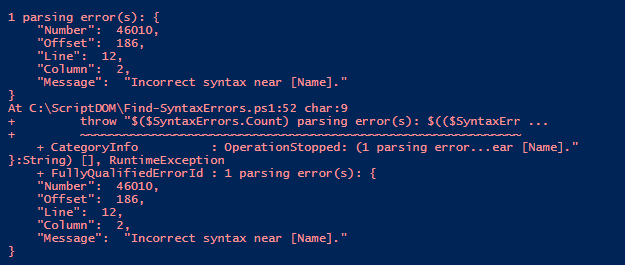
I pass this script to the syntax checking function as below. (The code for the entire function is below this post).
Find-SyntaxErrors c:\scriptdom\createtable.sql

My results are as below.

I add a comma,fix the error, and re-run it – my results are as below

This is hence an easy, asynchronous way to check for syntax errors in code. To be aware though that it cannot validate objects (check for valid column names/table names etc) as it is not connected to any SQL Server.

The output of a syntactically clean script is the abstract syntax tree object – which can be used to find patterns. In the next post, we can look at how to use it to find what we need in the code. The complete code is as below. Thanks for reading!

<#
.SYNOPSIS
Will check passed script for syntax errors
.DESCRIPTION
Will display syntax errors if any
.NOTES
Author : Mala Mahadevan (malathi.mahadevan@gmail.com)
.PARAMETERS
-Script: text file containing T-SQL
.LIMITATIONS
Can only check for syntax, not validate objects since it is asynchronous and not connected to any sql server
.LINK
.HISTORY
2022.01.25 V 1.00
#>
function Find-SyntaxErrors
{
[CmdletBinding()]
param(
$Script
)
try {
# load Script DOM assembly for use by this PowerShell session
Add-Type -Path "C:\Program Files\Microsoft SQL Server\150\DAC\bin\Microsoft.SqlServer.TransactSql.ScriptDom.dll"
If ((Test-Path $Script -PathType Leaf) -eq $false)
{
$errormessage = "File $Script not found!"
throw $errormessage
}
#Use the parser that is best suited to your compat level.
$parser = New-Object Microsoft.SqlServer.TransactSql.ScriptDom.TSql150Parser($true)
#Set object to capture errors if any
$SyntaxErrors = New-Object System.Collections.Generic.List[Microsoft.SqlServer.TransactSql.ScriptDom.ParseError]
#Set object to read script linewise
$stringreader = New-Object -TypeName System.IO.StreamReader -ArgumentList $Script
#Building the abstract syntax tree
$tSqlFragment = $parser.Parse($stringReader, [ref]$SyntaxErrors)
#If any syntax errors are found display
if($SyntaxErrors.Count -gt 0) {
throw "$($SyntaxErrors.Count) parsing error(s): $(($SyntaxErrors | ConvertTo-Json))"
}
else
{
write-host "No Syntax errors found in $($Script)!" -backgroundcolor Green
}
}
catch {
throw
}
}

T-SQL Tuesday 146: Where should business logic reside?

I am trying to get started on blogging again this year…T-SQL Tuesday came in handy with a great topic. This month’s host is Andy Yun(t |b). Andy’s challenge for us is to write about some notion ‘something you’ve learned, that subsequently changed your opinion/viewpoint/etc. on something. ‘

There are many things on which I’ve changed my opinion in my journey as a data professional. For this blog post, I picked a common one – where business logic should reside. During my years as a production DBA – there was (and probably is) a hard-held belief that databases are meant for CRUD operations only and business logic belongs in the application/middle tier. This belief has its place – DBAs don’t like debugging code that is application-specific, or be tasked with why data looks a certain way or what code caused it. Business logic can also be very complex and get deeply embedded in one place (the database). I have believed in this and fought for this at most places I’ve worked as a DBA.

Over time though, my opinion has changed. The fact that DBAs have to learn some degree of programming to survive today’s world has a lot to do with it. Also, I started to understand the nature of business logic better. I learned that a lot of things like foreign key constraints, not null constraints, triggers actually have to do with business logic and how the business defines its data. Databases usually outlive applications and less work is necessary when there is a move to a new application layer. It is much faster to make changes on the database side and roll it out compared to most application changes. It also offers single-point control of business logic, as opposed to it spread all over the place in applications.

And last but not least – learning business logic makes a person an important asset to the business. Most DBAs complain about being ‘just firefighters’…if we know business logic and have control over that, that makes us more than that – it makes us an important asset, in addition to helping us learn more programming as part of that process.

I do realize that there are cons to putting business logic in the database too. It can be very complex in some cases. The business may not have enough people to maintain it. It is a single point of control, therefore a single point of failure too if one looks at it that way. But now I believe there are more advantages to it than disadvantages. Thank you, Andy, for hosting.

TSQL-Tuesday 143: Short Code Examples

I decided to resume tech blogging after a long break and this tsql-tuesday came in handy. This month’s blog part is hosted by John McCormack (B|T). He would like us to blog about handy scripts.

I use Query Store a lot where I work – and I’d like to share queries I use on Query Store DMVs that I find incredibly useful.

My favorite is one below, which I use to see stored procedure duration. It comes with other information including plan id, start and end time – all of us help me see red flags right away if there is any query not performing as well as it should.

SELECT q.object_id,object_name(q.object_id),q.query_id,max_duration, avg_duration, max_rowcount,
   p.plan_id,i.start_time,i.end_time
FROM sys.query_store_runtime_stats AS a
JOIN sys.query_store_runtime_stats_interval i
ON I.runtime_stats_interval_id = a.runtime_stats_interval_id
JOIN sys.query_store_plan p on p.plan_id = a.plan_id
JOIN sys.query_store_query q on p.query_id = q.query_id
WHERE q.object_id = object_id(‘dbo.myproc’)
order by i.start_time DESC

My next favorite one is one I use to find a plan based on text in the query.

SELECT c.plan_id, cast(c.query_plan as xml) , c.last_execution_time
FROM sys.query_store_plan C INNER JOIN sys.query_store_query B
ON C.query_id = b.query_id
INNER JOIN sys.query_store_query_text A ON
B.query_text_id = A.query_text_id
WHERE A.query_sql_text like ‘tablea’

The last one is duration of specific queries over time.

SELECT TOP 100 avg_duration/1000000.0 avg_dur_sec
FROM

sys.query_store_runtime_stats WHERE plan_id = 4962438
order by runtime_stats_id DESC

If you are reading this and not using query store yet – you must. Consider signing up for Erin Stellato’s precon too at the upcoming past community summit. It may be a good use of your time and money.

Crocs and Naps….

I was planning a blog post for a TSQL2sday..instead would up writing an obituary blog post for a dear friend who passed on yesterday.

Brian Moran was among the older members of the community. I was introduced to him by a mutual friend at a SQL saturday many years ago. I recognized him instantly as the person who with a beard (he didn’t have one when i met him) who wrote articles in SQLServerMagazine. There was one on statistics, i think, which was well written that i could recall well and i spent some time discussing that with him. It was actually a funny discussion because it was a really old article, one that he could not recollect writing, but one that I could recollect really well because it was one I read during my early years as a SQL Server DBA. But he managed to keep up the conversation with ‘hmmm’, ‘did i really say that’, ‘oh wow your memory is great’ and so on. He didn’t seemed bored or tired discussing something that old and was keen we become friends. I appreciated that and it started the beginning of a friendship that will remain among my sweetest memories.

What I really appreciated about Brian was his sense of humor – ability to laugh at just about anything. We were discussing careers once after he moved to microsoft in a sales position, and was doing more recruiting for them. He reached out to me and asked if i’d be interested in a salesy role and i said no, ‘i can’t sell a pin’. At the next sql saturday at DC , I was sitting at the swag table with some PASS Related swag to hand to attendees. There were some pins ..he came up and said ‘what do you have here?’… I handed him a pin, he turned his head and went ‘look what you just did..you sold me a pin..bwahahaha’…and then we met the Microsoft manager for the role, and he introduced me ‘This is Mala, she can sell a pin, really well. She is great ‘…we laughed a good amount of time after that.

I liked how much Brian enjoyed life, or seemed to. He spent a lot of time in beaches, loved naps and wearing crocs around even when he wasn’t at a beach. To me, tech is a way of finding time to do things like that, not an end in of itself and he was exactly that. I also liked informal, sloppy footwear a lot. With an arch problem I could not wear flip flops even when i wanted to and that left me mostly with crocs, most of which were oversized for a female with small feet like me. When i finally found some that matched my size..i actually texted Brian from the shoe store… ‘they are bright yellow, but seem to fit..what do you think?’…he responded ‘go for it!’. I bought those and they are still with me.

In Brian’s memory, when COVID is over, I will wear those bright yellow crocs to the beach..and enjoy a nap after. Or two. And laugh and hug more. RIP dear, kind, funny friend. Thank you for the cheer and brighness you bought all of us.

Scripting using SMO

I will be delivering a lightning talk at DataMinutes on June 7th on this topic. I thought it would help to write a synopsis of what am going to talking of on my blog post.

SMO – essentially stands for SQL Server Management Objects…this is a .net based scripting model Microsoft created to perform several SQL Server based tasks using scripts. It has been around since SQL Server 2005 and many people have written scripts using .net languages or powershell to accomplish various tasks. Using SMO is increasingly important in ‘Infrastructure as code’ world. Databases are a really important part of this infrastructure. Most of us find it easy and familiar to generate scripts using SSMS or Azure Data Studio and would prefer to keep doing it the same way. But, when you have a large code base – this can become problematic in many ways. People have varied SSMS settings that can allow room for non standard scripting. Scripting out what we create to add to our database repository becomes an additional task to do. Automating scripting using SMO helps to generate scripts that are uniform/standard in appearance and save the time lost in generating them as well.

SMO can accomplish a great many tasks within SQL server – those include backp/restore, creating agent jobs, changing server settings…on and on. I choose to focus my attention on just scripting SQL Server objects in this blog post and in my talk.

My script i will be using for this talk can be found here . My talk is at 11 am EST and the conference schedule is here. There are many awesome speakers..hope you will consider attending if you are reading this. Thank you.

Data dictionary script

I restarted speaking with New Stars of Data today – I gave a talk on Database documentation. Below is the script I created to pull metadata into an excel file if you need it. Thank you Mladen Prajdic(t) for being the original inspiration for this.

--Query to pull data dictionary from sql server metadata.
--Author: Mala Mahadevan
--Date 3/11/2021 V1.00
--Read:
--Have xp_cmdshell enabled for export to excel file
--Run on database you need metadata from
--Works on SQL Server 2012+
--Set variable @outputfilename to whatever filename you desire output to go to.
DROP TABLE IF EXISTS ##TempExportData

DECLARE @DBName varchar(100),
		@SQLStmt nvarchar(4000),
		@ShellStmt varchar(8000),
		@OutputFilename varchar(100)

SELECT @OutputFilename = 'c:\ugpresentation\datadictionary.xls'

BEGIN TRY
SELECT @DBName = db_name()	
SELECT @SQLStmt = 'USE ' + @DBName + ';'+'
	SELECT  
	''Database'' AS [Database Name],
	''Schema'' AS [Schema Name],
	''Table Name'' AS [Table Name],
	''Column Name'' AS [Column Name],
	''DataType'' AS [Data Type],
	''Length'' AS [Length],
	''Precision'' AS [Precision],
	''Scale'' AS [Scale],
	''IsNullable'' AS [IsNullable],
	''IsPrimaryKey'' AS [IsPrimaryKey],
	''Primary Key Constraint'' AS [PK Constraint],
	''IsIndexed'' AS [IsIndexed],
	''IsIncludedIndex'' AS [IsIncludedIndex],
	''Index Name'' AS [Index Name],
	''Foreign Key Constraint'' AS [FK Constraint],
	''Parent Table'' AS [Parent Table],
	''Default Constraint'' AS [Default Constraint],
	''Comments'' AS [Comments]
	INTO ##tempExportData  
	FROM sys.tables
	UNION
	SELECT
	DB_NAME() AS [Database Name],   
	OBJECT_SCHEMA_NAME(T.[object_id]) AS [Schema Name],
	T.[name] AS [Table Name],    
	C.[name] AS [Column Name],      
	UPPER(TY.[name]) AS DataType,    
	CAST(C.[max_length] AS VARCHAR(10)) AS [Length] ,     
	CAST(C.[precision] AS VARCHAR(5)) AS [Precision],    
	CAST(C.[scale] AS VARCHAR(5)) AS [Scale],    
	IIF(C.[is_nullable] = 0,''N'',''Y'') AS IsNullable,   
	IIF(ISNULL(I.is_primary_key,0) = 0, ''N'',''Y'') AS IsPrimaryKey,   
	KC.name as [Primary Key Constraint],   
	(CASE WHEN IC.index_column_id > 0 THEN ''Y'' ELSE ''N'' END) AS IsIndexed,   
	IIF(ISNULL(is_included_column, 0) = 0, ''Y'', ''N'') AS IsIncludedIndex,   
	I.name AS [Index Name],   
	OBJECT_NAME(FK.constraint_object_id) as [Foreign Key Constraint],   
	OBJECT_NAME(FK.referenced_object_id) as [Parent Table],   
	DC.name AS [Default Constraint],   
	EP.value AS Comments 
	FROM sys.tables AS T	
	INNER JOIN 
		sys.all_columns C 
	ON T.[object_id] = C.[object_id]  
	INNER JOIN 
		sys.types TY 
	ON C.[system_type_id] = TY.[system_type_id] 
	AND C.[user_type_id] = TY.[user_type_id]   
	LEFT JOIN 
		sys.index_columns IC 
	ON IC.object_id = T.object_id 
	AND C.column_id = IC.column_id
	LEFT JOIN 
		sys.indexes I 
	ON I.object_id = T.object_id 
	AND IC.index_id = I.index_id
	LEFT JOIN 
		sys.foreign_key_columns FK 
	ON FK.parent_object_id = T.object_id AND FK.parent_column_id = C.column_id
	LEFT JOIN 
		sys.key_constraints KC 
	ON KC.parent_object_id = T.object_id AND IC.index_column_id = KC.unique_index_id
	LEFT JOIN 
		sys.default_constraints DC 
	ON DC.parent_column_id = C.column_id AND DC.parent_object_id = C.object_id
	LEFT JOIN 
		sys.extended_properties EP 
	ON EP.major_id = T.object_id AND EP.minor_id = C.column_id
	--ORDER BY T.[name], C.[column_id]
'
	EXECUTE sp_executesql @SQLStmt

	--select * from ##tempexportdata
	
	SET @ShellStmt = 'bcp "' + ' SELECT * from ##TempExportData" queryout "' + @OutputFileName + '" -c -T -CRAW'
	Exec master..xp_cmdshell @ShellStmt
END TRY

BEGIN CATCH
	SELECT  
    ERROR_NUMBER() AS ErrorNumber  
    ,ERROR_SEVERITY() AS ErrorSeverity  
    ,ERROR_STATE() AS ErrorState  
    ,ERROR_PROCEDURE() AS ErrorProcedure  
    ,ERROR_LINE() AS ErrorLine  
    ,ERROR_MESSAGE() AS ErrorMessage; 
END CATCH


Old but not gone…

I am part of a weekly talk show we run at the TriPASS user group, called ‘Shop Talk’. Shop Talk was the brainchild of Kevin Feasel, our key user group lead..we meet on a bi weekly basis and discuss random tech topics related to sql server. Some of these are questions from our audience, and some are just ideas for discussion that one of us come up with. I am constantly amazed and grateful for how much I learn by being part of this show – from my co hosts and from the very intelligent audience we are blessed with. Last week, we discussed Brent Ozar’s blog post on ‘What SQL Server Feature Do You Wish Would Go Away?’. The recording of our discussion (this topic starts around 26:00) is here.
I am not blogging what we discussed in its entirety, the show speaks for itself there. I learned a few features, and use cases of SQL Server features that I never knew existed. Some of these are deprecated – so why is this important to blog about? It is, because if my resume says I’ve worked on this product for 20+ years – I better know what those features are as well. The topic of Brent’s post is a rather common interview question too – I’ve asked as an interviewer it once or twice myself, and I’ve been asked about it as an interviewee several times by several people. It helps to know more ways of answering it. Below are a few terms that I learned/re-learned as I had forgotten they existed, from the show.

Use cases for cursors

I did not consider cursors as among features that have to go away. Cursors are not ideal in a set based language but they absolutely have their use cases. But I heard of two use cases that I did not know of.
1 Leaky Bucket Algorithm
If we have a bucket into which water is poured in randomly. We have to get water in a fixed rate, to ensure that extra water gets out. This is possible by making a hole at the bottom of the bucket. It will ensure that water coming out is in a some fixed rate, and also if bucket will full we will stop pouring in it. So the idea is that the input rate can vary, but the output rate remains constant.

I found this cool blog post by Kevin Feasel again on not just the algorithm but a use case for it and why this use case demands cursors. Quoting from the post itself ‘  The problem is that we have not only a window, but also a floor and ceiling’ – this means using windowing functions is not possible. This is a genuine use case among others which makes it clear that cursors are needed although should be used sparingly.

2 Quirky Update
Remember the days before windowing functions? I do!! We had to do all kinds of workarounds to get running totals..there is no need for us to revisit that any more – but it helps to remember how things were done..the term ‘quirky update’ – using variables and cursors to do what windowing functions now do – came from this article by Robyn Page. Scrolling down to the code, we can see how she does it. I have used this, several times – and I recall how hard it was when you had to write SSRS reports with running totals with logic like this. This is not an argument to keep cursors, but not one to get rid of them either. We have other ways of accomplishing what Quirky Updates used to do, and that’s a good thing to remember, for sure.

Fibers Vs Threads
When Kevin asked me if I knew what fibers were – I drew a blank. I am not aware of any such term with SQL Server. Looks like this goes back all the way to Windows NT/SQL Server 6.5 days – I vaguely do remember ‘lightweight pooling’…’Fiber is multiple pieces of code set on a single thread to execute and controlled by an internal piece of code written in the SQL executable and not by Windows itself.’ This line from an old article made me laugh out loud ‘ Fibers, called lightweight pooling, should be turned on only if CPU is 100 percent and context switching is high.’ Needless to say in today’s world lightweight pooling is no longer necessary.

Numbered Procedures
I had no idea such a thing even existed..but apparently they do…and how it works is as below..you can group procedures by naming them with a <samename>;<incrementing number> as below.

CREATE PROCEDURE proc1;1
AS
BEGIN
SELECT 1
END
GO
CREATE PROCEDURE proc1;2
AS
BEGIN
SELECT 2
END
GO
CREATE PROCEDURE proc1;3
AS
BEGIN
SELECT 3
END
GO

DROP PROCEDURE proc1

The ONLY advantage of such a grouping is , apparently, the last line – you get to drop all of them with one call. I am not sure what was the motivation behind such a feature, but was glad to see it deprecated now.

Those are all the quaint/interesting things I learned during this show. Thanks for reading.

TSQL Tuesday #134 – Taking a break

This month’s TSQL Tuesday invite is from James McGillivray – he asks people to write about what they were/are doing to take a break during this crisis ridden time we are in.
Breaks are very important – it is very easy to drive ourselves deeper into work when we are working from home. I personally still struggle with guilt that am not doing enough and tend to work harder than i am in a regular office. Limitations and breaks are really important for me. Below are a few things I do in this regard.
1 Take short walks – I live near a wooded area and it is easy to take a stroll out of home up the lane and back. We get a lot of sunshine even in winter in NC, so it is an added opportunity to get some much needed Vitamin D as well. I take a lot of walks, depending on the weather – a minimum of two to a maximum of 5. I always feel fresh and invigorated after a walk.
2 Coloring books – this is a hobby I enjoy very much. I have a lot of different types of books – mandalas, landscapes, flowers…various. I take one and color it vigorously. It is amazing how much stress relief this can bring.
3 Meditation – I cannot not emphasize how important this is. I recently ran into something called ‘tapping meditation’ and use this – it is a combo of acupressure based tapping and guided visualisation on positive thoughts. I meditate twice a day, for my health and general well being.
4 Watch random television – when I am tired I tend to lean back into rewatching stuff I’ve enjoyed. That includes old classic movies and tv serials – my particular favorites are Downton Abbey and ER. I know lots of little things from rewatching these over and over and still laugh at the jokes. It helps me destress.

These are a few of my little stress breakers. Thanks for reading.
