DiskANN Experiment — Exploring Entry Points and Graph Neighborhoods

Introduction

I was experimenting with vector search in SQL Server 2025 using approximately 3.8 million Hacker News articles that that I used for my talk on SQL Server-based vector search feature at EightKB. I generated two sets of embeddings from the same articles: one stored as FP32 (32-bit floating point) and the other as FP16 (16-bit floating point). Both sets contained the same articles and used DiskANN vector indexes.I used a query as below to find articles similar to a selected example.

DECLARE @QueryVector VECTOR(768, FLOAT32);
-- Get the embedding of our example article.
SELECT @QueryVector = embedding
FROM dbo.ArticlesEmbeddings_FP32
WHERE hn_id = 18349232;
-- Find the 10 most similar articles.
SELECT TOP (10)
e.hn_id,
vs.distance
FROM VECTOR_SEARCH(
TABLE = dbo.ArticlesEmbeddings_FP32 AS e,
COLUMN = embedding,
SIMILAR_TO = @QueryVector,
METRIC = 'cosine',
TOP_N = 11
) AS vs
WHERE e.hn_id <> 18349232
ORDER BY vs.distance;

The query takes the embedding of one article and uses SQL Server’s vector index to find articles with similar embeddings. The distance value tells us how close the articles are: a smaller cosine distance means greater similarity.I then ran the equivalent query against the FP16 table, using an FP16 query vector. I expected FP16 to be faster, or at least require fewer logical reads. After all, an FP16 embedding uses roughly half the storage of an FP32 embedding.But that wasn’t always the case. Some FP16 searches were slower and performed more logical reads than the equivalent FP32 searches, although the size of embeddings were half the size of FP32.It made me wonder whether the difference had less to do with embedding size and more to do with how SQL Server builds and searches its DiskANN vector indexes.There are two possible explanations:

1. SQL Server’s FP32 and FP16 indexes report different starting nodes, based on the sys.vector_indexes DMV. Even if the graphs are nearly identical, beginning in different places could lead the search through different parts of the graph and require different amounts of work.

2. Although the graphs are similar, they are not identical. A few different connections could cause the search to discover different articles, follow different routes, and perform more or fewer comparisons.

I engaged in two experiments for this purpose.

Experiment A — Graph structure and ranking

Determine whether changing vector precision from FP32 to FP16 changes the reconstructed graph’s connections or the ranking of candidates.

Experiment B — Search traversal

Determine whether the small differences between the FP32 and FP16 reconstructed graphs cause the search to perform different amounts of work, and whether the different starting points contribute to those differences.

In this blog post, I’ll explore Experiment A. These experiments are only exploratory recreations of the DiskANN algorithm, based on what we know of its parameters, using SQL Server Graph tables. They are not a replica of the index.

As a first step, I tried to recreate DiskANN’s graph structure using SQL Server Graph tables. DiskANN algorithm has many parameters. Not all of them are exposed in the SQL Server implementation. You can view what is exposed in the build_parameters column using the query below.

SELECT
 i.name,
 vi.vector_index_type as index,
 vi.distance_metric,
 vi.build_parameters
FROM sys.vector_indexes AS vi
JOIN sys.indexes AS i
 ON i.object_id = vi.object_id
AND i.index_id  = vi.index_id;

My results for my FP32 and FP16 indexes are below.

name index distance_metric
build_parameters

IX_ArticlesEmbeddings_FP32_Embedding DiskANN COSINE  {“StartId”:”2041021″, “L”:”48″, “M”:”8″, “R”:”48″}

IX_ArticlesEmbeddings_FP16_Embedding DiskANN COSINE
{“StartId”:”5237″, “L”:”48″, “M”:”8″, “R”:”48″}

Microsoft has marked the build_parameters column as ‘for internal use only’.  We don’t know how these parameters are used. But based on the algorithm, we can reasonably assume L stands for Search List/Candidate List Size, and R stands for the maximum degree of the graph index. It is unclear what M means.

To construct the simulated graph, I used the parameters reported by SQL Server’s DiskANN indexes as a starting point.

I treated R = 48 as the maximum number of outgoing connections each node could have.
I used L = 48 as the search-list size when exploring the graph, but not as a limit on the number of connections.

For graph construction, I considered up to 192 candidate neighbors (4×R) for each node, then selected the best connections using cosine distance and a pruning factor of 1.2 to avoid keeping too many similar neighbors.
I also allowed reverse-edge proposals to help connect the graph.
StartID seemed to align with hn_id, the key defined in the embedding tables, so I used that.

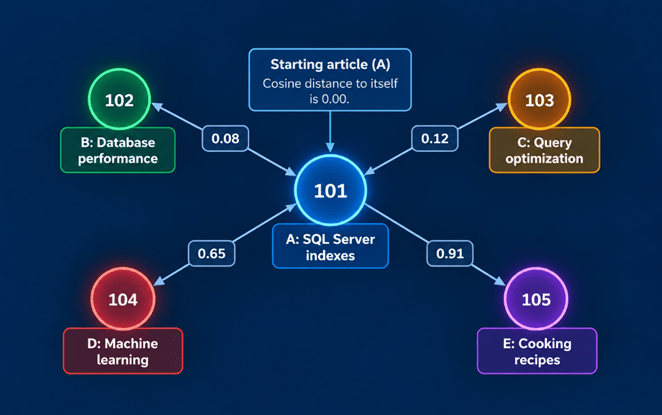
Imagine we have five rows in our embeddings table. Each row represents a Hacker News article and contains a 768-dimensional vector describing its content.

embedding_idArticleExample cosine distance from A
101A: SQL Server indexes0.00
102B: Database performance0.08
103C: Query optimization0.12
104D: Machine learning0.65
105E: Cooking recipes0.91

Illustrative graph built from those rows may look as below.
The graph-building process works as follows:

1.       Create nodes: Each embedding row becomes a potential graph node, identified by its embedding_id.

2.       Find candidates: For article A, our simulation considers up to 192 candidate articles and calculates their cosine distances.

3.       Select connections: It uses a pruning rule with alpha = 1.2 to favor useful connections rather than simply keeping many nearly identical neighbors.

4.       Apply R = 48: Article A can have at most 48 outgoing connections. In this small example, it might retain B and C because they are closely related, plus another connection that helps reach a different part of the graph.

5.       Store edges: Each selected connection becomes a row in VectorSearchEdgeFP32 or VectorSearchEdgeFP16, such as 101 → 102.

The original vector tables are as below:

USE [HackerNews]
GO
CREATE TABLE [dbo].[HackerNewsStories](
[hn_id] [int] NOT NULL,
[type_value] [nvarchar](50) NULL,
[by_user] [nvarchar](200) NULL,
[time_value] [bigint] NULL,
[title] [nvarchar](max) NULL,
[url] [nvarchar](max) NULL,
[score] [int] NULL,
[descendants] [int] NULL,
[actualtext] [nvarchar](max) NULL,
CONSTRAINT [PK_HackerNewsStories_hn_id] PRIMARY KEY CLUSTERED
(
[hn_id] ASC
)WITH (PAD_INDEX = OFF, STATISTICS_NORECOMPUTE = OFF, IGNORE_DUP_KEY = OFF, ALLOW_ROW_LOCKS = ON, ALLOW_PAGE_LOCKS = ON, OPTIMIZE_FOR_SEQUENTIAL_KEY = OFF) ON [PRIMARY]
) ON [PRIMARY] TEXTIMAGE_ON [PRIMARY]
CREATE TABLE [dbo].[ArticlesEmbeddings_FP16](
[embedding_id] [int] IDENTITY(1,1) NOT NULL,
[hn_id] [bigint] NOT NULL,
[n_tokens] [int] NOT NULL,
[embedding] [vector](768, float16) NULL,
[created_at] [datetime2](7) NOT NULL,
PRIMARY KEY CLUSTERED
(
[embedding_id] ASC
)WITH (PAD_INDEX = OFF, STATISTICS_NORECOMPUTE = OFF, IGNORE_DUP_KEY = OFF, ALLOW_ROW_LOCKS = ON, ALLOW_PAGE_LOCKS = ON, OPTIMIZE_FOR_SEQUENTIAL_KEY = OFF) ON [PRIMARY]
) ON [PRIMARY]
GO
CREATE TABLE [dbo].[ArticlesEmbeddings_FP32](
[embedding_id] [int] IDENTITY(1,1) NOT NULL,
[hn_id] [bigint] NOT NULL,
[n_tokens] [int] NOT NULL,
[embedding] [vector](768, float32) NULL,
[created_at] [datetime2](7) NOT NULL,
PRIMARY KEY CLUSTERED
(
[embedding_id] ASC
)WITH (PAD_INDEX = OFF, STATISTICS_NORECOMPUTE = OFF, IGNORE_DUP_KEY = OFF, ALLOW_ROW_LOCKS = ON, ALLOW_PAGE_LOCKS = ON, OPTIMIZE_FOR_SEQUENTIAL_KEY = OFF) ON [PRIMARY]
) ON [PRIMARY]
GO

The graph table equivalents are as below:

USE [HackerNews]
GO
SET ANSI_NULLS ON
GO
SET QUOTED_IDENTIFIER ON
GO
CREATE TABLE [dbo].[VectorSearchNode](
[GraphVectorID] [int] IDENTITY(1,1) NOT NULL,
[hn_id] [bigint] NOT NULL,
[FP32EmbeddingID] [int] NOT NULL,
[FP16EmbeddingID] [int] NOT NULL,
[Embedding32] [vector](768, float32) NOT NULL,
[Embedding16] [vector](768, float16) NOT NULL,
[IsQuery] [bit] NOT NULL,
[InFP32Result] [bit] NOT NULL,
[FP32Rank] [int] NULL,
[FP32ResultDistance] [float] NULL,
[InFP16Result] [bit] NOT NULL,
[FP16Rank] [int] NULL,
[FP16ResultDistance] [float] NULL,
CONSTRAINT [PK_VectorSearchNode] PRIMARY KEY CLUSTERED
(
[GraphVectorID] ASC
)WITH (PAD_INDEX = OFF, STATISTICS_NORECOMPUTE = OFF, IGNORE_DUP_KEY = OFF, ALLOW_ROW_LOCKS = ON, ALLOW_PAGE_LOCKS = ON, OPTIMIZE_FOR_SEQUENTIAL_KEY = OFF) ON [PRIMARY],
CONSTRAINT [UQ_VectorSearchNode_hn_id] UNIQUE NONCLUSTERED
(
[hn_id] ASC
)WITH (PAD_INDEX = OFF, STATISTICS_NORECOMPUTE = OFF, IGNORE_DUP_KEY = OFF, ALLOW_ROW_LOCKS = ON, ALLOW_PAGE_LOCKS = ON, OPTIMIZE_FOR_SEQUENTIAL_KEY = OFF) ON [PRIMARY]
)
AS NODE ON [PRIMARY]
GO
CREATE TABLE [dbo].[VectorSearchEdgeFP32](
[FromEmbeddingID] [int] NOT NULL,
[ToEmbeddingID] [int] NOT NULL,
[ToHnId] [bigint] NOT NULL,
[NeighborRank] [int] NOT NULL,
[SourceDistance] [float] NOT NULL,
CONSTRAINT [PK_VectorSearchEdgeFP32] PRIMARY KEY CLUSTERED
(
[FromEmbeddingID] ASC,
[ToEmbeddingID] ASC
)WITH (PAD_INDEX = OFF, STATISTICS_NORECOMPUTE = OFF, IGNORE_DUP_KEY = OFF, ALLOW_ROW_LOCKS = ON, ALLOW_PAGE_LOCKS = ON, OPTIMIZE_FOR_SEQUENTIAL_KEY = OFF) ON [PRIMARY]
) ON [PRIMARY]
GO
CREATE TABLE [dbo].[VectorSearchEdgeFP16](
[FromEmbeddingID] [int] NOT NULL,
[ToEmbeddingID] [int] NOT NULL,
[ToHnId] [bigint] NOT NULL,
[NeighborRank] [int] NOT NULL,
[SourceDistance] [float] NOT NULL,
CONSTRAINT [PK_VectorSearchEdgeFP16] PRIMARY KEY CLUSTERED
(
[FromEmbeddingID] ASC,
[ToEmbeddingID] ASC
)WITH (PAD_INDEX = OFF, STATISTICS_NORECOMPUTE = OFF, IGNORE_DUP_KEY = OFF, ALLOW_ROW_LOCKS = ON, ALLOW_PAGE_LOCKS = ON, OPTIMIZE_FOR_SEQUENTIAL_KEY = OFF) ON [PRIMARY]
) ON [PRIMARY]
GO

The stored procedure used to construct the graphs and populate it from the original embedding tables is as below – the procedure is the same for FP16 and FP32, only points to the appropriate tables.

USE [HackerNews]
GO
ET ANSI_NULLS ON
GO
SET QUOTED_IDENTIFIER ON
GO
CREATE   PROCEDURE [dbo].[BuildRobustNeighborsFP16_ExpA]
(
@FromEmbeddingID    int,
@CandidatePool      int = 192,
@R                  int = 48,
@Alpha              float = 1.2
)
AS
BEGIN
SET NOCOUNT ON;
SET XACT_ABORT ON;
IF @CandidatePool > 256
THROW 55101, 'CandidatePool must be <= 256.', 1;
IF @R > @CandidatePool
THROW 55102, 'R cannot exceed CandidatePool.', 1;
/*==============================================================
Check existing cached adjacency
==============================================================*/
DECLARE @ExistingBuiltAt datetime2(7);
SELECT
@ExistingBuiltAt = BuiltAt
FROM dbo.VectorAdjacencyBuildState_ExpA
WHERE Precision = 'FP16'
AND FromEmbeddingID = @FromEmbeddingID
AND CandidatePool = @CandidatePool
AND R = @R
AND Alpha = @Alpha;
/*
If this node has already been built using the same parameters,
reuse it unless a newer reciprocal-edge proposal exists.
*/
IF @ExistingBuiltAt IS NOT NULL
AND NOT EXISTS
(
SELECT 1
FROM dbo.VectorReverseProposalFP16_ExpA
WHERE OwnerEmbeddingID = @FromEmbeddingID
AND CreatedAt > @ExistingBuiltAt
)
BEGIN
RETURN;
END;
/*==============================================================
Rebuild this node's adjacency list
==============================================================*/
DELETE FROM dbo.VectorSearchEdgeFP16_ExpA
WHERE FromEmbeddingID = @FromEmbeddingID;
DELETE FROM dbo.VectorAdjacencyBuildState_ExpA
WHERE Precision = 'FP16'
AND FromEmbeddingID = @FromEmbeddingID;
/*==============================================================
Retrieve source vector
==============================================================*/
DECLARE @SourceVector vector(768,float16);
SELECT
@SourceVector = embedding
FROM dbo.ArticlesEmbeddings_FP16
WHERE embedding_id = @FromEmbeddingID;
IF @SourceVector IS NULL
THROW 55103, 'FP16 source embedding not found.', 1;
/*==============================================================
Candidate pool
Candidate generation uses VECTOR_SEARCH against the complete
FP16 table/index.
TOP_N = 257 gives us:
up to 256 candidate nodes
+ source vector itself
We retain @CandidatePool candidates after removing source.
==============================================================*/
CREATE TABLE #Pool
(
CandidateEmbeddingID int NOT NULL PRIMARY KEY,
CandidateHnId        bigint NOT NULL,
CandidateVector      vector(768,float16) NOT NULL,
DistanceFromSource   float NOT NULL,
IsActive             bit NOT NULL
);
INSERT #Pool
(
CandidateEmbeddingID,
CandidateHnId,
CandidateVector,
DistanceFromSource,
IsActive
)
SELECT TOP (@CandidatePool)
E.embedding_id,
E.hn_id,
E.embedding,
VS.distance,
1
FROM VECTOR_SEARCH
(
TABLE       = dbo.ArticlesEmbeddings_FP16 AS E,
COLUMN      = embedding,
SIMILAR_TO  = @SourceVector,
METRIC      = 'cosine',
TOP_N       = 257
) AS VS
WHERE E.embedding_id <> @FromEmbeddingID
ORDER BY
VS.distance,
E.embedding_id;
/*==============================================================
Add reciprocal-edge proposals
If another node previously selected:
OtherNode -> ThisNode
then we consider:
ThisNode -> OtherNode
as an additional candidate.
==============================================================*/
INSERT #Pool
(
CandidateEmbeddingID,
CandidateHnId,
CandidateVector,
DistanceFromSource,
IsActive
)
SELECT
E.embedding_id,
E.hn_id,
E.embedding,
VECTOR_DISTANCE
(
'cosine',
@SourceVector,
E.embedding
),
1
FROM dbo.VectorReverseProposalFP16_ExpA AS RP
INNER JOIN dbo.ArticlesEmbeddings_FP16 AS E
ON E.embedding_id = RP.CandidateEmbeddingID
LEFT JOIN #Pool AS P
ON P.CandidateEmbeddingID = E.embedding_id
WHERE RP.OwnerEmbeddingID = @FromEmbeddingID
AND E.embedding_id <> @FromEmbeddingID
AND P.CandidateEmbeddingID IS NULL;
/*==============================================================
Robust pruning
Repeatedly:
1. Select closest remaining candidate U.
2. Add U as a graph edge.
3. Remove U from candidate pool.
4. Remove candidates V that are sufficiently represented
by U.
Approximate pruning rule:
Alpha * distance(U,V)
<=
distance(Source,V)
Continue until:
R neighbors selected
OR
no candidates remain.
==============================================================*/
DECLARE @SelectedCount int = 0;
DECLARE @CurrentRank int = 0;
DECLARE @SelectedEmbeddingID int;
DECLARE @SelectedHnId bigint;
DECLARE @SelectedDistance float;
DECLARE @SelectedVector vector(768,float16);
WHILE @SelectedCount < @R
BEGIN
SET @SelectedEmbeddingID = NULL;
/*----------------------------------------------------------
Pick closest active candidate
----------------------------------------------------------*/
SELECT TOP (1)
@SelectedEmbeddingID =
P.CandidateEmbeddingID,
@SelectedHnId =
P.CandidateHnId,
@SelectedVector =
P.CandidateVector,
@SelectedDistance =
P.DistanceFromSource
FROM #Pool AS P
WHERE P.IsActive = 1
ORDER BY
P.DistanceFromSource,
P.CandidateEmbeddingID;
IF @SelectedEmbeddingID IS NULL
BREAK;
SET @SelectedCount += 1;
SET @CurrentRank += 1;
/*----------------------------------------------------------
Add selected neighbor to graph
----------------------------------------------------------*/
INSERT dbo.VectorSearchEdgeFP16_ExpA
(
FromEmbeddingID,
ToEmbeddingID,
ToHnId,
NeighborRank,
SourceDistance
)
VALUES
(
@FromEmbeddingID,
@SelectedEmbeddingID,
@SelectedHnId,
@CurrentRank,
@SelectedDistance
);
/*----------------------------------------------------------
Selected candidate is consumed
----------------------------------------------------------*/
UPDATE #Pool
SET IsActive = 0
WHERE CandidateEmbeddingID =
@SelectedEmbeddingID;
/*----------------------------------------------------------
Robust prune remaining candidates
U = selected neighbor
V = remaining candidate
Remove V when:
Alpha * distance(U,V)
<=
distance(Source,V)
This is what introduces diversity compared with simply
keeping the nearest 48 vectors.
----------------------------------------------------------*/
UPDATE P
SET IsActive = 0
FROM #Pool AS P
WHERE P.IsActive = 1
AND
(
@Alpha *
VECTOR_DISTANCE
(
'cosine',
@SelectedVector,
P.CandidateVector
)
)
<= P.DistanceFromSource;
END;
/*==============================================================
Generate reciprocal-edge proposals
Every selected:
Source -> Neighbor
proposes:
Neighbor -> Source
The proposal will be considered when Neighbor's adjacency
list is built/rebuilt.
==============================================================*/
INSERT dbo.VectorReverseProposalFP16_ExpA
(
OwnerEmbeddingID,
CandidateEmbeddingID
)
SELECT
E.ToEmbeddingID,
E.FromEmbeddingID
FROM dbo.VectorSearchEdgeFP16_ExpA AS E
LEFT JOIN dbo.VectorReverseProposalFP16_ExpA AS Existing
ON Existing.OwnerEmbeddingID =
E.ToEmbeddingID
AND Existing.CandidateEmbeddingID =
E.FromEmbeddingID
WHERE E.FromEmbeddingID =
@FromEmbeddingID
AND Existing.OwnerEmbeddingID IS NULL;
/*==============================================================
Mark adjacency list as built
==============================================================*/
INSERT dbo.VectorAdjacencyBuildState_ExpA
(
Precision,
FromEmbeddingID,
CandidatePool,
R,
Alpha,
BuiltAt
)
VALUES
(
'FP16',
@FromEmbeddingID,
@CandidatePool,
@R,
@Alpha,
SYSUTCDATETIME()
);
END;
GO

After constructing the graph, I use L as the search-list size when navigating it. It controls how many promising candidates the simulated search keeps track of, not how many edges each node has.

R controls graph connections, while L guides graph searching. The 192-candidate pool and pruning factor are assumptions.

ParameterSetting
Matched source articles1,000
Candidate pool192
Maximum outgoing edges (R)48
Pruning parameter (alpha)1.2
Build passes2
Query article hn_id18349232

The graph was built by calling dbo.BuildRobustNeighborsFP32_ExpA and dbo.BuildRobustNeighborsFP16_ExpA (code above) for the matched embedding IDs, using @CandidatePool = 192, @R = 48, and @Alpha = 1.2.

Tests performed

1. Graph size and overlap

The two graphs had almost the same number of edges: 45,855 for FP32 and 45,871 for FP16. Each graph had outgoing edges for all 1,000 sampled source articles. FP16 had only 16 more edges, about 0.035% more than FP32.

MetricFP32FP16
Built source nodes1,0001,000
Directed edges45,85545,871
Distinct destinations43,15143,148
Average outgoing edges45.8645.87

SQL: graph size

SELECT 'FP32' AS Precision,
    COUNT(DISTINCT FromEmbeddingID) AS BuiltSourceNodes,
    COUNT_BIG(*) AS TotalEdges,
    COUNT(DISTINCT ToEmbeddingID) AS DistinctDestinationNodes
FROM dbo.VectorSearchEdgeFP32_ExpA
UNION ALL
SELECT 'FP16', COUNT(DISTINCT FromEmbeddingID),
    COUNT_BIG(*), COUNT(DISTINCT ToEmbeddingID)
FROM dbo.VectorSearchEdgeFP16_ExpA;

I then compared neighbors using article hn_id, rather than embedding_id, because the identity values are not guaranteed to match between precision tables. The average Jaccard similarity was 0.9191 (91.91%).( Jaccard similarity is the number of shared neighbors divided by the number of distinct neighbors across both lists.

Neighborhood measureResult
Average shared neighbors43.81
Average Jaccard91.91%
Minimum Jaccard41.18%
Maximum Jaccard100%

Our earlier exploratory run reported 96.35% average Jaccard, but only for 143 common source articles. The revised 1,000-article matched test is the more useful comparison. The 4.44 percentage-point decrease should not be interpreted as an effect of sample size alone: the experiment population and build histories also changed.

SQL: neighborhood overlap

WITH FP32Edges AS
(
 SELECT src.hn_id AS SourceHnId, g.ToHnId AS NeighborHnId
 FROM dbo.VectorSearchEdgeFP32_ExpA AS g
 JOIN dbo.ArticlesEmbeddings_FP32 AS src
   ON src.embedding_id = g.FromEmbeddingID
),
FP16Edges AS
(
 SELECT src.hn_id AS SourceHnId, g.ToHnId AS NeighborHnId
 FROM dbo.VectorSearchEdgeFP16_ExpA AS g
 JOIN dbo.ArticlesEmbeddings_FP16 AS src
   ON src.embedding_id = g.FromEmbeddingID
),
Combined AS
(
 SELECT COALESCE(a.SourceHnId,b.SourceHnId) AS SourceHnId,
        CASE WHEN a.NeighborHnId IS NULL THEN 0 ELSE 1 END AS InFP32,
        CASE WHEN b.NeighborHnId IS NULL THEN 0 ELSE 1 END AS InFP16
 FROM FP32Edges AS a
 FULL JOIN FP16Edges AS b
   ON a.SourceHnId=b.SourceHnId
  AND a.NeighborHnId=b.NeighborHnId
),
PerNode AS
(
 SELECT SourceHnId,
        SUM(InFP32) AS N32, SUM(InFP16) AS N16,
        SUM(CASE WHEN InFP32=1 AND InFP16=1 THEN 1 ELSE 0 END) AS Shared,
        COUNT(*) AS UnionCount
 FROM Combined GROUP BY SourceHnId
)
SELECT COUNT(*) AS ComparedNodes,
    CAST(AVG(1.0*N32) AS decimal(10,2)) AS AvgFP32Neighbors,
    CAST(AVG(1.0*N16) AS decimal(10,2)) AS AvgFP16Neighbors,
    CAST(AVG(1.0*Shared) AS decimal(10,2)) AS AvgSharedNeighbors,
    CAST(AVG(1.0*Shared/NULLIF(UnionCount,0)) AS decimal(10,4)) AS AvgJaccardSimilarity,
    CAST(MIN(1.0*Shared/NULLIF(UnionCount,0)) AS decimal(10,4)) AS MinJaccardSimilarity,
    CAST(MAX(1.0*Shared/NULLIF(UnionCount,0)) AS decimal(10,4)) AS MaxJaccardSimilarity
FROM PerNode;

2. Starting-article neighborhoods

The two articles associated with the reported native StartId values were more similar than the overall average. For hn_id 20594, both reconstructed graphs selected the same 48 neighbors. For hn_id 11559412, they shared 47 of 48 neighbors. The builder’s assigned order was also almost identical.

Start articleFP32 / FP16 neighborsSharedJaccardSame rank
2059448 / 4848100.00%48
1155941248 / 484795.92%45

For the 47 shared neighbors of article 11559412, average absolute rank movement was 0.04 and the largest movement was one position. The builder’s NeighborRank is a selection order, not a recorded native DiskANN traversal order.

SQL: compare starting neighbors and ranks

WITH N32 AS
(
 SELECT src.hn_id AS SourceHnId, g.ToHnId AS NeighborHnId,
        g.NeighborRank AS Rank32
 FROM dbo.VectorSearchEdgeFP32_ExpA AS g
 JOIN dbo.ArticlesEmbeddings_FP32 AS src
   ON src.embedding_id=g.FromEmbeddingID
 WHERE src.hn_id IN (20594,11559412)
),
N16 AS
(
 SELECT src.hn_id AS SourceHnId, g.ToHnId AS NeighborHnId,
        g.NeighborRank AS Rank16
 FROM dbo.VectorSearchEdgeFP16_ExpA AS g
 JOIN dbo.ArticlesEmbeddings_FP16 AS src
   ON src.embedding_id=g.FromEmbeddingID
 WHERE src.hn_id IN (20594,11559412)
),
C AS
(
 SELECT COALESCE(a.SourceHnId,b.SourceHnId) AS SourceHnId,
        a.Rank32,b.Rank16
 FROM N32 AS a FULL JOIN N16 AS b
   ON a.SourceHnId=b.SourceHnId
  AND a.NeighborHnId=b.NeighborHnId
)
SELECT SourceHnId,
    COUNT(Rank32) AS FP32Neighbors,
    COUNT(Rank16) AS FP16Neighbors,
    SUM(CASE WHEN Rank32 IS NOT NULL AND Rank16 IS NOT NULL THEN 1 ELSE 0 END) AS SharedNeighbors,
    SUM(CASE WHEN Rank32=Rank16 THEN 1 ELSE 0 END) AS SameRankCount,
    CAST(AVG(CASE WHEN Rank32 IS NOT NULL AND Rank16 IS NOT NULL
                  THEN 1.0*ABS(Rank32-Rank16) END) AS decimal(10,2)) AS AvgAbsoluteRankDifference,
    MAX(CASE WHEN Rank32 IS NOT NULL AND Rank16 IS NOT NULL
             THEN ABS(Rank32-Rank16) END) AS MaxAbsoluteRankDifference
FROM C GROUP BY SourceHnId ORDER BY SourceHnId;

3. Distance differences at starting articles

For shared source-to-neighbor edges, FP16 and FP32 cosine distances differed by only a few millionths. These distances describe edges in our reconstructed graph; they are not distances from the search query.

Start articleAvg absolute differenceMax absolute differenceAvg relative difference
205940.00000463430.00001364950.002764%
115594120.00000596300.00001525880.002975%

SQL: compare stored edge distances

SQL: compare stored edge distances
WITH N32 AS
(
SELECT src.hn_id AS SourceHnId, g.ToHnId AS NeighborHnId,
g.SourceDistance AS D32
FROM dbo.VectorSearchEdgeFP32_ExpA AS g
JOIN dbo.ArticlesEmbeddings_FP32 AS src
ON src.embedding_id=g.FromEmbeddingID
WHERE src.hn_id IN (20594,11559412)
),
N16 AS
(
SELECT src.hn_id AS SourceHnId, g.ToHnId AS NeighborHnId,
g.SourceDistance AS D16
FROM dbo.VectorSearchEdgeFP16_ExpA AS g
JOIN dbo.ArticlesEmbeddings_FP16 AS src
ON src.embedding_id=g.FromEmbeddingID
WHERE src.hn_id IN (20594,11559412)
)
SELECT a.SourceHnId, COUNT(*) AS SharedNeighbors,
CAST(AVG(ABS(a.D32-b.D16)) AS decimal(18,10)) AS AvgAbsoluteDistanceDifference,
CAST(MAX(ABS(a.D32-b.D16)) AS decimal(18,10)) AS MaxAbsoluteDistanceDifference,
CAST(AVG(CASE WHEN a.D32<>0
THEN 100.0*ABS(a.D32-b.D16)/ABS(a.D32) END)
AS decimal(18,6)) AS AvgRelativeDifferencePct
FROM N32 AS a JOIN N16 AS b
ON a.SourceHnId=b.SourceHnId AND a.NeighborHnId=b.NeighborHnId
GROUP BY a.SourceHnId ORDER BY a.SourceHnId;
4. Ranking by distance to the query
A search decides which candidate looks promising using its distance to the query, not its distance to the node that supplied the edge. I therefore used query article 18349232 to calculate query-relative cosine distances in both precisions.
At the two starting articles, every candidate kept the same query-relative rank: 48 of 48 around article 20594, and 49 of 49 in the union of the two neighbor lists around article 11559412. The average absolute query-distance differences were 0.0000094548 and 0.0000083179, respectively.
SQL: query ranking at both starting articles
DECLARE @Query32 vector(768,float32), @Query16 vector(768,float16);
SELECT @Query32=embedding FROM dbo.ArticlesEmbeddings_FP32 WHERE hn_id=18349232;
SELECT @Query16=embedding FROM dbo.ArticlesEmbeddings_FP16 WHERE hn_id=18349232;
WITH StartingNeighbors AS
(
SELECT src.hn_id AS StartHnId, g.ToHnId AS CandidateHnId
FROM dbo.VectorSearchEdgeFP32_ExpA AS g
JOIN dbo.ArticlesEmbeddings_FP32 AS src ON src.embedding_id=g.FromEmbeddingID
WHERE src.hn_id IN (20594,11559412)
UNION
SELECT src.hn_id, g.ToHnId
FROM dbo.VectorSearchEdgeFP16_ExpA AS g
JOIN dbo.ArticlesEmbeddings_FP16 AS src ON src.embedding_id=g.FromEmbeddingID
WHERE src.hn_id IN (20594,11559412)
),
Distances AS
(
SELECT n.StartHnId,n.CandidateHnId,
VECTOR_DISTANCE('cosine',@Query32,e32.embedding) AS D32,
VECTOR_DISTANCE('cosine',@Query16,e16.embedding) AS D16
FROM StartingNeighbors AS n
JOIN dbo.ArticlesEmbeddings_FP32 AS e32 ON e32.hn_id=n.CandidateHnId
JOIN dbo.ArticlesEmbeddings_FP16 AS e16 ON e16.hn_id=n.CandidateHnId
),
Ranked AS
(
SELECT *,
ROW_NUMBER() OVER (PARTITION BY StartHnId ORDER BY D32,CandidateHnId) AS Rank32,
ROW_NUMBER() OVER (PARTITION BY StartHnId ORDER BY D16,CandidateHnId) AS Rank16
FROM Distances
)
SELECT StartHnId,COUNT(*) AS ComparedCandidates,
SUM(CASE WHEN Rank32=Rank16 THEN 1 ELSE 0 END) AS SameQueryRankCount,
CAST(AVG(1.0*ABS(Rank32-Rank16)) AS decimal(10,2)) AS AvgQueryRankDifference,
MAX(ABS(Rank32-Rank16)) AS MaxQueryRankDifference,
CAST(AVG(ABS(D32-D16)) AS decimal(18,10)) AS AvgAbsoluteQueryDistanceDifference
FROM Ranked GROUP BY StartHnId ORDER BY StartHnId;

4. Ranking by distance to the query

A search decides which candidate looks promising using its distance to the query, not its distance to the node that supplied the edge. I therefore used query article 18349232 to calculate query-relative cosine distances in both precisions.

At the two starting articles, every candidate kept the same query-relative rank: 48 of 48 around article 20594, and 49 of 49 in the union of the two neighbor lists around article 11559412. The average absolute query-distance differences were 0.0000094548 and 0.0000083179, respectively.

SQL: query ranking at both starting articles

WITH N32 AS
(
 SELECT src.hn_id AS SourceHnId, g.ToHnId AS NeighborHnId,
        g.SourceDistance AS D32
 FROM dbo.VectorSearchEdgeFP32_ExpA AS g
 JOIN dbo.ArticlesEmbeddings_FP32 AS src
   ON src.embedding_id=g.FromEmbeddingID
 WHERE src.hn_id IN (20594,11559412)
),
N16 AS
(
 SELECT src.hn_id AS SourceHnId, g.ToHnId AS NeighborHnId,
        g.SourceDistance AS D16
 FROM dbo.VectorSearchEdgeFP16_ExpA AS g
 JOIN dbo.ArticlesEmbeddings_FP16 AS src
   ON src.embedding_id=g.FromEmbeddingID
 WHERE src.hn_id IN (20594,11559412)
)
SELECT a.SourceHnId, COUNT(*) AS SharedNeighbors,
    CAST(AVG(ABS(a.D32-b.D16)) AS decimal(18,10)) AS AvgAbsoluteDistanceDifference,
    CAST(MAX(ABS(a.D32-b.D16)) AS decimal(18,10)) AS MaxAbsoluteDistanceDifference,
    CAST(AVG(CASE WHEN a.D32<>0
                  THEN 100.0*ABS(a.D32-b.D16)/ABS(a.D32) END)
         AS decimal(18,6)) AS AvgRelativeDifferencePct
FROM N32 AS a JOIN N16 AS b
ON a.SourceHnId=b.SourceHnId AND a.NeighborHnId=b.NeighborHnId
GROUP BY a.SourceHnId ORDER BY a.SourceHnId;

5. Finally, I repeated the ranking test across all 1,000 source neighborhoods, comparing only candidates present in both graphs. This isolates distance-order changes from differences in candidate membership.

Ranking measure across all 1,000 neighborhoodsResult
Shared candidate occurrences43,813
Same-rank candidate occurrences43,648
Same-rank percentage99.6234%
Nodes with identical ranking920
Nodes with at least one rank difference80
Largest rank displacement2

Only 165 of 43,813 shared candidate occurrences changed position. These are occurrences within source neighborhoods, not necessarily 165 distinct articles.

SQL: query ranking across the sample

DECLARE @Query32 vector(768,float32), @Query16 vector(768,float16);
SELECT @Query32=embedding FROM dbo.ArticlesEmbeddings_FP32 WHERE hn_id=18349232;
SELECT @Query16=embedding FROM dbo.ArticlesEmbeddings_FP16 WHERE hn_id=18349232;
WITH SharedNeighbors AS
(
SELECT s.hn_id AS SourceHnId,g32.ToHnId AS CandidateHnId
FROM dbo.VectorGraphSample AS s
JOIN dbo.ArticlesEmbeddings_FP32 AS e32 ON e32.hn_id=s.hn_id
JOIN dbo.ArticlesEmbeddings_FP16 AS e16 ON e16.hn_id=s.hn_id
JOIN dbo.VectorSearchEdgeFP32_ExpA AS g32 ON g32.FromEmbeddingID=e32.embedding_id
JOIN dbo.VectorSearchEdgeFP16_ExpA AS g16
ON g16.FromEmbeddingID=e16.embedding_id AND g16.ToHnId=g32.ToHnId
),
Distances AS
(
SELECT n.SourceHnId,n.CandidateHnId,
VECTOR_DISTANCE('cosine',@Query32,e32.embedding) AS D32,
VECTOR_DISTANCE('cosine',@Query16,e16.embedding) AS D16
FROM SharedNeighbors AS n
JOIN dbo.ArticlesEmbeddings_FP32 AS e32 ON e32.hn_id=n.CandidateHnId
JOIN dbo.ArticlesEmbeddings_FP16 AS e16 ON e16.hn_id=n.CandidateHnId
),
Ranked AS
(
SELECT *,
ROW_NUMBER() OVER (PARTITION BY SourceHnId ORDER BY D32,CandidateHnId) AS Rank32,
ROW_NUMBER() OVER (PARTITION BY SourceHnId ORDER BY D16,CandidateHnId) AS Rank16
FROM Distances
),
PerNode AS
(
SELECT SourceHnId,COUNT(*) AS SharedCandidates,
SUM(CASE WHEN Rank32=Rank16 THEN 1 ELSE 0 END) AS SameRankCount,
MAX(ABS(Rank32-Rank16)) AS MaxRankDifference
FROM Ranked GROUP BY SourceHnId
)
SELECT COUNT(*) AS ComparedSourceNodes,
SUM(SharedCandidates) AS TotalSharedCandidates,
SUM(SameRankCount) AS TotalSameRankCandidates,
CAST(100.0*SUM(SameRankCount)/NULLIF(SUM(SharedCandidates),0)
AS decimal(10,4)) AS SameRankPercentage,
SUM(CASE WHEN SameRankCount=SharedCandidates THEN 1 ELSE 0 END) AS NodesWithIdenticalRanking,
SUM(CASE WHEN SameRankCount<SharedCandidates THEN 1 ELSE 0 END) AS NodesWithRankingDifferences,
MAX(MaxRankDifference) AS LargestRankDisplacement
FROM PerNode;

Conclusions

FP16 and FP32 produced almost the same graph density in this reconstruction. Most outgoing neighbors were shared, and the two starting articles had nearly identical local connections. For the chosen query, 99.6234% of shared candidate occurrences kept the same query-relative rank.

The practical finding is not huge, but can be useful: changing embedding precision did not substantially reorder shared candidates (in this test). It did change some edges. Those non-shared edges could still affect traversal, especially after several hops.

Scope and limitations

This experiment studies a reconstructed graph based on DiskANN parameters that are revealed. It is also not an exhaustive test – Only a sample of the original dataset was used and tests done on a couple of nodes, not all.

The two precisions use separate native indexes for candidate generation. Therefore, we cannot attribute observed edge differences to FP16 rounding alone. I did not reproduce undocumented native build behavior, and I did not implement the native index parameter M because it is undocumented and its purpose is unknown. The L = 48 value belongs to the planned traversal simulation, not the graph-construction procedure.

The rank-agreement percentage is conditional on neighbors being shared. It does not include candidates found only in one graph, nor does it show the exact order of any native search.

Next experiment

I will run a four-way controlled traversal: each reconstructed graph (FP32 and FP16) starting from each reported starting article (11559412 and 20594), using query 18349232 and the same simulated frontier limit L = 48. It is expected to find expanded nodes, candidates evaluated, and attempts to expand destinations that lack adjacency lists. This will help us understand starting-point effects from graph/precision effects within the reconstruction.

To refer and to be referred


Referrals have never been more important in the job market. They’re no longer nice to have; in many cases, they’re what gets your résumé through the door.

I’ve been fortunate to land jobs through referrals throughout my career, and I’ve referred many people to positions at organizations where I’ve worked. A recent experience with a friend made me think about some common misunderstandings around referrals—both giving them and receiving them.

A friend of mine, whom I’ll call J, had been out of work for several months. J and their partner were under considerable emotional stress and financial pressure. They had been through a few interviews with no follow ups or offers. One day I got a chat message. Our conversation went as below.

“You won’t believe who referred me for this job!”

“That’s great,” I said. “Do you have an interview?”

“Yes, in two days. I’m feeling really positive about it. I never thought this person would refer me—or that they thought so highly of me.”

“Did they write you a recommendation? Did you see what they said?”

“No. They just told me they referred me, and the interview call came soon after.”

I congratulated J but added one caution: “Go in with enthusiasm, but remember there may be other candidates too.”

J brushed it off. “Of course there are other candidates. But this person thought I was the best, so there you go!”

I left it at that and wished J luck.

Two days later, J called again. They hadn’t gotten the job.

“I think you were trying to warn me,” J said. “That person referred several people, and one of them got the job.”

I told J I was sorry, then explained what I had been trying to say: a referral doesn’t necessarily mean the referrer believes you are the best candidate. Sometimes it does. Sometimes it simply means, “I think this person is worth talking to.”

Then I asked: “Would you have done anything differently if you had known?”

J said yes.

“The person they hired is much more experienced than I am. I’ve seen their work, blogs, and presentations. They have more than a decade of experience on me. If I had known I was competing with people like that, I wouldn’t have gone. The interview was 100 miles away and had to be in person. I spent an entire day on it.”

J’s experience felt familiar because I’ve made similar assumptions myself.

Once, I assumed that someone referring me believed I was the strongest person for the job. Another time, I assumed the other candidates would have roughly the same level of experience and skills that I did. Both assumptions were wrong, and both led to unnecessary disappointment.

In any scenario, we rarely know who else is competing for a position. But a referral can create an additional expectation: ‘Someone put my name forward, so they must think I have an especially good chance’.

That isn’t always what a referral means.

Over time, I’ve developed a few personal guidelines to make referrals clearer and manage expectations on both sides.

When I refer someone

If I can, I refer only one person for a particular position. Usually, it’s someone I know well enough to genuinely vouch for. (A strong community contact, someone I worked with). I find this rule particularly important when the person I am referring is a minority (A woman, a person of color etc). I think this is valuable (to me) because minority folks are most commonly pitted against unfair competition.

That’s my personal approach, not a universal rule. Other people use referrals differently. Some see a referral as a strong endorsement. Others see it simply as a way to help a qualified person get their résumé in front of a hiring manager.

Neither approach is necessarily wrong. The important thing is understanding which kind of referral you’re receiving.

When someone refers me

I ask a couple of questions.

First, I ask whether they’ve referred other candidates for the same position.

Second, I ask what the referral means: ‘Are you specifically recommending me for this role, or are you helping me get an opportunity to interview?’

That distinction matters.

I also try to understand the likely competition. Who already works at the organization? What level of experience does the position appear to require? Is this the kind of opening that will attract a large and highly qualified pool?

None of this guarantees an outcome. But it helps me decide how much time, travel, preparation, and emotional energy I want to invest.

A referral is valuable. It can get you noticed in a crowded market and open a door that might otherwise remain closed.

But an open door is not a job offer.

Perhaps the healthiest way to think about a referral is this: ‘someone believes you deserve a chance to be considered’.

Sometimes it means more than that. But unless you know otherwise, it’s probably best not to assume it does.

How I used AI for this post:
For image generation. Grammarly for spell check. Voice is entirely mine.

Part 3 of 3: Tuning DiskANN — R, Alpha, L, Beam Width, Recall and Latency

In Part 1, we saw how ‘Vamana’ represents vectors as nodes, connects them with edges, and uses greedy graph traversal to avoid comparing a query against every vector in the dataset. In Part 2, we investigated how PQ gave us compact representations for inexpensive distance calculations, caching kept useful graph nodes close, how SSDs provided capacity, and beam search allowed multiple promising nodes to be expanded together.

In this last part, we will be exploring how we use the parameters to tune DiskANN.

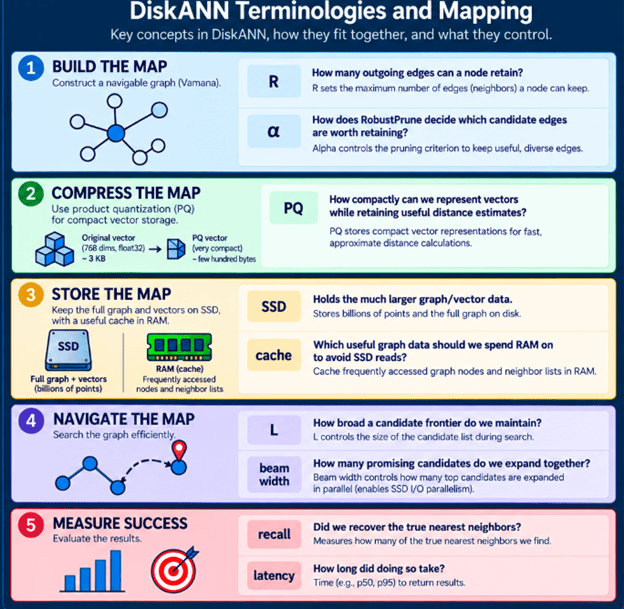
DiskANN offers several settings that control graph construction and search aggressiveness.  Those settings trade recall, latency and memory against one another, There is no correct setting that is universal. It is therefore useful to understand what each parameter changes physically inside the algorithm.

Some parameters affect the graph.  Others affect how we search that graph.

R and alpha shape the map. L and beam width control how we navigate it.

Changing fundamental build parameters such as R or alpha means changing the graph itself, so evaluating them involves rebuilding the index.

Changing L or beam width can change query behavior without rebuilding the graph.

1. R — maximum roads/edges per node

During graph construction, we may identify multiple candidate neighboring nodes, or edges, associated with a given node.  We do not need to retain every edge, so \(R\) sets an upper limit on a node’s outgoing edges—its edge budget.

Larger graphs require more storage, while expanding nodes increases search work. A higher *R* provides richer connectivity and more routes but requires additional index storage and construction time; *R* = 64 does not mean every node has exactly 64 neighbors.  It only means pruning allows up to 64 connections per node.  
Tradeoffs:

More edges create more routes to search in the vector space, but each route adds computational cost. The larger the search, the longer the index is going to take to build and the longer a query is going to take. The sweet spot is finding enough nodes that add value and make results decent quality wise.

2. Alpha — which roads are worth keeping?

R specifies the permitted number of edges.  It does not tell us which ones are useful. That is the job of pruning. Suppose node ‘Waterproof hiking boots have two neighbors’ Rain boots’ and ‘Trail shoes.                

‘Rain boots’ is close to ‘Waterproof hiking boots. ‘Waterproof hiking boots’ is also close to ‘Trail shoes. But ‘Trail Shoes’ and ‘Rain boots’ are themselves remarkably close. If we already retain ‘Waterproof Rain boots’ -> ‘Rain boots’ then ‘Waterproof Rain boots’ → ‘Trail Shoes’ may add little navigational value because ‘Trail Shoe’’s region can already be reached through A. This is the intuition behind RobustPrune.

Rather than simply selecting the R closest vectors, Vamana uses RobustPrune to determine whether candidate edges provide useful routes or are sufficiently covered by edges already selected. The parameter alpha influences this pruning criterion, changing which edges survive and therefore the topology and navigability of the resulting graph.

Trade-off: Changing alpha can produce a more navigable graph and affect recall, but it also changes graph construction and requires rebuilding the index to retune.

3. L — how hard are we willing to search?

Once constructed, the graph is ready for querying.   

A query arrives:

“Boots for hiking in the rain” It becomes query vector q, and graph traversal begins.

During the search, we maintain promising candidates – such as below:

P17   Waterproof hiking boots     0.12
P83   Rain boots                  0.15
P51   Trail shoes                 0.19
P20   Snow boots                  0.24
P91   Hiking backpack             0.31

…

Parameter L controls the size of this list. A small L means we are willing to keep a narrow search frontier. A smaller L may limit the list to P17, P83 and P 51.

A larger L keeps more possibilities open, including P17, P83, P51, P20, P91, P33, P74, P82, and others.  Greedy graph search can mistake the best immediate direction for the best route.  A broader frontier gives the algorithm more opportunities to recover from those decisions.

Trade-offs: Larger L improves recall by exploring more of the graph, but requires more distance calculations, node expansions and potentially SSD reads—raising query latency and resource usage.

4. Beam width — the amount of work issued parallelly.

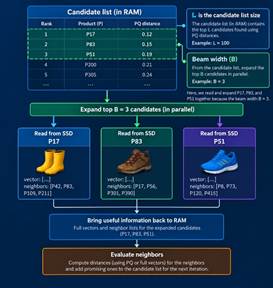
Assume that *L*, the number of candidates being evaluated, is 100.  Our candidate list may contain up to roughly that search breadth. That does not mean we have expanded 100 candidates simultaneously. That depends on ‘beam width’. If beam width = 3, then we may only select 3 candidates out of the list of 100 to expand at any given time. L refers to the number of promising possibilities retained, whereas beam width denotes the number of possibilities expanded simultaneously.  SSD performance depends on simultaneous expansion to handle multiple outstanding I/O operations.

DiskANN’s SSD design uses beam search and asynchronous I/O to increase the amount of useful work the SSD can have in flight.

Tradeoffs: Increasing beam width exposes more I/O parallelism, helping DiskANN hide SSD latency. Beyond the SSD’s optimal capacity, larger beams cause unnecessary reads, computation, and I/O contention.  The sweet spot is enough parallelism to keep the SSD busy—not maximize parallelism.

5. PQ — required RAM precision

Our original vectors might be large,768 × float32 ≈ 3 KB/vector. PQ can represent them much more compactly for approximate distance calculations. But compression has a cost. More compression can help with smaller in-memory representation and less memory usage. But it also means less precise approximation. This introduces another dimension to tuning. If the PQ representation is too coarse, our approximate distances can become less informative.

Imagine the real distances are:

Waterproof hiking boots    0.121
Rain boots                           0.147
Running shoes                    0.512

PQ might estimate:

Waterproof hiking boots   ~0.13
Rain boots                          ~0.15
Running shoes                   ~0.50

Perfect precision wasn’t required. The approximation still clearly tells search which candidates look promising. But aggressive compression can make those approximations noisier.
Tradeoffs: How much RAM are we prepared to allocate to make our approximate distance estimates more informative?

6. Cache — where should we spend our RAM?

PQ helps reduce the amount of memory needed for vector representations, but that does not mean we want to leave the remaining RAM unused. Nodes along frequently used paths are visited more often.  Keeping these frequently accessed nodes and their neighbor information cached in RAM can avoid repeatedly fetching them from SSD. A larger cache can therefore increase cache hits, reduce SSD reads, lower I/O pressure, and potentially improve query latency.
Tradeoffs: Caching uses RAM that could serve other purposes.  Like the other DiskANN parameters, the goal is not simply to maximize the cache, but to spend the available RAM where it eliminates the most expensive disk work.

7. How these parameters interact

These parameters do not operate independently. For example, increasing L may improve recall but can cause more node expansions and SSD reads. An appropriate beam width may allow some reads to overlap, while increasing the cache size can remove the need for others.   Likewise, a larger R may make the graph easier to navigate but gives each expansion more neighbors to evaluate. We are not tuning independent numbers—we are tuning a system.

It is important to work out the right combination of their values, which work well.

8. Recall vs latency — the curve that matters

Suppose exact search for “boots for hiking in the rain” tells us the true top five results for our query:

1. Waterproof hiking boots
2. Tall rain boots
3. Lightweight rain boots
4. Insulated waterproof boots
5. Waterproof trail shoes

With conservative search settings, DiskANN may return:

✓ Waterproof hiking boots
✓ Tall rain boots
✓ Lightweight rain boots
✗ Hiking shoes
✗ Winter boots

With three correct of the true five: Recall@5 = 3/5 = 60%
If we increase search effort further, Recall@5 = 4/5 = 80%
If we increase search effort even further, we may get Recall@5 = 5/5 = 100%

But query cost may increase correspondingly with each effort.
“What is the smallest amount of search work that achieves the recall my application requires within its latency budget?”

9. Benchmarking for actual results

A real evaluation also needs a representative query set. For those queries, we establish ground truth—typically using exact nearest-neighbor computation—and then compare ANN results against it. At the same time, measure the operational metrics that matter. Those metrics include –

  • Recall
  • Latency
  • QPS / throughput
  • Memory usage
  • SSD I/O
  • Index size
  • Index build time.

The winner is the configuration that satisfies the application’s constraints with an acceptable resource cost.

Summary

The graph gives us a map.

  • RobustPrune tries to make that map sparse but navigable.
  • R bounds its connectivity.
  • Alpha influences pruning.
  • PQ gives us compact approximations.
  • Caching avoids unnecessary disk access.
  • L controls how broadly we search.
  • Beam search gives the SSD multiple useful operations to work on.

Using an example –
A screenshot of a computer

AI-generated content may be incorrect.

DiskANN converts “boots for hiking in the rain” into vector *q* to navigate the Vamana graph.

Rather than loading everything from SSD, PQ-compressed vectors in RAM help estimate which nodes look promising, while cached graph nodes avoid disk reads when possible. The most promising candidates are retained in list *L*, while the beam width specifies the number of candidates expanded at each stage.

Only nodes deemed promising are selectively retrieved from the SSD.  The candidate list grows by adding neighboring items until convergence, finding similar products—such as waterproof hiking and rain boots—without comparing every dataset vector.

The goal is not to make searching for a billion vectors cheap by making every comparison faster. It’s to design the index so that we don’t need to make most of those comparisons in the first place.

In the next post, we will look at how SQL Server uses this algorithm for vector search and what we can do to understand that better.

Exploring DiskANN: Part 2: PQ, SSDs, caching and beam search

How I used AI for this post
ChatGPT to generate images based on info specifically provided by me,including examples.
Grammarly to catch grammar and sentence construction errors.

In Part 1, we looked into foundational elements of  DiskANN. The example we used  was:

“boots for hiking in the rain”.

Vectors are represented as nodes in the DiskANN graph structure, and Edges are connections between those nodes. ‘Vamana’ and ‘RobustPrune’ make that graph sparse without destroying useful routes. At query time, ‘greedy graph traversal’ used a candidate list to find vectors increasingly similar to the query.

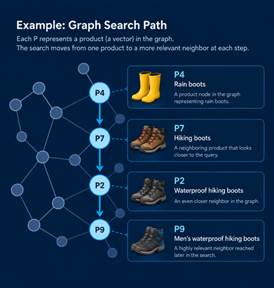
Conceptually the search looked like this:

At this point, the consideration becomes – ‘What if the graph and all of its vectors don’t fit in memory?’

If every step of graph traversal had to wait for an arbitrary SSD read, the navigation could become painfully slow.

Why not just put everything in RAM?

Suppose our product embedding has 768 dimensions, with each dimension stored as a 32-bit floating-point number.
One vector requires roughly – 768 dimensions × 4 bytes = 3,072 bytes ≈ 3 KB
When we scale upto a billion of them, we get to 3 KB × 1,000,000,000 ≈ 3 TB

That’s before we even consider accounting for the graph and other index structures. At this scale, “keep the entire index in RAM” becomes an expensive design constraint. SSDs give us vastly more affordable capacity. But SSDs introduce another problem. RAM access is extremely fast. SSD access is much slower, particularly when an algorithm repeatedly asks for small pieces of data from different locations.

Imagine our search moving through the rain-boots graph:

If every expansion means:

visit P4 → wait for SSD
visit P7 → wait for SSD
visit P2 → wait for SSD
visit P9 → wait for SSD

Then storage latency starts controlling search latency.

An efficient search needs to keep enough information in RAM to make good navigation decisions, while touching the SSD only when necessary. That is what makes Product Quantization important to understand.

Product Quantization: a smaller map in memory

One of our product vectors stands for:
“Men’s waterproof hiking boots” and may be represented as
[0.12, -0.73, 0.41, 0.08, …]

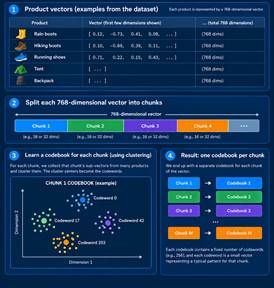
The vector holds many floating-point numbers.  It is not always essential to employ the full-precision vector when assessing whether a candidate merits further investigation.  Product Quantization, or PQ, gives us a cheap approximation.

Before the index is searched, DiskANN trains a PQ model on representative vectors from the dataset. Training generates compact codebooks that compress dataset vectors for efficient search.

PQ trades precision for memory. The compressed vector is not identical to the original vector. Distances calculated from it are approximate. The goal of ANN Search is to identify promising candidates; not necessarily make the final ranking decision from every candidate it encounters.
For our rain boots query that looks like “boots for hiking in the rain” –

PQ can help us cheaply estimate the approximate distance.

Vectors/Nodes Distance
Waterproof hiking boots          0.12
Rain boots                                 0.17
Snow boots                               0.29
Running shoes                    0.61
Camping tent                     0.82

That may be enough information to decide where the graph search should go next.

PQ – ‘cheap screening stage.’

Imagine you have one billion shoes to pick from but can only have time to look at 20. You don’t need each pair’s description. You only need the 20 that are worth your time. The summary helps you screen those 20. Then you retrieve the full documents only for the shoes that matter. DiskANN uses compressed representations for the same reason.

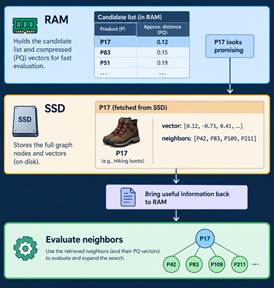
RAM helps answer “where should I look?”

SSD holds the larger information needed when it is needed and when the graph traversal reaches the point where it is needed after the greedy-search iteration.

What lives on SSD?

For a graph node such as:
P17 = Waterproof hiking boots
The vector search cares about two things:
P17, the vector, and its graph neighbors, say
P42 – running boots
P83 – rain boots
P109 – snow boots.

When search decides that P17 is worth expanding, it needs to discover:

“What are the other nodes I can reach from P17?” It then goes to disk to reach the complete set of embeddings for P17 and gets its neighbors.

It does not read the whole index from SSD. It does selective reads driven by graph search. But SSD reads are still expensive.

The algorithm has reduced the amount of data kept in RAM. But it is still read intensive, because it still needs to fetch data for each of the neighbors, and each of that adds up to a read. The reads are sequential, which means CPU spends time waiting for storage.

DiskANN is about evaluating a list of candidates, not just one at a time.

It maintains a candidate frontier. That leads to ‘beam search’.

Beam search: give the SSD several things to do

From the candidate list, instead of doing the loop of reading the node we want – wait process-read the next node, we can work several promising candidates simultaneously, as below.

That gives the storage device more parallel work and helps hide some of the latency of individual reads. The SSD-index design notes in the DiskANN repository explicitly call for beam search to explore more than one neighbor at a time and increase SSD queue depth, with asynchronous I/O used to hide waiting time.

This is why beam width becomes much more interesting once DiskANN moves to disk. Beam width depends on more than just the number of expanded candidates.

Beam width facilitates I/O parallelism by enabling simultaneous retrieval of multiple promising graph nodes, rather than performing each SSD access in a sequential manner.  It may also be noteworthy that L and beam width are not the same thing.

L determines the permitted breadth of the frontier.  Beam width determines the number of candidates expanded at once.  

For example, L = 100 beam width = 4 does not mean we are reading 100 nodes from SSD simultaneously. It means keeping up to 100 promising candidates. From amongst them, choose a small batch of 4 to expand and search together.

On an SSD-backed index, the second knob also affects how effectively we can use the storage device. Certain graph nodes exhibit higher popularity compared to others, resulting in more frequent visits.  such nodes are cached for further processing. These optimizes reads from SSD even further.

Putting the pieces together

Let’s run our rain boots query again.

“Boots for hiking in the rain”

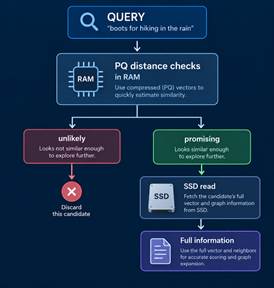
  1. The query is vectorized, then graph search starts in RAM.
  2. PQ-compressed vectors speed up candidate selection, and cached graph nodes improve access efficiency.
  3. The candidate list (L) holds the best options found so far, while beam width determines how many can be expanded at once.
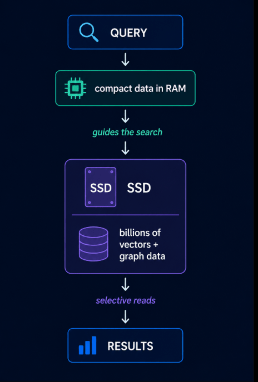
  4. Only those promising nodes require selective reading from SSD, where the larger graph and vector data live.

This lets DiskANN search for datasets far larger than RAM without reading the entire index from disk.

PQ helps make large numbers of approximate distance evaluations cheap enough to guide the search.

The graph indicates the permitted destination nodes. Takeaways are as below –

L determines how broad a set of possibilities we keep alive.

The cache prevents us from repeatedly fetching useful nodes from disk.

Beam search enables concurrent SSD operations by expanding multiple promising nodes.

The SSD provides the capacity to hold an index far larger than available RAM.

Exploring only a tiny, useful portion of the vector space while still recovering the true nearest neighbors are often enough to achieve high recall.

Summary of terminologies used so far –

TermSimple meaning
SSD indexthe large graph/vector store that does not need to fit entirely in RAM
PQa compressed approximation of vectors used to make candidate evaluation cheaper
PQ codethe compact representation of a vector
Cacheuseful graph data we keep in RAM to avoid repeated SSD reads
Cache hitThe node we need is already in RAM
Cache misswe have to fetch the node from SSD
SSD readfetching graph/vector information for a node we want to explore
Lhow broad a candidate frontier we maintain
Beam widthhow many promising candidates we expand together
I/O parallelismhaving multiple SSD reads in flight instead of waiting for them one at a time
Recallwhether all these shortcuts still find the true nearest neighbors often enough

In the next and final part, we can look at how to tweak each of these knobs operationally: R, alpha, L, beam width, PQ size, memory budget, recall, latency and actually tune a DiskANN index.

Exploring DiskANN: Part I: Understanding the Algorithm before the disk

How I used AI for this post
ChatGPT to generate images based on info specifically provided by me,including examples.
Grammarly to catch grammar and sentence construction errors.


I did a presentation on Vector Economics at EightKB, a popular SQL Server Internals conference, recently. The talk was well received. Among the follow up suggestions, one was about doing a blog series on DiskANN Algorithm – the algorithm created by Microsoft Research, documented here, and is used for vector index on SQL Server Vector Search.

DiskANN is meant to help with searching a billion-vector dataset from a single machine using SSDs.

Microsoft Research’s original work demonstrated a billion-point index on a workstation with 64 GB of RAM and an SSD, while targeting high recall and low query latency. Before we get to ‘why ssd’ and details of storage, we need to understand the basics of vector search and underlying terminologies.

Basics of Vector Search

Imagine we’re building semantic search for an online store. Our catalog contains below products:
P1 “Men’s waterproof hiking boots”
P2 “Women’s trail running shoes”
P3 “Insulated winter snow boots”
P4 “Lightweight camping tent”
P5 “Waterproof hiking backpack”
P6 “Running socks”

Assume that a customer is searching for: “boots for hiking in the rain”.

Full-text search can efficiently find and rank documents containing terms such as boots, hiking, and rain, while features such as stemming and fuzzy matching can handle variations of those words.

But what if the query says “boots for hiking in the rain” while the product description says “waterproof outdoor footwear”? There may be little direct word or phonetic overlap, even though the two clearly mean similar things.

This is where vector search is useful: instead of asking whether the words match, it gives us a way to search based on how closely their meaning is represented.

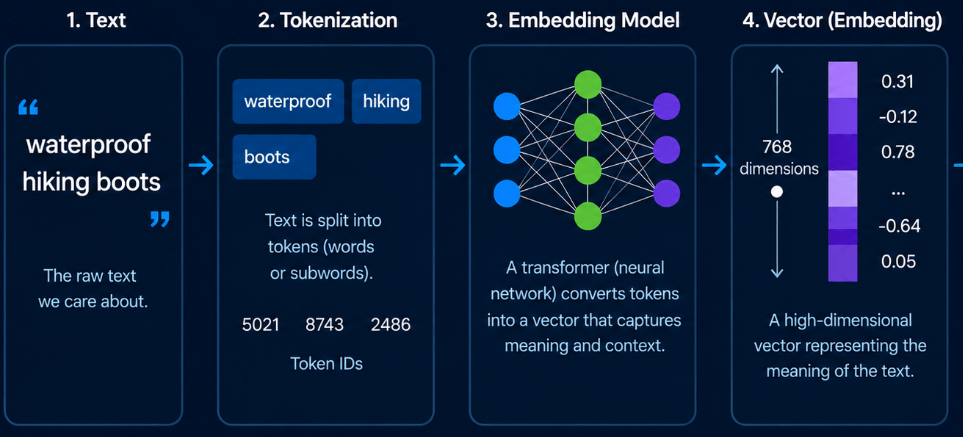
An embedding model converts each product into a vector:
“Men’s waterproof hiking boots” ->
[0.12, -0.73, 0.41, 0.08, …]

The customer’s query goes through the same process:
“boots for hiking in the rain” ->
[0.15, -0.69, 0.45, 0.04, …]
Then, these two vectors are compared. (There are multiple metrics one can use for comparison).

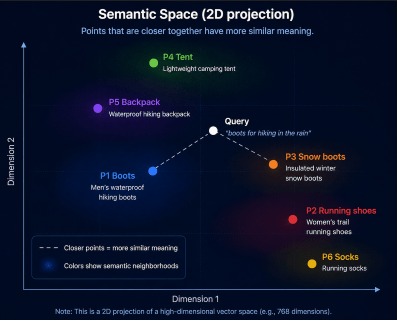
The closer the results are mathematically, the similar they are in semantic meaning. That is essentially how vector search works.

Each vector might contain hundreds or thousands of dimensions. Each individual number means nothing in of itself. Objects with similar meaning tend to occupy nearby regions of this high-dimensional space.

Illustrative 2-D projection of what is actually a high-dimensional vector space. (It is several hundred, or thousand dimensions)

The vector-search problem can be stated as:

“Given a query vector, find the vectors closest to it.”

Why do we need an index?

With a small list of six products, the obvious solution works perfectly. Compare the query against every product:

distance(query, P1)
distance(query, P2)
distance(query, P3)
distance(query, P4)
distance(query, P5)
distance(query, P6)

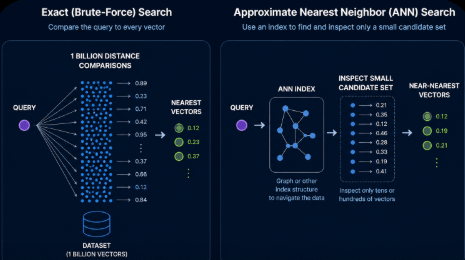
Then, sort the distances and return the nearest products. This is exact nearest-neighbor search. For a small number of vectors, we can scan every vector we have for comparison. But, But suppose our system contains a billion vectors. Or more.Every query potentially needs to be compared against a billion other vectors or more. This can get really expensive and time consuming. An ANN index tries to answer a different question:

Can we inspect only a small fraction of the billion vectors and find NEARLY all of the nearest ones?

ANN stands for ‘Approximate Nearest Neighbor’. The algorithm intentionally trades a small amount of certainty for a potentially enormous reduction in search work.

Before looking at how DiskANN accomplishes that, let us try to understand the vocabulary around it.

DiskANN vocabulary

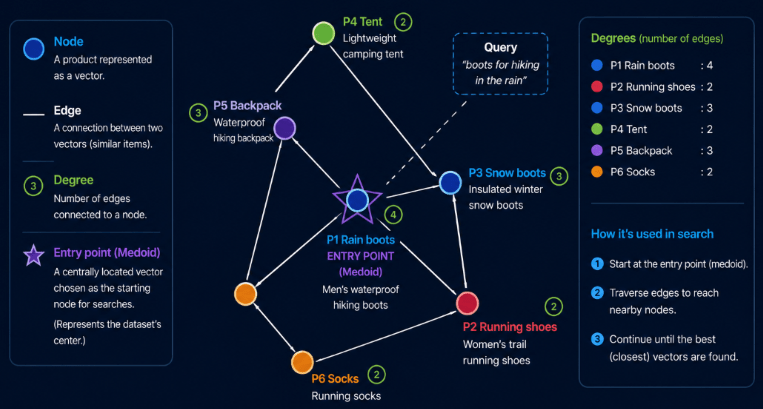
Vector / Point / Node

A vector in general , is simply an ordered list of numbers – like below.
[0.12, -0.73, 0.41, 0.08, …]
An embedding is a vector with a particular purpose—produced by a model to represent something, such as text, an image, or a product, in a numerical space where similarity can be measured. Every embedding is a vector, but not every vector is an embedding. In this context, we are talking about vectors as they represent embeddings. Every embedding is a vector, but not every vector is an embedding. In this context we are talking of vectors as they represent embeddings.

Once that vector becomes part of a graph, we can think of it as a node or vertex. In the context of DiskANN we can consider them equivalent terms.

Distance

We need a way to answer: How similar is this vector to my query?

Similarity can generally be measured using 3 metrics. They are cosine, Euclidean, and dot product. More details can be found here.  We will use cosine for this demo. With that metric, the smaller the distance, the more similar the vector is to the query vector.

Neighbor

If two vectors are close in embedding space, we can treat them as neighbors. For example, hiking boots may be ‘close’ to ‘Rain boots’ or ‘Snow boots’.DiskANN’s graph stores selected relationships like these as edges. “Neighbor” does not simply mean “the closest vector.” That distinction is important.

Graph

A stored connection between two vector nodes that gives graph search a route from one vector to another. Vector distances help determine which edges should exist, but DiskANN does not simply connect every vector to its nearest neighbors—it selectively keeps edges that help make the graph navigable.The graph becomes a map that search can navigate.

Degree

The degree of a node is, roughly speaking, how many graph connections it has. Degrees matter because connecting every node to everything else would defeat the purpose.

DiskANN wants a graph with a limited number of useful edges. But, how does it determine which edges deserve to exist? We’ll answer that when we get to the pruning strategy.

Entry point / Medoid

Graph search needs to begin at any one node. One strategy represented in the DiskANN code is starting from a medoid—roughly, a representative central point of the dataset.

It gives search a reasonable place from which to begin navigating.

Greedy graph traversal

Once our vectors have been organized into a graph, we need a way to search it. One key idea behind DiskANN is ‘greedy graph traversal‘.

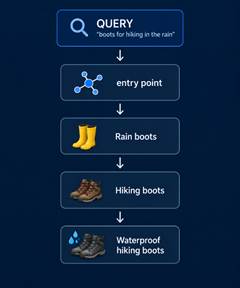
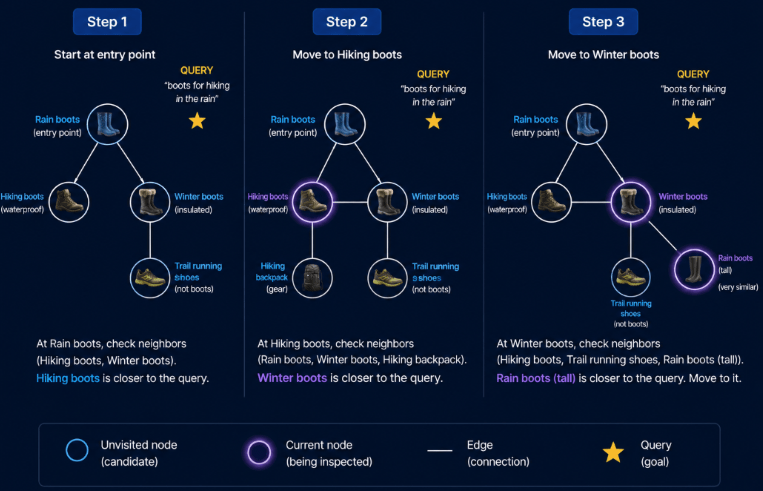
At each step, the search looks at the neighbors available from its current node and prioritizes the one that appears closest to the query vector.Consider our query: “boots for hiking in the rain”. A simplified traversal would be –

Step 1 — Start at the entry point.
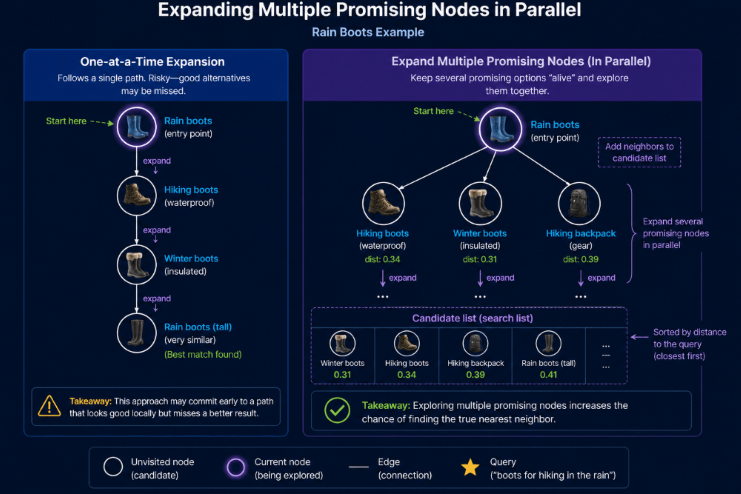
Suppose the search starts at a node called ‘Rain boots’. Ot examines the nodes connected to ‘Rain boots’. Of the available candidates, ‘Hiking boots’ is closer to our query, so the search moves in that direction.

Step 2 — Explore the new neighborhood.
From ‘Hiking boots’, the search discovers another set of neighbors. It compares those candidates with the query and finds ‘Winter boots‘ promising, so the traversal continues there.

Step 3 — Keep moving toward the query.
From ‘Winter boots’, another ‘Rain boots’ type of vector becomes visible. Its embedding is even closer to the query, so it becomes the next candidate.

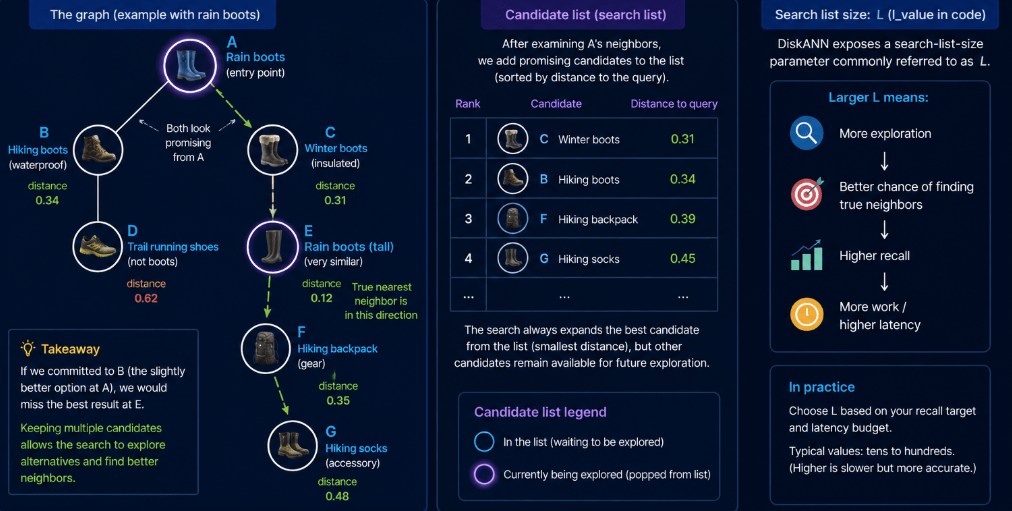
The graph behaves like a map through the vector space.The edges tell the search which vectors are worth considering next, and vector distance tells it which of those candidates looks most promising. This is a simplified example. Real DiskANN search doesn’t blindly follow a single path and forget everything else. It maintains a candidate list of promising nodes so it can return to another route if necessary. That distinction leads to the next DiskANN concept: the search list, or L.

Candidate list / Search list (L)

Committing to a single path is risky. Looking at the search term in our example –

“boots for hiking in the rain”

Suppose the search begins at ‘Rain boots’. From there, it discovers two promising neighbors: ‘Hiking boots‘ and ‘Winter boots’. Both look relevant. One may appear slightly more promising than the other, but we don’t yet know what lies beyond them in the graph. The best result might be several hops away through either route. If we choose one path and permanently discard the other, we could miss a much better result.

This is why graph-based ANN search maintains a ‘candidate list’, sometimes called the ‘search list’ or ‘frontier’. As promising nodes are discovered, they’re added to this list and ordered according to their distance from the query.DiskANN controls the size of this search list using a parameter commonly called L (l_value in the implementation). L controls how much of the graph search the algorithm is willing to explore. A small L keeps fewer possibilities alive. It is faster, but increases the chance that a useful route is discarded. A larger L allows the search to consider more candidates. This is one of the fundamental ANN tradeoffs.

Recall

ANN search is approximate. We need to measure how often it finds the answers an exact search would have found.Suppose our query is:

“boots for hiking in the rain”

If we perform an ‘exact search’ over the entire catalog, imagine the true 5 nearest products are:
1. Waterproof hiking boots
2. Tall rain boots
3. Lightweight rain boots
4. Insulated waterproof boots
5. Waterproof trail shoes

Now suppose DiskANN’s approximate search returns:
1. Waterproof hiking boots ✓
2. Tall rain boots ✓
3. Lightweight rain boots ✓
4. Waterproof trail shoes ✓
5. Hiking shoes ✗

DiskANN found 4 of the true top 5 results. So, Recall@5=54​=80% (for this one query, not the entire dataset). High recall means our approximate search behaves more like exact search.

Beam width

We’ve seen that DiskANN keeps a ‘candidate list‘ rather than committing permanently to one path. There is more to it: instead of expanding candidates strictly one at a time, search can expand several promising nodes together. Return to our query:

“boots for hiking in the rain”

Starting from Rain boots, the graph might expose several promising neighbors – such as ‘winter boots’ , ‘hiking boots’, or even a ‘hiking backpack’. Think of beam width as:

How many promising graph nodes can we expand simultaneously?

Its importance becomes much clearer when DiskANN starts fetching graph data from SSD.

RobustPrune , Alpha and R

These terms belong primarily to building the graph rather than searching it.
RobustPrune is a procedure for deciding which candidate edges are worth keeping.
Alpha is a parameter that determines how aggressively candidate neighbors are considered redundant during pruning.
R is a Vamana/DiskANN index-build parameter that controls the maximum degree of the graph—the ‘edge budget’, or roughly how many outgoing edges each node is allowed to keep after pruning.

From Vector Search to Graph Search

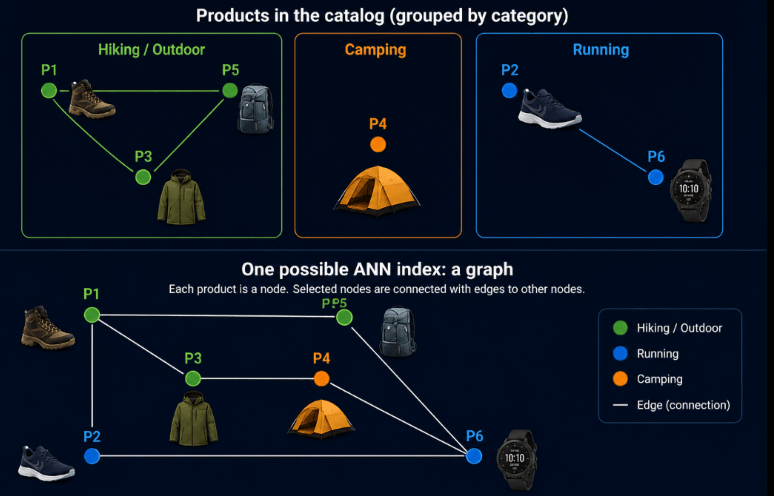
Let’s return to our product catalog.Imagine how products are grouped by rough categories, as below.

A query no longer needs to inspect every product. Instead, it can navigate the graph. This changes vector search from ‘Compare the query against everything’ to ‘Start somewhere reasonable and use the graph to discover increasingly promising candidates.’ That’s the fundamental abstraction behind graph-based ANN. That leads to how nodes/vectors are connected.

Why not simply connect every vector to its nearest neighbors?

At first, building the graph seems straightforward: for every vector, find its closest vectors and connect them.

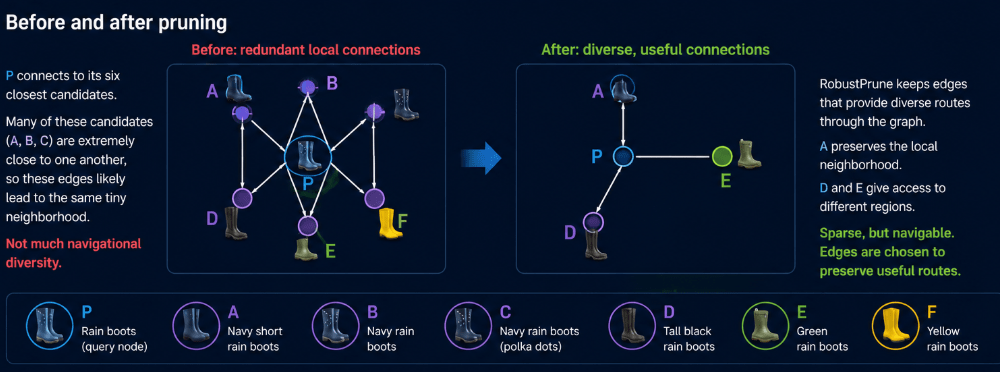
Consider node A — ‘Rain boots’. Suppose its four closest vectors are B, C, D and E, all representing very similar rain boots. Connecting A to all four seems sensible—they are, after all, its nearest neighbors.

But there’s a problem: B, C, D and E may all occupy essentially the same small region of the vector space.

A has what we can call an ‘edge budget’ (R) – limited number of edges. Using nearly all of them to connect to very similar vectors gives us excellent knowledge of A’s immediate neighborhood, but those connections are somewhat redundant. If search reaches A, every available route may take it to roughly the same place. In other words, it may not matter to a purchaser of Rain boots if they get to A, and then B, C, D or E..they are all very close as products. The results are not hugely diverse.
Now consider X — Tall rain boots and Y — Green rain boots. They aren’t as close to A as B, C, D and E are, but they represent different regions of the vector space. In other words, the product is a bit different, in an interesting way. The purchaser may suddenly decide, hey, ‘tall boots’ , maybe I do need some of those, not just this ‘rain boot’ with a regular length. Using some of A’s limited edge budget to create routes toward those (more diverse) regions can make the graph much easier to navigate (and the results more interesting). But it is also a bit of a design problem.

Given a limited number of edges per node, how do we choose a set of neighbors that makes the entire graph easy to navigate and result in a diverse result set?

Meet Vamana

Microsoft Research introduced ‘Vamana‘ as part of the original DiskANN system, describing it as a new graph-based ANNs index that was useful even independently as an in-memory graph index. Vamana constructs the graph that DiskANN will eventually search.

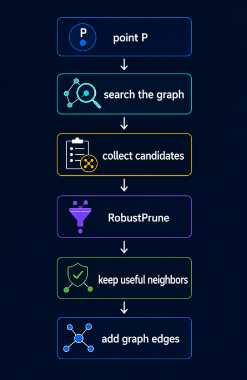
The high-level looping structure may be as follows.


Let us examine those steps in more detail.

Building one node’s neighborhood

Point P – Search the Graph – Collect Candidates

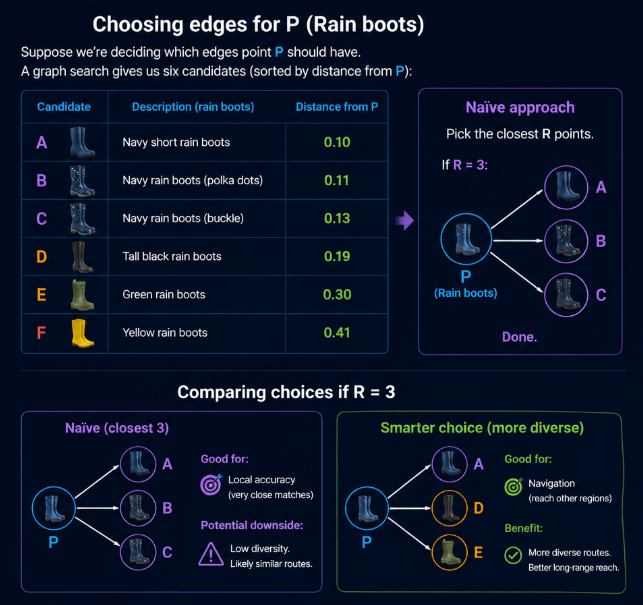
Suppose we’re deciding which edges P — ‘Rain boots’ should have. I have an ‘edge budget'(R) of 3. Why do I even need an ‘edge budget’? Because not every node can connect to every other node; we are limited in resources. A graph search has already given us six candidate neighbors, ordered by their distance from P.

A Navy short rain boots 0.10
B Navy rain boots 0.11
C Navy rain boots 0.13
D Tall black rain boots 0.19
E Green rain boots 0.30
F Yellow rain boots 0.41

If P is allowed a maximum of three edges (R = 3), the obvious strategy would be to simply choose the three closest candidates:

P → A
P → B
P → C

That gives P excellent connections to its immediate neighborhood. But look at the geometry in the diagram: A, B and C are also extremely close to one another (A and B are separated by 0.01 and B and C by 0.03). Once P has an edge to A, adding edges to B and C doesn’t give me any additional value. All 3 connections potentially lead search into essentially the same part of the vector space. We’ve used our entire three-edge budget, but haven’t created much diversity in where those edges can take us.

RobustPrune: Keep useful neighbors

The RobustPrune procedure evaluates candidates and poses the question:

“If I’ve already selected this neighbor, does another candidate still give me a sufficiently useful connection?”

It gives Vamana a systematic way to ask:

“If I’ve already kept A, do I really need a direct edge to B—or does A already give me a good enough route toward B’s neighborhood?“

If B is effectively redundant, it can be pruned, leaving room in P’s limited edge budget for a candidate that adds more navigational value.

RobustPrune considers the relationships between the candidates themselves, not just their individual distances from P.

Instead, imagine keeping A but also retaining D and E.

P → A close local neighbor
P → D another useful direction
P → E access to another region

D and E are farther from P than B and C, but that doesn’t automatically make them worse graph neighbors. They may provide routes into portions of the graph that aren’t already easily reachable through A.

This illustrates an important distinction:

Distance alone tells us which vectors are similar. Graph construction has to decide which connections are useful for navigation – in order to find the best matches in the shortest time.

The goal therefore isn’t simply to minimize the distance of every edge. It’s to build a small set of edges that collectively gives search useful routes through the vector space.This is where RobustPrune adds value.

The resulting graph is sparse, but its edges are deliberately chosen to preserve useful routes. This is a much deeper and better idea than simply “connect every vector to its nearest neighbors.”

Where ‘alpha’ fits

The current repository configuration uses 1.2 as a default alpha in its graph-index configuration. What is ‘alpha’ ? Alpha influences when RobustPrune decides:

“I’ve already selected a neighbor that makes this candidate sufficiently redundant.” In other words, it is how aggressively RobustPrune decides that one neighbor makes another neighbor redundant.

Suppose we’re pruning the outgoing edges for our P = Rain boots node. We have these candidate neighbors:
P = Rain boots

A = Navy rain boots
B = Waterproof hiking boots
C = Tall rain boots
D = Winter boots
E = Green rain boots

Robust prune picks the first possible candidate, A , and connects it to P.
Suppose d stands for distance and d(P,B) = 0.3 while d(A,B) = 0.2 .
Alpha (simplified) is checking if d(A,B) <= d(P,B).

With Alpha = 1.0, If we check if 1.0 x 0.20 <= 0.30, yes it is. So RobustPrune can essentially say: “A is already close enough to B. I don’t necessarily need P->B.” Then it proceeds to prune/remove P->B.

With Alpha = 1.5, the test is if 1.5×0.20 <= 0.30. This is still true, so the decision with 1 to prune P->B is still valid.

With Alpha = 2.0, the test becomes 2.0×2.0<=0.30. Now this is false. Now B survives this pruning test.

Increasing alpha generally makes the pruning condition harder to satisfy, so fewer candidates are eliminated as redundant by a selected neighbor.Higher alpha makes RobustPrune less willing to eliminate a candidate because another selected neighbor is nearby, changing which edges survive within the R-edge budget.

Summary

Summarizing the terms learned –

TermSimple meaning
Vectorthe numerical representation of an item
Distancehow similar or dissimilar two vectors are
Nodea vector represented as a point in the graph
Graphthe map we navigate
Edgea route we are allowed to explore
Degreehow many edges a node has
Medoida centrally located node used as a starting point for navigation
Candidatea node we’re considering as potentially useful
Candidate list / frontierpromising nodes we haven’t finished exploring
Greedy traversalprioritize candidates that currently look closer to the query
ANNfind very close neighbors without checking every vector
Recallhow often we recover the true nearest neighbors

Terminologies relevant to graph building/pruning may be –

TermSimple meaning
RobustPruneremove redundant edges while preserving useful routes
Rthe maximum number of outgoing edges a node is allowed to retain
α (alpha)how strong the evidence must be before one candidate makes another candidate redundant
Redundant edgean edge we may not need because another neighbor already provides a good route there
Edge budgetan intuitive way to think about the limited number of connections available under R
Neighbor diversitykeeping edges that provide meaningfully different routes through the graph
Pruningdeciding which candidate edges to discard
Reverse edgea connection added back from a selected neighbor toward the node during graph construction

Ok, so where is the “Disk” in DiskANN?

Graph search works well when the graph and vector data fit comfortably in memory. But at high volume (billions of vectors), keeping everything in RAM becomes expensive and impractical.

This is where the “Disk” in DiskANN becomes relevant .

DiskANN was designed around keeping a compact representation of the index in memory, while placing the much larger graph and full-precision vector data on SSD. The graph’s navigability helps search avoid random access across the entire dataset—it only needs to fetch a relatively small number of promising nodes from SSD. That combination allowed DiskANN to demonstrate high-recall, low-latency ANN search over datasets much larger than available memory.

But making graph traversal work efficiently when its data lives on SSD introduces an entirely new set of engineering problems: what stays in RAM, what goes to disk, how many SSD reads a query requires, and how those reads are scheduled.


That’s where we’ll pick up in Part 2: taking DiskANN from memory to disk.


Next: Part 2: Putting the “Disk” in DiskANN — PQ, SSDs, caching and beam search.

T-SQL Tuesday #200: Bad Query signals

NO AI was used to generate this content. Grammarly was used to check and correct language and sentences in parts.


I just managed to get a post in for this landmark T-SQL Tuesday, hosted by Brent Ozar. Brent was kind enough to keep the submission window open for two weeks instead of the usual one, and I was able to sneak a post in last – minute.

His invitation is to write about the things that immediately stand out as “bad signs” when reviewing a SQL query.

The list below covers a few things that catch my attention. It is far from comprehensive and they’re in no particular order, and with one exception, almost all of them have legitimate use cases. The problem is that they’re often used when there isn’t a legitimate reason, and that’s when they become warnings.

1. SELECT * on a regular table

In most cases I’ve seen, this means retrieving far more data than the query actually needs. There are valid scenarios—small lookup tables, temporary tables, or table variables, for example – but those aren’t always the situations where I usually encounter it. Pulling unnecessary columns increases I/O, can lead to less efficient execution plans, and creates avoidable performance overhead.

2. SELECT DISTINCT

DISTINCT introduces unnecessary work, but that’s not my primary issue with it. It’s often used to hide underlying design or query problems. Instead of fixing incorrect joins or returning the correct rows in the first place, it’s common to slap a DISTINCT on to a poorly written query to remove duplicates after the fact.

3. CTEs and table variables

My first thought is always, what happens when the data grows? Both CTEs and table variables have legitimate uses, especially when working with smaller datasets. However, they aren’t always the best choice as data volume increases.

4. CASE expressions without an ELSE

It’s entirely possible that the data is tightly controlled and every possible condition is accounted for. But omitting an ELSE means unexpected values that silently return NULL. That may also be acceptable in some cases, but it’s always something I want to verify rather than assume.

5. Unqualified table names

Referencing tables without explicitly specifying the schema (for example, using Orders instead of dbo.Orders) may work because dbo is the default schema, but I still consider it sloppy coding. It can also lead to unexpected behavior if objects exist under multiple schemas or if the default schema isn’t what the developer assumed.

6. The NOLOCK hint

Enough has already been written about NOLOCK. More often than not, it’s been added as a quick fix without fully understanding the consequences of reading uncommitted data.

7. LIKE predicates with a leading %

Patterns such as LIKE '%Jane' prevent index seeks in many cases and can result in expensive scans.

8. LEFT JOIN followed by a filter that turns it into an INNER JOIN

For example:

SELECT p.ProductID,
c.CustomerName
FROM ProductTable AS p
LEFT JOIN Customer AS c
ON p.CustomerID = c.CustomerID
WHERE c.CustomerID IS NOT NULL;

This query is effectively an INNER JOIN. The WHERE clause filters out all rows where the left join would have returned NULL, eliminating the very behavior that makes it a left join. It’s a simple mistake, but one that shows up surprisingly often in production code.

TSQL2sday was a brilliant idea started by Adam Machanic , and it has helped countless people make significant progress in both blogging and learning. I know , because I’m one of them.

I’d like to use this opportunity to thank Adam, along with every host and participant who has helped keep T-SQL Tuesday going over the years. Your contributions have built a community that continues to educate, inspire, and encourage others to share what they’ve learned. Let us keep going.

T-SQL Tuesday #192: What career risks have you taken?

This T-SQL Tuesday is hosted by the one and only James Serra – literally my go-to guy for data lakes and BI architecture. I am so tickled to be writing this right when am reading his book on ‘Deciphering Data Architectures: Choosing Between a Modern Data Warehouse, Data Fabric, Data Lakehouse, and Data Mesh’ (small book and easy to get through, recommended). James’s call to us is to blog on career risks we’ve taken.

I am a risk taker.

I strongly believe in doing work that stimulates and energizes you, rather than treating work as just a job. Some people regard this belief as elitist. I don’t.

I come from a poor country, and I have seen firsthand the toll that ill‑suited work takes on people—jobs taken purely to pay the bills, regardless of health, temperament, or personality. We spend eight to ten hours a day at work on average. If we dislike what we do, it is bound to have detrimental effects over time. Wanting work that helps you be creative and does not slowly wear you down is not elitism; it is self‑preservation.

My career reflects that belief.

I began as a COBOL programmer, transitioned to VB, then became a SQL Server DBA. I spent many years as a DBA before moving into a Database Engineering role, and I am now a Data Engineer. I am also close to graduating with a master’s degree in data science, and my next goal is to transition into an AI Ethics role.

Along the way, I took several significant risks.

1. Stepping outside data entirely

Seven years into my DBA role at a healthcare company, I realized the job had stopped helping me grow—financially and intellectually. I left for a cloud architect role at a startup, which turned out not to be what I had hoped. When I tried to move on, I couldn’t find another role that met my needs.

At my former employer, the infrastructure and Windows support team had an open sysadmin position. I had limited sysadmin experience, but I believed I could learn, and the team consisted of people I knew and trusted. I interviewed and got the role.

I worked as a sysadmin for two years. I can’t say I loved it, but I learned a lot —about monitoring, alerting, patching, managing heterogeneous server environments, and, most importantly, teamwork. When I returned to data work, that experience stayed with me and continues to serve me well.

2. Leaving the comfort of deep expertise

My next major risk was moving from a DBA role—where I had significant experience—into a Database Engineering role. I had always leaned toward application DBA work due to my programming background, but I was also experiencing serious burnout from on‑call rotations and constant operational stress.

I wanted a role with no on call, one that allowed me to focus more on building and programming. I found such a role, but it required relocating to another town. I took the risk and moved.

That Database Engineering role turned out to be the best career decision I’ve made. I enjoyed the work immensely and learned more than I could have imagined.

3. Returning to school

Another major risk was pursuing a master’s degree in data science. I have a background in statistics and have always enjoyed working with R and solving analytical problems on the side. Graduate school had long appealed to me, but it was either too expensive or required in‑person attendance—neither of which was feasible.

Post‑COVID, many universities began offering affordable, fully online programs. One of them was the University of Massachusetts. The program fit my budget, and the curriculum aligned perfectly with what I wanted to learn. I enrolled, and I am enjoying the experience.

4. Embracing Databricks and analytics

The most recent risk I took was moving from a Database Engineering role into a Data Engineer role. My organization decided to adopt Databricks as its data lake platform. While I had some exposure to BI in previous roles, I was far from an expert.

The analytics teams were heavily invested in Databricks, and learning it felt like a natural complement to my data science studies. I’m now three months into working with Databricks and loving every bit of it. I hope this path will eventually take me into a data scientist or AI Ethics role—and I’m looking forward to the ride.

Thank you James, for hosting.

T-SQL Tuesday #193 – Notes to past and future me

The last T-SQL Tuesday of the year is hosted by my good friend Mike Walsh. Mike’s call for us is to end the year on a poignant note – write a note each to your past me and future me, on things you wish you knew, or learning plans or anything you’d like to say.

My notes are as below –

Note to My Past Self (10 Years Ago)

I wish you had realized that admiring others shouldn’t make you lose sight of your own worth and potential.

I wish you knew that real friendships take time to grow.

I wish you understood that if all you share with someone are conversations about community politics and tech, that relationship probably won’t last.

I wish you expected people to ask about you too—not just the other way around.

I wish you learned to let go and move on easily—whether from people or jobs that have outlived their value.

I wish you knew how to pick your battles and not let every little thing upset you.

But despite all this, you did your best. Life is a learning experience, after all.

Note to My Future Self

I’m glad you’ve learned to find joy in doing things for their own sake—not for rewards, even in tech.

I’m glad you kept learning what you wanted to learn, despite the challenges.

I’m glad you figured out who your true friends are—and held on to them.

I’m glad you learned to trust life and let go of what doesn’t matter.

And I’m glad you still find time to smell the roses and be grateful.


As we close out the year, I’m reminded that growth is a journey—one that stretches across decades, shaped by lessons learned and hopes carried forward. Here’s to continuing that journey with curiosity, resilience, and gratitude. Thank you Mike, for hosting and wishing everyone a happy and safe holiday season.


TSQL Tuesday #189: How is AI changing our careers

This month’s TSQL Tuesday invite is from my good friend, long standing MVP and community volunteer Taiob Ali – Taiob’s call is to blog on how AI, (the biggest invention since the internet, according to some) is changing our careers.

The place I work is passionate about AI adoption. We are exploring many tools in that regard. I may not be able to share details of exact usage for privacy reasons. These are my personal experiences.

How I use it personally

I have not played with many AI tools. I use a paid version of ChatGPT, which I find helpful for the following reasons.

1 To generate small amounts of test data for demo and other reasons. It is very good at this – especially if I can provide table(s) and ask it to generate Insert statements.
2 To review my blog post and ask for suggestions on English, or if it matches the tone I have in mind.
3 For occasional art generation – such as some thank you card logos for events like SQL Saturday. I have had some experiences there that I can blog about separately.
4 For simplifying complex text in research papers – I must read a lot of research papers for school, and sometimes the language is too hard for me to follow. So, I ask for help with one paragraph at a time. It is not capable of condensing all of it. By the way, it gets worse with more data, and it has little memory for what you asked earlier. Even with these limitations, it can be helpful.
5 For assistance with R Programming. Maybe because R is an open-source product, the help you can get is fantastic and saves you hours. I do not cut and paste any code; I ask it specific questions like ‘how do I increase font on legend with this scatterplot’.

My experience so far is that it is another tool in my toolkit. While I have not had transformative experiences yet, it has proven to be helpful in my daily work. I also have thoughts on ethical challenges and concerns with mental health that it causes.
For my own sanity – I do not address it or talk to it like a person. Nor do I engage in experiments like some do – like debate it on what it says or try to get some cool answer they can share on social media about it. It is strongly ‘it’ to me, not a person with reasoning skills or feelings.

Some of the links that I have found helpful in that regard are below.

Resources that I recommend.

Harvard neuroscientist Dr Srini Pillay’s interview on balanced usage of AI, with warnings on the impact on the brain if used too much. This is not a pro or anti AI talk – it is very pragmatic and eye-opening on how much and why we need to use these tools. Dr Pillay explains how to find balance in the confusing world we are in by using AI appropriately and paving the way for healthy, innovative outcomes.

A research study shared by my colleague Mark Wilkinson found that AI does not necessarily improve productivity among programmers. This study is based on a small sample of programmers and has interesting findings related to higher productivity.

Stack Overflow 2025 survey results related to AI – of particular interest is the # of people using it at work, challenges with trust, AI tools versus AI agent usage. Also has a dataset we can use to explore further – the largest dataset of developer opinions available.

Long-time SQL Server MVP and data scientist Kevin Feasel, who is my go-to guy for all things data science related, wisely pointed out that Generative AI is hardly the only form of AI. It is easy to forget this critical fact, given that the term AI is used to refer to just generative AI these days. Here is a blog post teaching us about other forms of AI.

Ethical considerations

Last but hardly least, there are lots of ethical issues surrounding AI. My humble research using Stack Overflow data from last year (still a work in progress) is here.
I follow an Australian researcher named Kate Crawford, who has written a fantastic book called ‘Atlas of AI’. She highlights what goes into AI in the form of environmental resources, cheap labor, and many other factors. She also has many talks on YouTube that are worth listening to.

Data Platform MVP and longtime volunteer/mentor Eugene Meidinger has a great post on AI Ethics about Power BI. I loved one of his quotes – to always paste ‘into’ it and not ‘out of ‘it.

Conclusion

All of this said, AI is a game-changer, like it or not. There are basically two strong stances about its future – one that thinks it will die down, if not go away, because of how much garbage goes into it over time, and the second that says it will pave the way for a new future. Most of us are, safe to say, in the middle and confused about where we are going to land with it. My own stance – use it limitedly, stay informed and rely on educated resources, be open to possibilities, and stay grounded in your ethical stances.

Thank you Taiob, for hosting.

TSQL Tuesday #188 Growing community

I am responding late to a T-SQL Tuesday invite from John Sterrett. John’s call is about various ways to grow young data community/speakers.

I’m going to take a brief detour to talk about what held us together as a community over the past two decades.

We worked on a fantastic product – Microsoft SQL Server. It was thriving, growing in leaps and bounds. Each new release brought exciting features that sparked dialogues, blog posts and in-depth conversations. Jobs were plentiful if you had expertise in even one area of this vast product. We referred each other for job roles, building strong professional ties.

We saw each other often – at SQL Saturdays, PASS Summit, and other events. Between 2005 and 2018, I averaged about five events per year. We saw familiar faces and had plenty to talk about: the latest release, what worked and what didn’t, who’s hiring, who’s moving where. PASS had its fair share of politics, which added to the chatter. Twitter/X was our central hub – we knew who was attending events, where the after-parties were, and whose blogs to follow.

Then came COVID. Many of us shifted to working from home. PASS dissolved, giving way to smaller, independent or Azure-linked user groups. Some disappeared entirely. Event funding dropped and never really bounced back. SQL Server matured – still solid, but with fewer shiny new features. Twitter/X changed hands and tone, becoming more political, pushing many, even long-time influencers, away.

Meanwhile, job descriptions changed. SQL Server expertise wasn’t enough. Employers now ask for Postgres, Python, CI/CD, and more.

My late friend Brian Moran used to say that as we age, our “outer circle” gets bigger, while our “inner circle” – those we truly trust – shrinks. I found this painfully true during COVID. Pre-COVID, I had a long list of people to catch up with at events. Post-COVID, I realized many were just contacts. I don’t come from a culture that views friendship as transactional. That, combined with the discovery that many people didn’t care as much as I thought they did, left me in a difficult place.

Why didn’t they care? Partly because the West tends to treat relationships transactionally. And partly because the reasons for our interactions – events, jobs, shared tools – weren’t there anymore.

So what’s next? Is this the end of what we call “community”? I hope not.

In these tougher years, I’ve made new friends among younger speakers. I’ve learned how to support them – and be supported in return. Here are a few things that helped me:

  • Actively seek out and befriend new faces. Podcasts like Finding Data Friends by Ben Weissman and Jess Pomfret are great starting points. LinkedIn is another good space. Remember – tech today is much broader than SQL Server. I follow blogs on diversity, mental health, analytics, AI, and more.
  • Attend at least one event per year. If that’s not feasible, join a local user group. If that’s still tough, try a virtual event. I’m lucky to still attend PASS Summit and local meetups when I can.
  • Show genuine interest in people. COVID taught me that conversations based solely on tech or politics are fleeting. Regardless of cultural norms, people crave authentic connection. Ask how someone is doing – and mean it.

What’s positive about today’s community?

  • There’s far more diversity now.
  • Conversations feel smoother – even without shared tech or politics.
  • The younger generation is self-aware, clear on what works for them, and eager to extract value from their contributions.

Lots to learn, even for an old geek like me.

So, to answer John’s question about how to grow community: find what already exists, and participate – however you can. Real growth comes from real human connection.

Thank you, John, for hosting.