This month’s T-SQL Tuesday is hosted by Jess Pomfret. Jess’s theme is ‘Life Hacks to make your day easier’. She talks of some things we do to make life simpler/easier. Two of mine are as below. 1 Before I accepted the current gig I am at – I worked several years in telecommuting positions. I found myself struggling in two ways with this – one, not getting enough walking/exercise, and two, not being around real people. I liked the benefits of telecommute though – which is, no commute and the ability to eat warm home cooked meals for lunch. I wanted to combine benefits of both – so for the next gig, I rented an apartment that is walking distance from work. It was not cheap – but got me all the benefits I needed. Fast forward – two years and this has been a wise call. I am loving the combined benefits I get and feel healthier, physically and emotionally. This might not work as a solution for all jobs but it does for this one and am grateful. 2 We all struggle with finding time to learn. About two years ago I discovered the joy of podcasts. I made it a point to listen to a tech podcast during my evening walk and was able to get both exercise as well as learning done. But I started to run out of material there – not that there is any shortage of podcasts in general but my focus was data specific tech podcasts and there were not that many to feed my needs on a daily basis. This year I decided to go one step further – I put a laptop on the dining table right in the middle of my living room. I have a long hallway that i can walk up and down on, and watch a pluralsight course, or a pass summit recording as I walk. This does not work for very demo-heavy recordings, but it does for a lot of lectures and am getting a lot of learning done this way.
I think we all need ‘hacks’ to make our lives easier and maximise value and pleasure we get out of doing what we do. Thank you Jess, for hosting.
This month’s T-SQL Tuesday is hosted by Jon Shaulis – the topic is an evergreen one, dealing with Imposter Syndrome. I learned of this word via Mindy Curnett a.k.a @sqlgirl in one of her presentations. I was aware of it in a different way for a long time. Trauma victims know what it is better than most others. To deal with trauma, especially as a kid, one learns to dis associate or pretend it is happening to somebody else. It is a form of survival since you don’t have the necessary skills to deal with it as a child. Entire fantasies can form around such disassociation, many people do not recover from it. I knew I had it because I was given to frequent day dreaming as an adult. I was rarely present in the moment and always carried a perpetual sense of loss about me. In essence dealing with Imposter Syndrome is about being in the present and feeling life as it happens. Below are my strategies. 1 Mindfulness practice – breathing and meditation. 2 Using present tense as often as i can in conversation – this is an excellent tip I got from somewhere. If other tenses are needed use them and consciously return to the present. 3 Keeping track of when I disconnect/wander off – typically triggers that cause this. 4 Find moments when I am in the moment – and try to make more of these happen. I was surprised to see how trivial some of these ‘moments’ where – I remember them because I was fully prsent in body and mind when it happened. 5 Read and get more tips whenever possible. I read an excellent book on this recently. It is called ‘Presence: Bringing your boldest self to your biggest challenges‘ by Amy cuddy. The author went through a traumatic accident and describes her process of recovery and finding her sense of connection/meaning/authenticity through it. Her tips include posture (she has diagrams on how to develop good posture), Surfing,smiling and singing to ourselves, and giving ourselves tiny nudges of encouragement constantly.
Every person wants to be seen for who they are .Being authentic and present is the biggest gift we can give ourselves to handle imposter syndrome. Thank you Jon, for hosting.
I attended my 16th PASS Summit this November 6th, 2019 at Seattle. It was a wonderful week of learning and networking. Below are my takeaways for key days.
The keynotes by Rohan Kumar from Microsoft on wednesday, and Tarah Wheeler, Cyber Security Expert on Thursday were not ‘among the best’, they were ‘THE BEST’ i’ve seen in 16 years. I’ve summarized Rohan’s keynote here. Tarah’s was basically a warning and an overview on the highly complex terrain of data security, with its many contradictions and ethical struggles.Tarah herself was a role model speaker, who did not bat an eyelid when power went down briefly on her on stage. Her slides were excellently done and her talk precise,crisp, and had us on the edge through every minute of it. I had the privilege of joining some other ladies in community for a private dinner with our WIT Panel guest Lashana Lewis. I have not had a trivial number of challenges myself but I was amazed at how much she had to face as a black woman in tech to break through. Her work and her words had a huge impact on the listeners at the luncheon on Thursday. I must not fail to mention here that SentryOne has been a sponsor of these luncheons for a several years now(thank you!). The quality of lunch is extra good as well. The recordings are available here, and will include these keynotes. I highly recommend ordering them if you haven’t already.
The other technical sessions I attended were as below. The recordings include these too. 1 Intelligent Query Processing (taught excellently by Hugo Kornelis) 2 Batch processing mode on Row Store (learned how this works from Niko Neugebauer) 3 Accelerated Database Recovery (Pam Lahoud did a great job showing how this works) 4 Azure Data Studio and Notebooks (New tools made by my dear friend Vicky Harp and her team) 5 How to design and maintain a cloud friendly data warehouse (brilliant session by Ike Ellis) 6 SQL Server on Linux (there were many sessions on this, but being a beginner to Linux I found Randolph West’s session the best)
In addition to this, I re-learned execution plans from Erin Stellato, how to avoid RBAR processing from Jonathan Kehayias, and irreverant ways of enforcing best practices on SQL Server from Rob Volk. There were a couple of vendor sessions which I went into accidentally and had to leave half way.
I cannot possibly write a summit overview without the benefits of networking. Networking is by far the key benefit of attending a conference like this. As a repeat attendee, I have learned to reach out to friends I already know beforehand and make sure I have a meeting with them on my calender. It is really easy to get busy and forget all about priorities. My friends are my priorities and I was glad I look care of that. I was also able to meet several people who are new or perhaps less known, and was able to add them to my network.
I’d like to complete this overview with a few lessons on making the most of the summit:
1 Get there a day before if possible – if you are on a different time zone. In today’s world it is possible to work remotely. It takes time for our bodies to adjust and also to adapt to a crazy schedule ahead. I usually take a day off and get myself acclamatised to what is to come. I know this may not be possible for many people – but I would recommend doing it if possible. 2 Pay attention to keynotes – especially microsoft keynotes. The days are gone when we could sleep in through what used to be mostly commercial and somewhat dry presentations – there are a lot of new terminologies to get familiar with. It also helps to understand how SQL Server is a product is evolving/growing in the market. It also helps to stay on twitter and follow what people say on keynotes. I’ve gotten some really cool insights from tweet feedback. 3 Make a schedule before hand, don’t try to wing it. There are too many sessions and just walking into something randomly can be a miss on a great in person session that would have given much value. Yes, recordings exist, but are a tad below a real class taught live by an expert. Besides, you get to introduce yourself to the speaker and add value to your network. I was glad to have spent time picking sessions I wanted to attend. 4 Reach out to people you know and set up time to talk to them. Sometimes encounters happen by chance, many times we can totally miss talking to people we rarely see. Intentional networking has high benefits. 5 Last but not the least, never neglect self care. Getting flu shots before, taking whatever makes one comfortable (I carry my fleece blanket wherever I go),staying in touch with loved ones, retiring when the body says ‘am done’, are hugely important. Well known author Stephen Covey talks of driving without having time for getting gas – neglecting self care is exactly this.
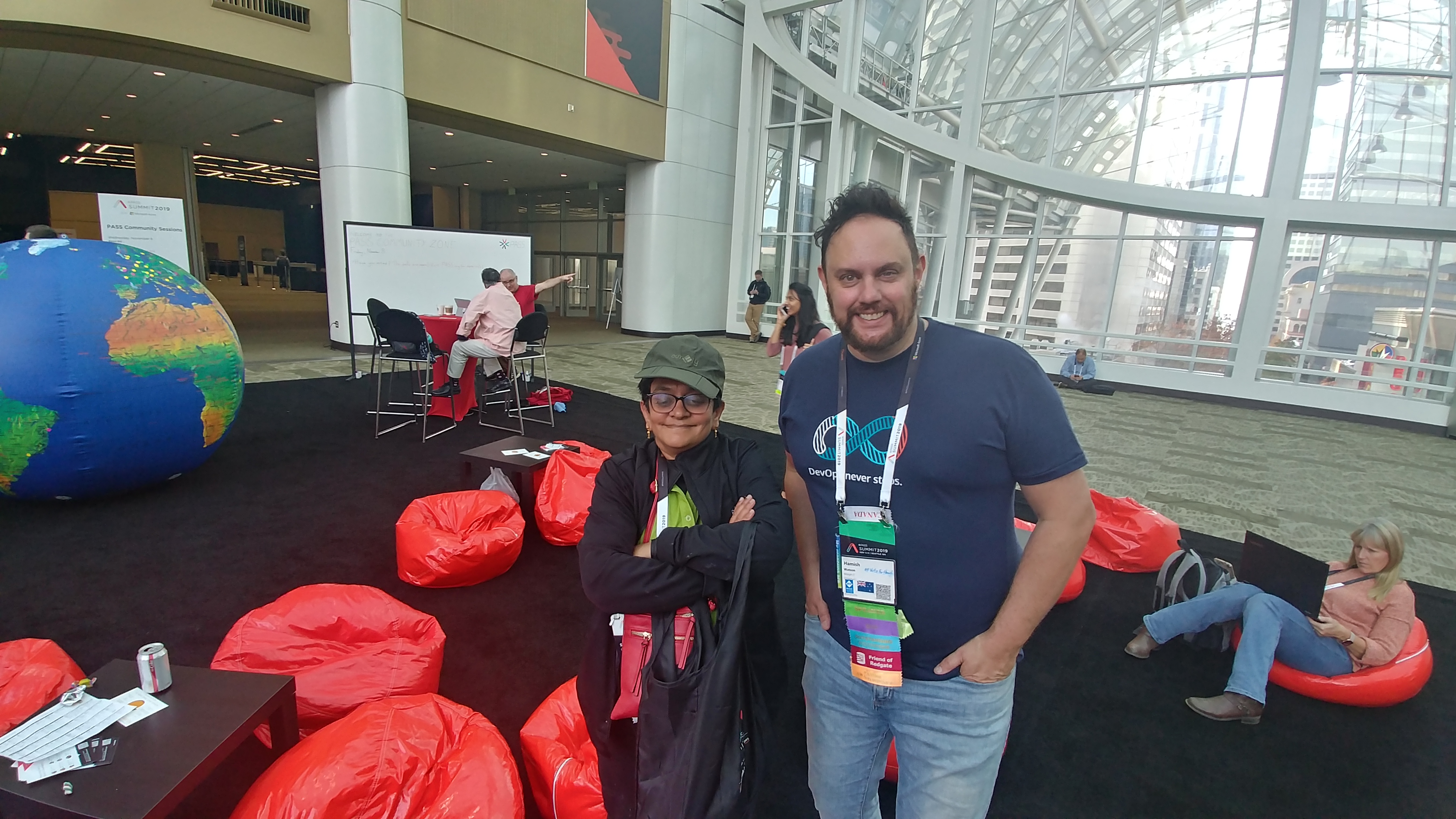
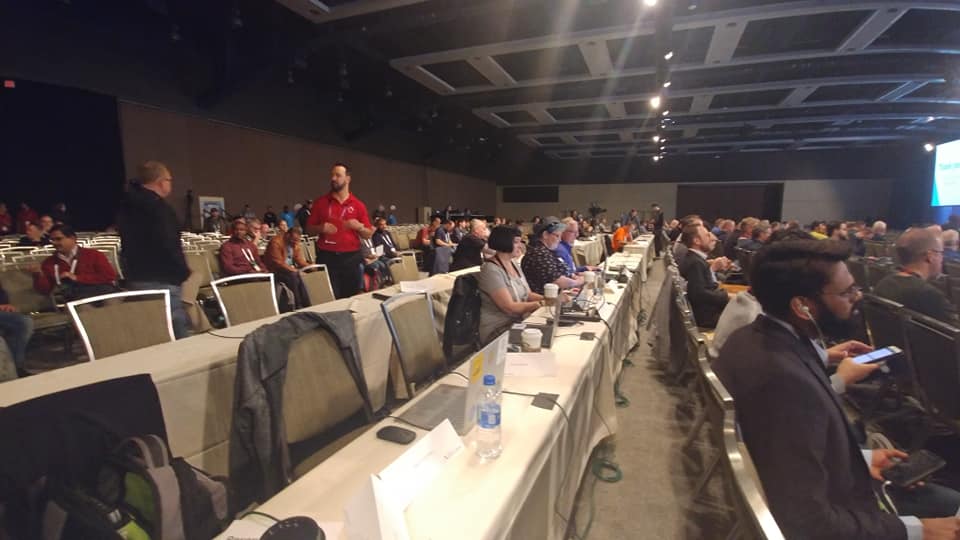
That is it for this year. Below are some pictures from my experience. Look forward to Summit 2020 at Houston, Texas. Thank you to everyone who made this year’s event valuable and worth attending.
I’ve been at the bloggers table for two years now. I felt honored to be selected this year too. The day has started a bit differently – bloggers were given an overview of what to expect from the board and staff of PASS. It was a very different and great move, in my opinion. It is 8 10 AM now on 6th of November 2019. We are waiting to get started.
Grant kicked off the keynote talking of how different summit is this year and how to take advantage of networking opportunities, of which I could say volumes.
I live-tweet more than live-blog as it has a better reach and many people can read it. But to summarize – a lot of yesterday was on cool features of 2019, including CosmosDB. Big Data Clusters, SQL for iOT(‘Edge’), Accelerated Database Recovery, Intelligent Query Performance and so on. We got to know some cool numbers like over 50 million databases are currently on Azure, and that we can support around 30 replicas as AG secondaries. (Just because you can…). We also learned some interesting terms like Synapse Analytics – which is the third generation Azure DataWarehouse, and Azure Arc – which is the new deployment process for Azure. Aside from all the cool tech, I was hugely impressed by the attempts at diversity – several women of color presented and demoed stuff to us. In my 16 years of summit I have not seen this many key women (usually you had one or two who were sidekicks to the lead male presenter). Consider following some of these amazing women – Shreya Verma Kale, Anna Thompson and Sri Chintala. Well done on diversity, Microsoft.
Look forward to the second day’s keynote. Follow me here for real time updates.
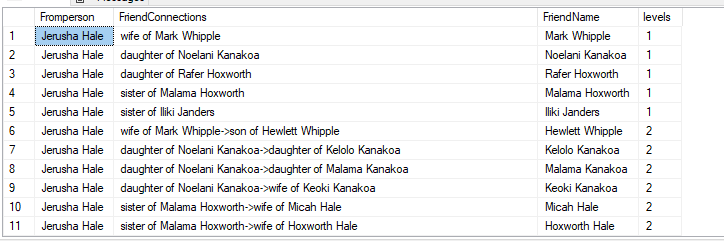
In the previous post I explored a query on how to construct a basic family tree with sql graph – including table set up and queries. In this post am going to explain how to query this to get relationships and some clues on DNA/ethnic mix. 1 Relationships: We can use the ‘shortest path’ clause to find how people are related in this database. So, if I want all the people a character named Jerusha Hale is related to – I can say this –
SELECT fromperson.name as Fromperson,STRING_AGG(f.remarks+' '+toPerson.Name, '->') WITHIN GROUP (GRAPH PATH) AS FriendConnections,
          LAST_VALUE(toPerson.Name) WITHIN GROUP (GRAPH PATH) AS FriendName,
          COUNT(toPerson.Name) WITHIN GROUP (GRAPH PATH) AS levels

FROM
          PersonNode AS fromPerson,
          PersonRelatedTo FOR PATH AS f,
          PersonNode FOR PATH AS toPerson
WHERE

		 MATCH(SHORTEST_PATH((toPerson<-(f)-)+fromPerson))
		 AND fromPerson.Name = 'Jerusha Hale'
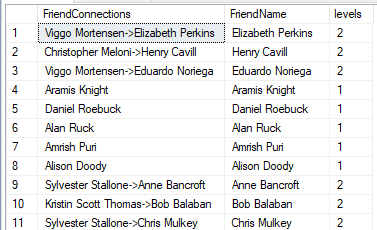
This is perfectly cool – it tells us who is she is married to, who her parents are, who her grandparents are, cousins are and so on. There are a few things to watch for though, here –
1 I chose not to store derived relationships like grandparents, cousins etc, because that is too much work. So what is pulled has some roundabout derived relationships like row 8, Malama Kanakoa is her grandmother but is being referred to in two steps, she is the daughter of her mother who is the daughter of her grandmother. In a real geneological database, these relationships may be defined more clearly/straightforward ways. 2 If you choose to store derived relationships, it might also be a good idea to store some kind of criteria to it that indicate if the person is immediate family or extended family or something similar. SQL Server will not know that a spouse is a closer relationship than a cousin, for example. And there may be many situations where this priority is important to distinguish. 3 Shortest path only pulls one relationship between two people(or ‘nodes’). For example, Jerusha could be someone’s sister and her sister could be married to her husband’s brother, say, then you will only get one relationship show up here. We have no control over what SQL Server chooses to show. This is a disadvantage and something to be aware of.
2 How to calculate ethnicity percentage, knowing the family tree?
Quite a lot of us think of ethnicity percentage as a 50-50 or an even match between parents somewhat. This is actually very erroneous. We can’t exactly tell how much of our ancestor’s DNA we receive, and the mileage may vary depending on many factors. There is a reason why Geneology is a business and a science in of itself. It is very complex and difficult to understand inherited patterns across many years. That said, 50% may be considered an average from each parent for mundane understanding. So the farther we go, the lower this percentage gets across multiple grandparents. This is a useful table as below:
Level
# from Me
100%
DNA per parent
1
2
Parents
50%
2
4
Grandparents
25%
3
8
Great-grandparents
12.50%
4
16
Great-great-grandparents
6.25%
5
32
Great-great-great-grandparents
3.12%
6
64
Great-great-great-great-grandparents
1.56%
7
128
Great-great-great-great-great-grandparents
0.78%
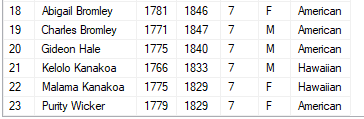
It needs a very detailed family tree to have all this information on every ancestor, even going back 5 levels. But given what is available – in this test data set for example – a character named Bromley Hale has some ancestors 7 levels away. I used below query to arrive at this.
DECLARE @Familydaughter TABLE(ID int, daughterID int)
DECLARE @Familyson TABLE(ID int, sonID int)
DECLARE @personid INT, @personsonid INT
SELECT @personid = personid FROM dbo.personnode WHERE name = 'Bromley Hale II'
INSERT INTO @Familydaughter
(id,daughterid)
select p1.personid,p.personid
FROM dbo.personnode p, dbo.personrelatedto r, dbo.personnode p1
where match(p-(r)->p1) and (r.remarks = 'daughter of')

INSERT INTO @Familyson
(id,sonid)
select p1.personid,p.personid
FROM dbo.personnode p, dbo.personrelatedto r, dbo.personnode p1
where match(p-(r)->p1) and (r.remarks = 'son of')

;WITH FamilyCTE
AS
(
SELECT
@personid as ID,
1 AS Level,
null as sonid,
null as daughterid
UNION ALL
SELECT
m.ID,
Level+1,
null,
m.daughterid
FROM @Familydaughter AS M
INNER JOIN FamilyCTE c ON m.daughterID = c.ID
UNION ALL
SELECT
f.ID,
Level+1,
f.sonid,
null
FROM @Familyson AS f
INNER JOIN FamilyCTE c ON f.sonID = c.ID
)

SELECT distinct p.name,p.born,p.died, q.level, p.sex,p.origin
FROM familyCTE Q
INNER JOIN dbo.personnode p ON q.id = p.personid
LEFT JOIN dbo.personnode M ON q.daughterid = m.personid
LEFT JOIN dbo.personnode F ON q.sonid = f.personid
order by q.level,p.name ;
Two of his ancestors 7 levels away seem hawaiian/native, so he may be perhaps, 1.56% Hawaiian, or has a wee bit of hawaiian blood and the rest of him is probably American or significantly unknown. The more data we have the easier it will be to calculate this, although this is only mundane approximation and not by any means an accurate measure of DNA from ancestors.
SQL Graph offers some tools to play with this kind of data and perhaps arrive at some interesting conclusions for our personal database. Thanks for reading.
I have been working a lot of SQL Graph related queries and applications of the graph data concept to the extent possible within SQL Server’s graph capabilities. Genealogy, or querying family trees is an important graph data application. A lot of us may not have work related applications that are genealogy related, necessarily. But conceptually, this can apply to many similar tree/hierarchy type structures. I was looking into some data to play with in this regard. Sometime ago – we were discussing novels by famed novelist James Michener. My friend Buck Woody made a tweet-remark that it would need a graph database to keep track of the characters and relationships in some of Michener’s novels. I am a big fan of Michener’s novels, and the most recent one I have read is ‘Hawaii’. It is based on history and evolution of the Hawaiian islands, and has a rather complex network of characters, with many ethnicities and several interwoven relationships. I decided to use the characters in Hawaii as my test data to understand how to query geneological data, stored in graph database format. The novel spans a huge historic period, from 724 AD into around 1937. It has primarily people from 4 ethnic groups: Caucasian North Americans, Japanese, Chinese and Native Hawaiian. Out of these, the Japanese remain their own group, largely. The other ethnic groups intermarry, a lot. There is polygamy, polyandry and all kinds of weird relationships from that time. To keep things simpler, I came up with what I would like to query on from such a database , if it existed:
1 What is the family tree starting from Person A? 2 What is the mix of ethnicity this person has? 3 How are person A and person B connected, or if they are connected? 4 Who is the oldest traceable ancestor of person A ? 5 How many first/second/third cousins does this person have?
Graph data is designed strongly based on what kind of querying you want to do. If we look at these questions, my queries are based on people, and their relationships. So I need a people table, which is my ‘node’ table, and I need a relationship table, which is my ‘edge’ table.
If you were to design it in the relational world , you would need some kind of hierarchy to indicate the level the person is. You would need multiple tables for relationships such as children, partners, parents and so on. And then you’d have to write a bunch of join based queries and use recursive CTEs to get the results we want.
Now, SQL server not being a full fledged graph implementation – would still mandate the use of recursion to get our results. But, the way we store data and our queries can be a lot simpler in graph model.
I just have one table, which I call a PersonNode. In this I store all details regarding the individual – name, sex, ethnicity(blended if person is product of an interracial partnership). Next, I have a second table, which I call PersonRelatedTo. It has a from_id and a to_id from the PersonNode table. And it has a remark that tells us how these two people are related.
CREATE TABLE [dbo].[PersonNode](

    [Name] varchar NULL,

    [Sex] char NULL,

    [Born] [smallint] NULL,

    [Died] [smallint] NULL,

    [Origin] varchar NULL,

    [Remarks] varchar NULL,

    [PersonId] [int] IDENTITY(1,1) NOT NULL

)

AS NODE ON [PRIMARY] TEXTIMAGE_ON [PRIMARY]
GO
CREATE TABLE [dbo].[PersonRelatedTo](
     [remarks] varchar NULL
 )
 AS EDGE ON [PRIMARY] TEXTIMAGE_ON [PRIMARY]
 GO
I insert into these tables the characters from Hawaii and how they are related. I kept the relationships down to ‘father of’, ‘mother of’,’husband of’,’wife of’ to begin with. Other relationships can be derived from here. We can choose to store them, to make our querying easier, or not. The novel has many partnerships that are not technically husband/wife, but I kept the dataset simpler and made it this way.
While querying this structure for constructing a family tree, I ran into following limitations: 1 A lot of characters have just one parent defined. The graph match query mandates an equi join on either side so pulling both parents in a single query when one may not exist is not possible with this clause.
2 The mother’s side and father’s side each can have its own branch since many characters partnered many times with multiple people. This meant querying each side separately and joining the results.
3 Some people are just listed as ancestors, not parents. There are links lost in the chain – these people have to be added in as a parent depending on gender.
4 No left joins are allowed in CTEs either.
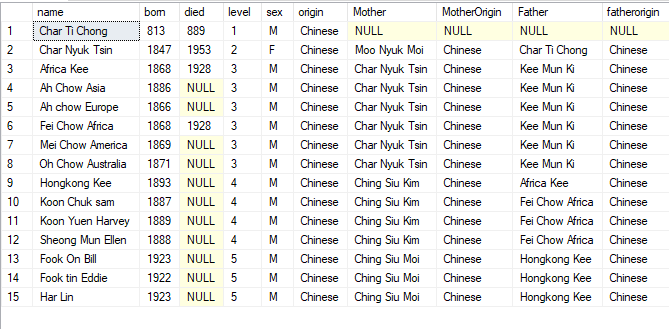
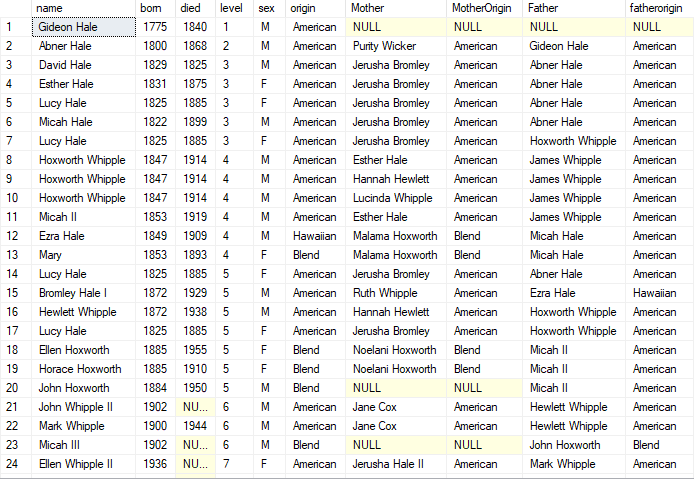
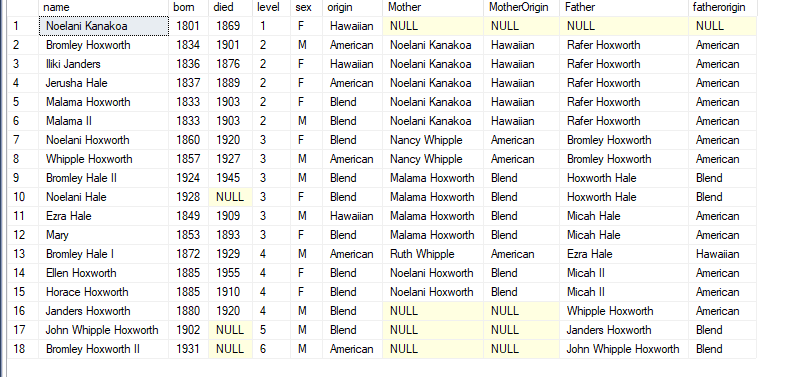
My query ended up rather clunky/not-very-graceful because of these limitations, but it works. I am still working on making it more elegant. With the help of below query, I was able to pull 4 main trees that go into core family structure of the novel. In the next post we can look at how to query the tree further – to find cousins, ethnic mix and various. My results with this query, on the chinese, american and native families that form core of Hawaii novel, are below.
CREATE   PROCEDURE [dbo].[usp_getfamilytree]
  @personname varchar(200)
 AS
 DECLARE @FamilyMother TABLE(ID int, MotherID int,MotherName varchar(200),origin varchar(100))
 DECLARE @FamilyFather TABLE(ID int, FatherID int,FatherName varchar(200),origin varchar(100))
 DECLARE @personid INT
 SELECT @personid = personid FROM dbo.personnode WHERE name = @personname
 INSERT INTO @FamilyMother
 (id,motherid,mothername,origin)
 select p1.personid,p.personid,p.name,p.origin
 FROM dbo.personnode p, dbo.personrelatedto r, dbo.personnode p1
 where match(p-(r)->p1) and (r.remarks = 'mother of' OR (r.remarks = 'ancestor of' and p.sex = 'F'))
 INSERT INTO @FamilyFather
 (id,fatherid,fathername,origin)
 select p1.personid,p.personid,p.name,p.origin
 FROM dbo.personnode p, dbo.personrelatedto r, dbo.personnode p1
 where match(p-(r)->p1) and (r.remarks = 'father of'  OR (r.remarks = 'ancestor of' and p.sex = 'M'))
 ;WITH FamilyCTE
 AS
 (
     SELECT
       @personid as ID,
       1 AS Level,
       null as fatherid,
       null as motherid
       UNION ALL
     SELECT
       m.ID,
       Level+1,
       null,
       m.Motherid
       FROM @FamilyMother AS M
   INNER JOIN FamilyCTE c ON m.motherID = c.ID
     UNION ALL
     SELECT
       f.ID,
       Level+1,
       f.fatherid,
       null
       FROM @Familyfather AS f
   INNER JOIN FamilyCTE c ON f.fatherID = c.ID
 )
 --select * from familycte
 SELECT distinct p.name,p.born,p.died, q.level, p.sex,p.origin,
 m.mothername as Mother, m.origin as MotherOrigin,
 f.fathername as Father,f.origin as fatherorigin
 FROM familyCTE Q
 INNER JOIN dbo.personnode p ON q.id = p.personid
 LEFT JOIN @familyfather f ON p.personid = f.id
 LEFT JOIN @familymother m ON p.personid = m.id
 order by q.level,f.fathername
 GO;WITH FamilyCTE

AS

(

    SELECT

      @personid as ID,

      1 AS Level,

      null as fatherid,

      null as motherid

      UNION ALL

    SELECT

      m.ID,

      Level+1,

      null,

      m.Motherid

      FROM @FamilyMother AS M

  INNER JOIN FamilyCTE c ON m.motherID = c.ID

    UNION ALL

    SELECT

      f.ID,

      Level+1,

      f.fatherid,

      null

      FROM @Familyfather AS f

  INNER JOIN FamilyCTE c ON f.fatherID = c.ID

)

--select * from familycte

SELECT distinct p.name,p.born,p.died, q.level, p.sex,p.origin,

m.mothername as Mother, m.origin as MotherOrigin,

f.fathername as Father,f.origin as fatherorigin

FROM familyCTE Q

INNER JOIN dbo.personnode p ON q.id = p.personid

LEFT JOIN @familyfather f ON p.personid = f.id

LEFT JOIN @familymother m ON p.personid = m.id

order by q.level,f.fathername

GO
To get the chinese branch – I go to the oldest chinese ancestor described, who has successors.
usp_getfamilytree ‘Char Ti Chong’
To get the american family (there are two but lets go with one). usp_getfamilytree ‘Gideon Hale’
To get the native family, usp_getfamilytree ‘Noelani Kanakoa’
This month’s T-SQL Tuesday is hosted by my friend across the pond – Alex Yates. Alex has a fantastic topic for us to blog about – he asks us to talk about why we changed our mind, on anything related to our careers. What was our original opinion, why we believed that, and what we believe now.
I have many things to relate in this regard. I decided to wite about two significant
decisions, one technical and the other non technical. I am including both in
the same blog post.
Technical point on which I’ve changed my mind: ORMs are evil. In most shops I have worked at – ORMs or Object Relational Mappers such as NHibernate and Entity Framework have been a DBA’s nightmare. They used to generate horrific queries and the inability to control what is generated when made it incredibly hard to work with. Over time, I’ve worked closely with developers and understood (well somewhat) their need to use such things. I’ve learned how to streamline ORM usage so that it doesn’t become the evil nightmare that it can. To do that – I try to do the following:
1 Keep calls down to basic CRUD operations. This is essentially all that ORMS were designed to do. The queries doing basic CRUD are parameterized, not that evil. 2 Avoid treating tables like objects and doing object-object mapping – relational tables are not objects. 3 Use stored procedures wherever possible or wherever ORM queries are nightmarish. The ORM can call the stored procedure.
With such basic rules in place, am able to manage ORM generated queries better. I don’t think I will ever love an ORM, but am down to thinking they are not as evil as we data people consider them to be.
Non technical point on which I’ve changed my mind: Career progress is a thing and is different from what makes me happy. I believed this for a long time – that there was something wrong with sticking to a job you like, or not getting big pay hikes, or that your next job should be ‘bigger’ with more responsibilities than your earlier one, and on and on. I defined career progress in terms of all these things, and thought I need a roadmap to live by that said – in 5 years – I am here, in 10 years am here, and so on , each level being with a different job title and of course, more money. After several job changes I have found out – there is no such thing. There are only jobs where you are happy, or not happy at. And happiness may very well include money, and job titles , for some. For me, it is mostly about quality of work, and working with smart people. I do need money, we all do –as long as the job pays me decent money, gives me quality work to do, and a good team to do it with – there is not much else to go after. Life is short, being happy at what we are doing matters. Most of us spend atleast 8 hours a day at work, if not more. It is important to be happy there, doing what we enjoy doing and liking atleast some of the people we work with. Success is really nothing more than that. To me. I don’t complicate my mind trying to figure it out any further.
Those are the two things I’ve changed my mind on. Thanks
Alex, for the great topic. I look forward to reading what other people in
community have to say on this.
‘Shortest path’ is by far the most feature of SQL Graph for
now. What does this even mean?
‘Shortest path’ is the term accorded to the shortest
distance between any two points, referred to as nodes in graph databases. The
algorithm that helps you find the shortest distance between node A and node B
is called the Shortest Path Algorithm.
Let us go back to the movie database. We have two people,
say Amrish Puri and Harrison Ford. Amrish wants to meet Harrison Ford. He has
not acted with Ford, he may have a few connections in common – or people who
know him. Or people who know him who know him. This is one way to get an
introduction. Or, let us say you are interviewing for a job. You want to see if
someone in your network works at that place – so that you can get an idea of
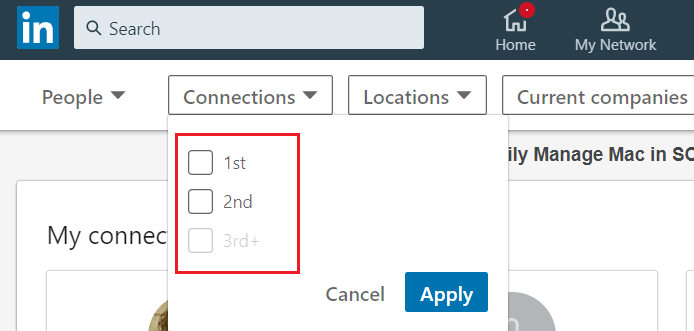
what the job or the company is like. So you go on linkedin – do a search for the
company, look under ‘people’, and it tells you if anyone in your network is
there, or someone is 2 levels away, or 3. Those numbers are what we get from
the shortest path feature.
Aside from social media examples, what are the specific uses
for this feature? Below are a few ways you can put this to use –
1 Find the path to person you want access to from a large
organizational chart
2 Find connections between specific tables in an ERDiagram (yes that is graph
data too)
3 Find connection between two resources in a data center graph model
4 Find which store is closest to customer or various applications related to
geography
You can even make a graph data model of characters in a complex novel and
explore relationships that way.
And so on.
In this I will illustrate the examples of shortest path with
the movie db:
Below illustrates connections
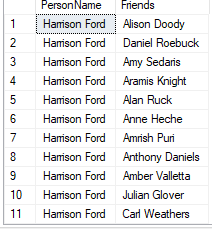
from Harrison Ford to all other actors in the database
SELECT STRING_AGG(toActor.PersonName, '->') WITHIN GROUP (GRAPH PATH) AS FriendConnections,
LAST_VALUE(toActor.PersonName) WITHIN GROUP (GRAPH PATH) AS FriendName,
COUNT(toActor.PersonName) WITHIN GROUP (GRAPH PATH) AS levels
FROM
PersonNode AS fromActor,
CoActorLink FOR PATH AS f,
PersonNode FOR PATH AS toActor
WHERE
MATCH(SHORTEST_PATH((toActor<-(f)-)+fromActor))
AND fromActor.PersonName = 'Harrison Ford'
The results show us how many levels away the person is as
well, and who are the people on the path if they are more than one level away.
We can filter this of course to find only people who are
only one hop away, or two levels away.
SELECT PersonName, Friends
FROM (
SELECT
Person1.Personname AS PersonName,
STRING_AGG(Person2.Personname, '->') WITHIN GROUP (GRAPH PATH) AS Friends,
COUNT(Person2.Personname) WITHIN GROUP (GRAPH PATH) AS levels
FROM
PersonNode AS Person1,
CoActorLink FOR PATH AS fo,
PersonNode FOR PATH AS Person2
WHERE MATCH(SHORTEST_PATH(Person1(-(fo)->Person2){1,3}))
AND Person1.Personname = 'Harrison Ford'
) Q
WHERE Q.levels = 1
If we want connections between two specific people, we can do
it as below.
SELECT PersonName, Friends, levels
FROM (
SELECT
Person1.Personname AS PersonName,
STRING_AGG(Person2.Personname, ‘->’) WITHIN GROUP (GRAPH PATH) AS Friends,
LAST_VALUE(Person2.Personname) WITHIN GROUP (GRAPH PATH) AS LastNode,
COUNT(Person2.Personname) WITHIN GROUP (GRAPH PATH) AS levels
FROM
PersonNode AS Person1,
CoActorLink FOR PATH AS fo,
PersonNode FOR PATH AS Person2
WHERE MATCH(SHORTEST_PATH(Person1(-(fo)->Person2)+))
AND Person1.Personname = ‘Harrison Ford’
) AS Q
WHERE Q.LastNode = ‘Tom Cruise’
In following posts I will explore more specific, every day
examples of this.
In this post we saw how to create some graph tables with data. In this I will explore simple queries off of this data and how they compare with their relational counterparts.
The main goal behind a graph design is to help you answer queries – so what are the questions you’d ask of a movie database, if you had one? Mine would typically be like below.
1 Who are the actors in this movie? 2 Who is this movie directed by? 3 Who is the most prolific actor, according this dataset? 4 How many actors are also directors? ..and so on. Lets answer these one by one, and see how they compare relationally. So if i were to answer the first question the typical relational way – my query would be as below:
SELECT c.actor_name from movies a, moviesactor b, actor c

WHERE a.MovieId = b.movieid AND b.actorid = c.ActorID

AND a.Movie_Title = 'Jurassic Park'
This is a very simple two table join – if we were to do the same with newly created graph tables – the query would look like below.
SELECT p.personname FROM dbo.personnode p, movienode m,moviesactorlink a

where MATCH(m-(a)->p) AND m.movietitle = 'Jurassic Park'
The queries for other questions, with their relational counterparts, are as below.
--Most prolific actor

SELECT TOP 10 c.actor_name,COUNT(1) AS moviesactedin from movies a, moviesactor b, actor c

WHERE a.MovieId = b.movieid AND b.actorid = c.ActorID GROUP BY c.actor_name ORDER BY moviesactedin desc
SELECT TOP 10 p.personname,count(1) AS moviesactedin FROM dbo.personnode p, movienode m,moviesactorlink a

where MATCH(m-(a)->p) GROUP BY p.personname ORDER BY moviesactedin desc
--2 Actors who are directors

SELECT c.actor_name,a.Movie_Title from movies a

INNER JOIN moviesactor b

ON a.MovieId = b.movieid

INNER JOIN actor c

ON b.actorid = c.ActorID

INNER JOIN MoviesDirector d

ON a.MovieId = d.movieid

INNER JOIN director e ON

d.directorid = e.directorid

AND e.director_name = c.actor_name
SELECT p1.personname, m.movietitle FROM personnode p1, movienode m, moviesactorlink a,moviesdirectorlink d

WHERE MATCH(m-(d)->p1 AND m-(a)->p1)
The advantages are 1 Fewer number of tables 2 Easy to write as opposed to a lot of joins.
The node table usually has a seek operator on it, but edge tables are scanned since it is not possible (currently) to create an index on edge id. I will explore the most useful part of this feature – shortest path, in the next post. Thanks for reading!
In the previous post on this we saw what is a basic graph data structure, and the layout of an example – a movie database with it. In this I am going to explain how to convert that design into graph tables.
The SQL Server graph architecture is explained really well here. I already have some relational tables with data for this model.
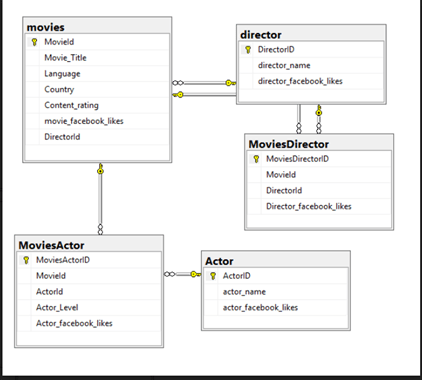
My relational model looks like below.
Why is this a good example to convert into a graph data model? There are atleast two many to many relationships – moviesactor and moviesdirector. And if you consider making a table of who acted with whom – coactors, that would make it 3. Many to many relationships/bridge tables are a key indicator of what makes a good candidate for graph data. So we are past Step 1, identifying if the data is a good candidate. The next step is to list the questions we want this new model to answer. Mine may be as below:
1 Who are the actors in this movie? 2 Who is this movie directed by? 3 Who is the most prolific actor, according this dataset? 4 How many actors are also directors? 5 What is the shortest path/number of connections Person A needs to reach Person B? (A person may be an actor or a director).
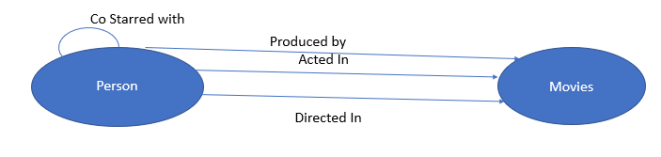
..and so on. If we look at the nouns here – actors/directors – those make up a node. Movie, is another node. We can choose to make actors and directors separate nodes, or put them into one node, called person node. The only criteria here is how much that one table is going to get hit query wise. In this case, since it is a small dataset with minimal querying, I choose to go with one node, called Person Node. The edges are the verbs – acted, directed and co starred. So each of them make up an edge table. My data model looks like below.
USE  MovieData_Demo;
 go
DROP TABLE IF EXISTS PersonNode;
   GO
   CREATE TABLE PersonNode (
     PersonID INT IDENTITY(1,1) NOT NULL    PRIMARY KEY,
     PersonName varchar(500)  ) AS NODE;
Now I get a node table..i’d like to see what the node table looks like.
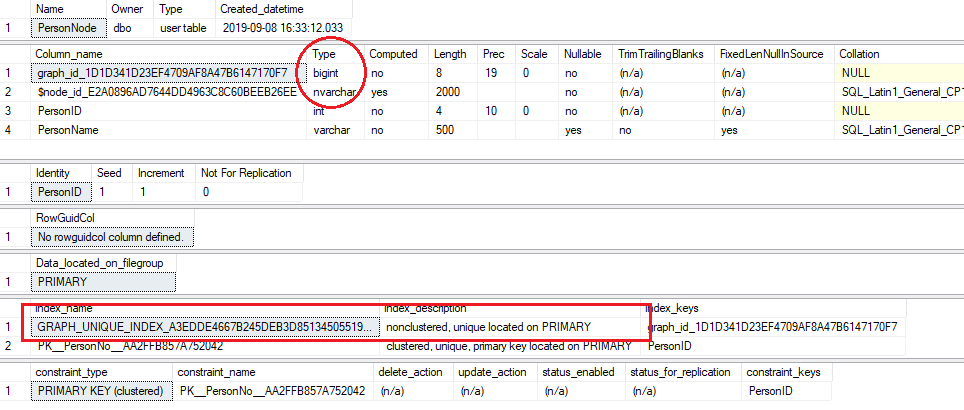
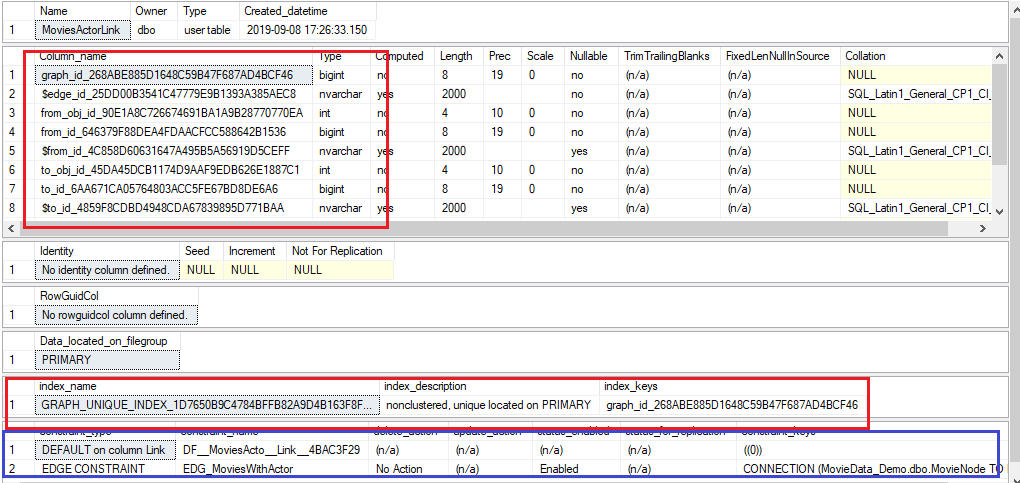
sp_help 'PersonNode'
I have highlighted in red what SQL Server adds to the table – the two system columns – graph id, which is bigint, and node id, which is nvarchar and stores json, and the unique index to help with queries. We can also see from constraint type that this table is similar to other relational tables – it can be enabled for replication and can have related delete or update actions defined on it if need be.
We can now insert data into this table from relational tables as below.
INSERT INTO PersonNode (PersonName)
 SELECT actor_name FROM MovieData.dbo.Actor
 UNION
 SELECT director_name FROM MovieData.dbo.Director
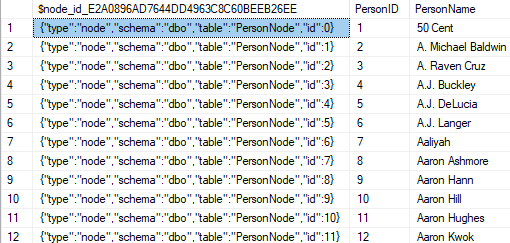
Selecting data from the table gives us below. It is interesting and informative to see how node id is stored as JSON.
SELECT * FROM PersonNode
We can create the movie node similarly, as below.
DROP TABLE IF EXISTS MovieNode;
 GO
 CREATE TABLE MovieNode (
     MovieID INT PRIMARY KEY,
     MovieTitle varchar(500) NOT NULL,
     MovieLanguage varchar(500) NULL,
     MovieCountry varchar(500) NULL,
     MovieFacebookLikes INT NULL
   ) AS NODE;
INSERT INTO MovieNode (movieid,movietitle,movielanguage,moviecountry,moviefacebooklikes)

SELECT [MovieId],[Movie_Title],[Language],[Country],movie_facebook_likes FROM MovieData.[dbo].[movies]
Now that we have the two basic nodes, lets try and create the edges or connections between them.
DROP TABLE IF EXISTS MoviesActorLink;

  GO

  CREATE TABLE MoviesActorLink (

    Link BIT NOT NULL DEFAULT 0,

    MovieActorLevel smallint NULL,

    MovieActorFacebooklikes DECIMAL NULL,

    CONSTRAINT EDG_MoviesWithActor CONNECTION (MovieNode TO PersonNode)

  ) AS EDGE;
Let us explore what an edge table looks like under the covers.
sp_help 'MoviesActorLink'
As highlighted in the red square on top, there are a whole bunch of system columns added for an edge table – the first two, graph id and edge id are unique identifying columns while the rest are for the nodes we plan to connect using this edge. There is also a default index added on graph id.
I chose to add a constraint on two nodes i plan to connect – movie node and person node. In case anyone wants to delete data from either of the node tables – there should not be an orphaned record in the edge table that points to the deleted node. This constraint can come in very useful.
Now I am ready to insert data into the edge table from relational table. I do this as below.
INSERT INTO MoviesActorLink ($from_id, $to_id,movieactorlevel,movieactorfacebooklikes)

 SELECT a.$node_id, p.$node_id,c.actor_level,c.actor_facebook_likes FROM dbo.MovieNode a

 INNER JOIN MovieData.dbo.MoviesActor c ON a.movieid = c.movieid

 INNER JOIN MovieData.dbo.Actor b ON c.actorid = b.actorid

 INNER JOIN dbo.PersonNode p ON b.actor_name = p.personname
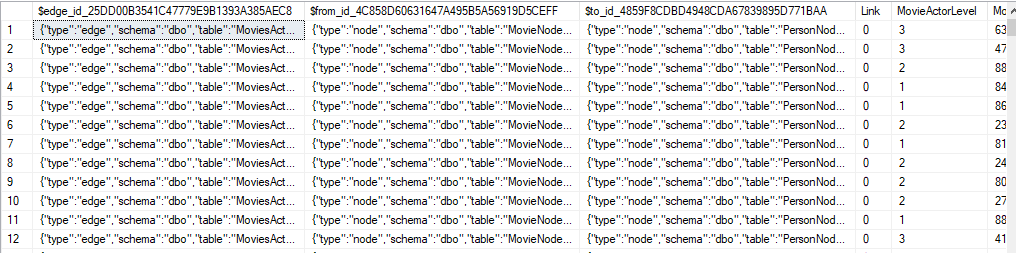
The data in my the newly created edge table can look as below.
SELECT * FROM dbo.MoviesActorLink
As we can see the node and edge ids are all json based pointing to existing nodes. In the next post I will explore running simple queries off of this data. Thanks for reading.

 This month’s T-SQL Tuesday is hosted by Jon Shaulis – the

 Curious..about data