SQL Saturdays – down memory lane

A casual twitter-conversation with Karla Landrum and some other peeps led me down memory lane on older events. Our SQL Saturday at Louisville will be 9 years old this year. We were event #23, in 2009. SQL Saturdays started two years before, in 2007.

Our first event was held at a training center – 2 tracks, 6 speakers, 29 sessions submitted, 3 sponsors and about 60 attendees. We outgrew that location the very next year. Our present event has 6 tracks, close to 300 attendees, 109 sessions submitted so far.

The 22 events before us were as below:
1 Orlando, FL
2 Tampa, FL
3 Jacksonville, FL
4 Orlando, FL
5 Olympia, WA
6 Cleveland, OH (did not actually happen).
7 Birmingham, AL
8 Orlando, FL
9 Greenville, SC
10 Tampa, FL
11 Tacoma, WA
12 Portland, OR
13 Alpharetta, GA
14 Pensacola, FL
15 Jacksonville, FL
16 South Florida
17 Baton Rouge, LA
18 Orlando, FL
19 East Iowa, IA
20 Jacksonville, FL
21 Orlando, FL
22 Pensacola, FL

A lot of the Florida events are past their 10 year anniversary. Many others will be having one this year or next year. This means 10+years of free training to many, networking opportunities, small businesses that have profited by providing services and vendors who have <hopefully> found more customers. If you attend any of these events make sure to thank the organizers – an event is a LOT of work to organize and doing it for 10+ years is no mean achievement – it takes considerable motivation and hard work. Some of my personal choices of memories around 9 years of running this include –

1 I did not have breakfast/coffee delivered once. This is probably the biggest thing I remember that went wrong during my decade of running the event. The food vendor had an employee who was new to town and made his delivery somewhere else (pre GPS days). I still recall that frantic morning with upset speakers and repeat calls to the food vendor.

2 One of the free locations we hosted our event in once threatened to cancel on us on the Friday before. The reason given was that there was ‘an inch of snow’ on the ground and they did not want to risk anybody’s safety. I was on my way to speaker dinner, and had to turn around to talk to them and convince them otherwise. One inch of snow is a big deal for some people. My team and the only volunteer we have left from those days – Deana, has stories on planting signs on the road on a frozen morning. Needless to say, we never had an event in winter ever again.

3 We had 8 tracks at one event. There was a new speaker who was doing her first talk and had nobody show up at her class. She was in tears. We never overdo how many tracks we have after that.

4 Among my other favorite (smaller) memories of the decade include –
1 A lady DBA who was also a new mom attended the WIT session we had with Kevin Kline and Karen Lopez. She was close to quitting her job and decided to stick on after she heard them.
2 One of my events happened to fall on my birthday. Some of the attendees got a big cake and I had a ‘happy birthday’ sung to me by hundreds of people.
3 Wendy Pastrick, one of the PASS board members appreciated our event as among the best organized smaller events.
4 Tim Ford convinced me to attend SQL Cruise during my of events. I’ve attended a cruise every year since then.
5 Hearing attendees talk about ‘do you remember 5 years ago…we came here..’ – never tire of that, ever.

Thank you to all the organizers of the events above for your dedication and hard work..and hope to keep this going as long as we can!! If you are an organizer of any of the above events – do write more on your favorite memories!!

Thanks for reading.


The Birthday Problem – with T-SQL and R

When I was on SQLCruise recently – Buck Woody (b|t) made a interesting statement – that in a room of 23 people, there is over a 50% chance that  two or more have the same birthdays. And sure enough, we did end up having more than two people with same birthday. I was tempted to play with this rather famous problem (there is a great introductory wiki post on it here)  using statistics for a while, and got around to it this weekend. Let us test the hypothesis first.

Given a room of 23 random people, what are chances that two or more of them have the same birthday? 

This problem is a little different from the earlier ones, where we actually knew what the probability in each situation was.

What are chances that two people do NOT share the same birthday? Let us exclude leap years for now..chances that two people do not share the same birthday is 364/365, since one person’s birthday is already a given. In a group of 23 people, there are 253 possible pairs (23*22)/2. So the chances of no two people sharing a birthday is 364/365 multiplied 253 times. The chances of two people sharing a birthday, then, per basics of probability, is 1 – this. Doing the math then – first with T-SQL –

DECLARE @x INTEGER, @NUMBEROFPAIRS INTEGER, @probability_notapair numeric(18, 4), @probability_pair numeric(18, 4)
DECLARE @daysinyear numeric(18,4), @daysinyearminus1 numeric(18, 4)
SELECT @x = 23
SELECT @numberofpairs = (@x*(@x-1)/2)
SELECT @daysinyear = 365
SELECT @daysinyearminus1 = @daysinyear - 1

SELECT @probability_notapair = (@daysinyearminus1/@daysinyear)

SELECT 'Probability of a pair having birthdays' ,1-power(@probability_notapair, @NUMBEROFPAIRS)

birthday

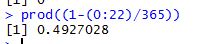
In R this is very easily calculated using the line

prod(1-(0:22)/365)

To be aware that prod is just a function that multiplies what it is supplied, it is not a special statistical function of any kind. In this case since the math is really easy, that is all we need to calculate the result.

bday

As we can see it is pretty close to what we got with T-SQL.

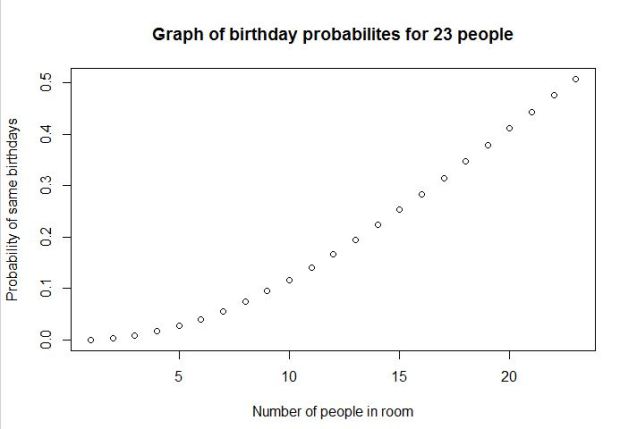
We can play around with R a little bit and get a nice graph illustrating the same thing.

positiveprob <- numeric(23) #creatingvectortoholdvalues
#loop and fill values in vector
for (n in 1:23) {
 negativeprob <- 1 - (0:(n - 1))/365
 positiveprob[n] <- 1 - prod(negativeprob) }
#draw graph to show probability
plot(positiveprob, main = 'Graph of birthday probabilites for 23 people', xlab = 'Number of people in room', ylab = 'Probability of same birthdays')

bday3

As we can see the probability of two or more people sharing a birthday in a room of about 23 is near 50%. Pretty amazing.

There is a ton of very detailed posts on this rather famous problem, this is just a basic intro for those of you learning stats and R.
1 https://www.scientificamerican.com/article/bring-science-home-probability-birthday-paradox/

2 http://blog.revolutionanalytics.com/2012/06/simulating-the-birthday-problem-with-data-derived-probabilities.html

Thanks for reading!!

Normal approximation to binomial distribution using T-SQL and R

In the previous post I demonstrated the use of binomial formula to calculate probabilities of events occurring in certain situations. In this post am going to explore the same situation with a bigger sample set. Let us assume, for example, that instead of 7 smokers we had 100 smokers. We want to know what are the chances that a maximum of 35 of them have a serious lung disease. Going by the Binomial formula illustrated in the previous post that would mean a whole lot of calculations – calculating the probability of every situation less than 35 and then stick the values into the formula to derive an answer. That is a very laborious way to derive a result, even if we are using an automated process to do it.  An easier way to do it is to use the normal distribution, or central limit theorem. My post on the theorem illustrates that a sample will follow normal distribution if the sample size is large enough. We will use that as well as the rules around determining probabilities in a normal distribution, to arrive at the probability in this case.
Problem: I have a group of 100 friends who are smokers.  The probability of a random smoker having lung disease is 0.3. What are chances that a maximum of 35 people wind up with lung disease?

Step 1: How do I know my problem fits this particular statistical solution?
To determine whether n is large enough to use what statisticians call the normal approximation to the binomial, both of the following conditions must hold:

image0.png

In this case 100*0.3 = 30, which is way greater than 10. The second condition 100*0.7 is also 70 and way greater than 10. So we are good to proceed.

2 Statistically stated, we need to find P(x<=35)

3 The formula to use now is zee where ‘meu’ in the numerator is the mean and sigma, the denominator is the standard deviation. Let us use some tried and trusted t-sql to arrive at this value.

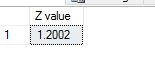
4 We use 35 as x, but we add 0.5 as suggested ‘corrective value’ to it. Running T-SQL to get z value as below:

DECLARE @X numeric(10,4), @p numeric(10, 4), @n numeric
(10, 4), @Z NUMERIC(10, 4)
DECLARE @MEAN NUMERIC(10, 4), @VARIANCE NUMERIC(10, 4), @SD NUMERIC(10, 4)
SELECT @X = 35.5
SELECT @P = 0.3
SELECT @N = 100
SELECT @MEAN = @N*@p
SELECT @VARIANCE = @N*@p*(1-@p)
SELECT @SD = SQRT(@VARIANCE)
SELECT @Z = (@X-@MEAN)/@SD
SELECT @Z as 'Z value'

zvalue

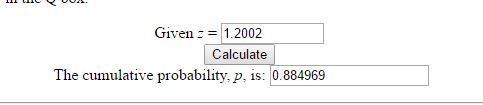
5 To calculate probability from Z value, we can use Z value tables. There are also plenty of online calculators available – I used this one.  I get probability to be 0.884969.

zvalue

6 The same calculation can be achieved with great ease in R by just saying

pbinom(35,size=100,prob=0.3)

The result I get is very close to above.

zvalue

You can get the same result by calling the R function from within TSQL as below

EXEC sp_execute_external_script
 @language = N'R'
 ,@script = N'x<-pbinom(35,size=100,prob=0.3);
 print(x);'
 ,@input_data_1 = N'SELECT 1;'

zee

In other words, there is a 88.39 percent chance that 35 out of 100 smokers end up with lung disease. Thank you for reading!


The Binomial Formula with T-SQL and R

In a previous post I explained the basics of probability. In this post I will use some of those principles to see how to solve certain problems. I will pick a very simple problem that I found in a statistics textbook. Suppose I have 7 friends who are smokers. The probability that a random smoker will develop a lung condition is 0.3. What is the probability that a maximum of 2 of them will develop a severe lung condition? To apply the binomial formula for this problem – I need the following conditions to be met:

1 The trials are independent
2 The number of trials, n is fixed.
3 Each trial outcome can be a success or a failure
4 The probability of success in each case is the same.

Applying these rules –
1 The 7 smoking friends are not related or from the same group. (This is important as one friend’s habits can influence another and that does not make for an independent trial).
2 They smoke approximately at the same rate.
3 Either they get a lung disease or they don’t. We are not considering other issues they may have because of smoking.
4 Since all these conditions are met, the probability of each of them getting a lung disease is more or less the same.

The binomial formula given that
x = total number of “successes” (pass or fail, heads or tails etc.)
P = probability of a success on an individual trial
n = number of trials
q= 1 – p – is as below:

prob

For those not math savvy the ! stands for factorial of a number. In above example n equals 7. x, The number of ‘successes’ (morbid, i know, to define a lung condition as a success but just an example) we are looking for is 2. p is given to be 0. and q is 1 – 0.3 which is 0.7.  Now, given the rules of probability – we need to add probability of 0 or none having a lung condition, 1 person having a lung condition and 2 having a lung condition – to see what is the probability of a maximum of 2 having a lung condition. Let us look at doing this with T-SQL first, then with R and then calling the R script from within T-SQL.

1 Using T-SQL:

There are a lot of different ways to write the simple code of calculating factorial. I found this one to be most handy and reused it. I created the user defined function as ‘factorial’ and used the same code below to calculate probabilities of 0.1 or 2 people getting a lung illness. If we add the 3 together we get the total probability of the maximum of 2 people getting a lung illness – which is about 0.65 or 65 %.

DECLARE @n decimal(10,2), @x decimal(10, 2), @p decimal(10, 2), @q decimal(10, 2)
DECLARE @p0 decimal(10, 2), @p1 decimal(10, 2), @p2 decimal(10, 2), @n1 decimal(10, 2), @n2 decimal(10, 2), @n3 decimal(10, 2)
SELECT @n = 7, @x = 0, @p = 0.3,@q=0.7
SELECT @x = 0
SELECT @n1 = dbo.factorial(@n) 
SELECT @n2 = dbo.factorial(@n-@x)
SELECT @n3 = 1

SELECT @p1 = ( @n1/(@n2 * @n3))*power(@p, @x)*power(@q,@n-@x)
select @p1 as 'Probability of 0 people getting lung illness'

SELECT @x = 1
SELECT @p1 = ( @n/@x)*power(@p, @x)*power(@q,@n-@x)
select @p1 as 'Probability of 1 person getting lung illness'

SELECT @x = 2
SELECT @n1 = dbo.factorial(@n) 
SELECT @n2 = dbo.factorial(@n-@x)
SELECT @n3 = dbo.factorial(@x)
SELECT @p2 = ( @n1/(@n2 * @n3))*power(@p, @x)*power(@q,@n-@x)
select @p2 as 'Probability of 2 people getting lung illness'


Results are as below:

prob1

2 Using R:

The R function for this is seriously simple, one line call as below.

dbinom(0:2, size=7, prob=0.3)

My results, almost exactly the same as what we got with T-SQL.

prob2

3 Calling R from T-SQL:

Instead of writing all that code i can simply call this function from with TSQL –

EXEC sp_execute_external_script
 @language = N'R'
 ,@script = N'x<-dbinom(0:2, size=7, prob=0.3);
 print(x);'
 ,@input_data_1 = N'SELECT 1;'

Results as below:

prob3

It is a LOT of fun to get our numbers to tie in more than one way. Thanks for reading.


Sampling Distribution and Central Limit Theorem

In this post am going to explain (in highly simplified terms) two very important statistical concepts – the sampling distribution and central limit  theorem.

The sampling distribution is the distribution of means collected from random samples taken from a population. So, for example, if i have a population of life expectancies around the globe. I draw five different samples from it. For each sample set I calculate the mean. The collection of those means would make up my sample distribution. Generally, the mean of the sample distribution will equal the mean of the population, and the standard deviation of the sample distribution will equal the standard deviation of the population.

The central limit theorem states that the sampling distribution of the mean of any independent,random variable will be normal or nearly normal, if the sample size is large enough. How large is “large enough”? The answer depends on two factors.

  • Requirements for accuracy. The more closely the sampling distribution needs to resemble a normal distribution, the more sample points will be required.
  • The shape of the underlying population. The more closely the original population resembles a normal distribution, the fewer sample points will be required. (from stattrek.com).

The main use of the sampling distribution is to verify the accuracy of many statistics and population they were based upon.

Let me try demonstrating this with an example in TSQL. I am going to use [Production].[WorkOrder] table from Adventureworks2016. To begin with, am going to test if this data is actually a normal distribution in of itself. I use the Empirical rule test I have described here for this.  Running the code for the test, I get values that tell me that this data is very skewed and hence not a normal distribution.

DECLARE @sdev numeric(18,2), @mean numeric(18, 2), @sigma1 numeric(18, 2), @sigma2 numeric(18, 2), @sigma3 numeric(18, 2)
DECLARE @totalcount numeric(18, 2)
SELECT @sdev = SQRT(var(orderqty)) FROM [Production].[WorkOrder]
SELECT @mean = sum(orderqty)/count(*) FROM [Production].[WorkOrder]
SELECT @totalcount = count(*) FROM [Production].[WorkOrder] where orderqty > 0

SELECT @sigma1 = (count(*)/@totalcount)*100 FROM [Production].[WorkOrder] WHERE orderqty >= @mean-@sdev and orderqty<= @mean+@sdev
SELECT @sigma2 = (count(*)/@totalcount)*100 FROM [Production].[WorkOrder] WHERE orderqty >= @mean-(2*@sdev) and orderqty<= @mean+(2*@sdev)
SELECT @sigma3 = (count(*)/@totalcount)*100 FROM [Production].[WorkOrder] WHERE orderqty >= @mean-(3*@sdev) and orderqty<= @mean+(3*@sdev)

SELECT @sigma1 AS 'Percentage in one SD FROM mean', @sigma2 AS 'Percentage in two SD FROM mean', @sigma3 as 'Percentage in 3 SD FROM mean

In order for the data to be a normal distribution – the following conditions have to be met –

68% of data falls within the first standard deviation from the mean.
95% fall within two standard deviations.
99.7% fall within three standard deviations.

The results we get from above query suggest to us that the raw data does not quite align with these rules and hence is not a normal distribution.

pic1

Now, let us create a sampling distribution from this. To do this we need to pull a few random samples of the data. I used the query suggested here to pull random samples from tables. I pull 30 samples in all and put them into tables.

 SELECT * INTO [Production].[WorkOrderSample20]
 FROM [Production].[WorkOrder]
 WHERE (ABS(CAST((BINARY_CHECKSUM(*) * RAND()) as int)) % 100) < 20

I run this query 30 times and change the name of the table the results go into, so am now left with 30 tables with random samples of data from main table.

Now, I have to calculate the mean of each sample, pool it all together and then re run the test for normal distribution to see what we get. I do all of that below.

DECLARE @samplingdist TABLE (samplemean INT)
 
 INSERT INTO @samplingdist (samplemean)
 select sum(orderqty)/count(*) from [Production].[WorkOrderSample1]

 INSERT INTO @samplingdist (samplemean)
 select sum(orderqty)/count(*) from [Production].[WorkOrderSample2]
 
 INSERT INTO @samplingdist (samplemean)
 select sum(orderqty)/count(*) from [Production].[WorkOrderSample3]
 
 INSERT INTO @samplingdist (samplemean)
 select sum(orderqty)/count(*) from [Production].[WorkOrderSample4]

 INSERT INTO @samplingdist (samplemean)
 select sum(orderqty)/count(*) from [Production].[WorkOrderSample5]

 INSERT INTO @samplingdist (samplemean)
 select sum(orderqty)/count(*) from [Production].[WorkOrderSample6]

 INSERT INTO @samplingdist (samplemean)
 select sum(orderqty)/count(*) from [Production].[WorkOrderSample7]

 INSERT INTO @samplingdist (samplemean)
 select sum(orderqty)/count(*) from [Production].[WorkOrderSample8]

 INSERT INTO @samplingdist (samplemean)
 select sum(orderqty)/count(*) from [Production].[WorkOrderSample9]

 INSERT INTO @samplingdist (samplemean)
 select sum(orderqty)/count(*) from [Production].[WorkOrderSample10]

 INSERT INTO @samplingdist (samplemean)
 select sum(orderqty)/count(*) from [Production].[WorkOrderSample11]

 INSERT INTO @samplingdist (samplemean)
 select sum(orderqty)/count(*) from [Production].[WorkOrderSample12]

 INSERT INTO @samplingdist (samplemean)
 select sum(orderqty)/count(*) from [Production].[WorkOrderSample13]

 INSERT INTO @samplingdist (samplemean)
 select sum(orderqty)/count(*) from [Production].[WorkOrderSample14]

 INSERT INTO @samplingdist (samplemean)
 select sum(orderqty)/count(*) from [Production].[WorkOrderSample15]

 INSERT INTO @samplingdist (samplemean)
 select sum(orderqty)/count(*) from [Production].[WorkOrderSample16]

 INSERT INTO @samplingdist (samplemean)
 select sum(orderqty)/count(*) from [Production].[WorkOrderSample17]

 INSERT INTO @samplingdist (samplemean)
 select sum(orderqty)/count(*) from [Production].[WorkOrderSample18]

 INSERT INTO @samplingdist (samplemean)
 select sum(orderqty)/count(*) from [Production].[WorkOrderSample19]

 INSERT INTO @samplingdist (samplemean)
 select sum(orderqty)/count(*) from [Production].[WorkOrderSample20]

 INSERT INTO @samplingdist (samplemean)
 select sum(orderqty)/count(*) from [Production].[WorkOrderSample21]

 INSERT INTO @samplingdist (samplemean)
 select sum(orderqty)/count(*) from [Production].[WorkOrderSample22]

 INSERT INTO @samplingdist (samplemean)
 select sum(orderqty)/count(*) from [Production].[WorkOrderSample23]

 INSERT INTO @samplingdist (samplemean)
 select sum(orderqty)/count(*) from [Production].[WorkOrderSample24]

 INSERT INTO @samplingdist (samplemean)
 select sum(orderqty)/count(*) from [Production].[WorkOrderSample25]

 INSERT INTO @samplingdist (samplemean)
 select sum(orderqty)/count(*) from [Production].[WorkOrderSample26]

 INSERT INTO @samplingdist (samplemean)
 select sum(orderqty)/count(*) from [Production].[WorkOrderSample27]

 INSERT INTO @samplingdist (samplemean)
 select sum(orderqty)/count(*) from [Production].[WorkOrderSample28]

 INSERT INTO @samplingdist (samplemean)
 select sum(orderqty)/count(*) from [Production].[WorkOrderSample29]

 INSERT INTO @samplingdist (samplemean)
 select sum(orderqty)/count(*) from [Production].[WorkOrderSample30]


DECLARE @sdev numeric(18,2), @mean numeric(18, 2), @sigma1 numeric(18, 2), @sigma2 numeric(18, 2), @sigma3 numeric(18, 2)
DECLARE @totalcount numeric(18, 2)
SELECT @sdev = SQRT(var(samplemean)) FROM @samplingdist
SELECT @mean = sum(samplemean)/count(*) FROM @samplingdist
SELECT @totalcount = count(*) FROM @samplingdist
SELECT @sigma1 = (count(*)/@totalcount)*100 FROM @samplingdist WHERE samplemean >= @mean-@sdev and samplemean<= @mean+@sdev
SELECT @sigma2 = (count(*)/@totalcount)*100 FROM @samplingdist WHERE samplemean >= @mean-(2*@sdev) and samplemean<= @mean+(2*@sdev)
SELECT @sigma3 = (count(*)/@totalcount)*100 FROM @samplingdist WHERE samplemean >= @mean-(3*@sdev) and samplemean<= @mean+(3*@sdev)

SELECT @sigma1 AS 'Percentage in one SD FROM mean', @sigma2 AS 'Percentage in two SD FROM mean', 
@sigma3 as 'Percentage in 3 SD FROM mean'The results I get are as below.

pic2

The results seem to be close to what is needed for a normal distribution now.

(68% of data should fall within the first standard deviation from the mean.
95% should fall within two standard deviations.
99.7% should fall within three standard deviations.)

It is almost magical how easily the rule fits. To get this to work  I had to work on many different sampling sizes – to remember the rule says that it needs considerable number of samples to reflect a normal distribution. In the next post I will look into some examples of using R for demonstrating the same theorem. Thank you for reading.


Basics of Probability

In this post am going to introduce into some of the basic principles of probability – and use it in other posts going forward. Quite a number of people would have learned these things in high school math and then forgotten – I personally needed a refresher. These concepts are very useful if we can keep them fresh in mind while dealing with more advanced programming in R and data analysis.
Probability is an important statistical and mathematical concept to understand. In simple terms – probability refers to the chances of possible outcome of an event occurring within the domain of multiple outcomes. Probability is indicated by a whole number – with 0 meaning that the outcome has no chance of occurring and 1 meaning that the outcome is certain to happen. So it is mathematically represented as P(event) = (# of outcomes in event / total # of outcomes). In addition to understanding this simple thing, we will also look at a basic example of conditional probability and independent events.

Let us take an example to study this more in detail.
I am going to use the same  dataset that I used for normal distribution – life expectancy from WHO. My dataset has 5 fields – Country, Year, Gender, Age. Am going to answer some basic questions on probability with this dataset.

1 What is the probability that a random person selected is female?  It is the total # of female persons divided by all persons, which gives us 0.6. (am not putting out the code as this is just very basic stuff). Conversely, the ‘complement rule’ as it is called means the probabilty of someone being male is 0.4. This can be computed as 1 – 0.6 or total # of men /total in sample. Since being both male and female is not possible, these two events can be considered mutually exclusive.

2 Let us look at some conditional probability. What is the probability that a female is selected given that you only have people over 50? The formula for this is probability of selecting a female over 50 divided by probability of selecting someone over 50.

DECLARE @COUNT NUMERIC(8, 2), @COUNTFEMALE NUMERIC(8, 2),@COUNTMALE NUMERIC(8, 2)
SELECT @COUNTFEMALE = COUNT(*) FROM [dbo].[WHO_LifeExpectancy] WHERE GENDER = 'female' and AGE > 50
SELECT @COUNT = COUNT(*) FROM [dbo].[WHO_LifeExpectancy]
SELECT 'PROBABILITY OF A FEMALE OVER 80' , @COUNTFEMALE/@COUNT
SELECT @COUNTMALE = COUNT(*) FROM [dbo].[WHO_LifeExpectancy] WHERE age > 50
SELECT @COUNT = COUNT(*) FROM [dbo].[WHO_LifeExpectancy]
SELECT 'PROBABILITY OF ANY RANDOM PERSON over 50' , @COUNTMALE/@COUNT
SELECT 'PROBABILITY OF SELECTING A FEMALE FROM OVER 50', @COUNTFEMALE/@COUNTMALE

PROBABILITY1

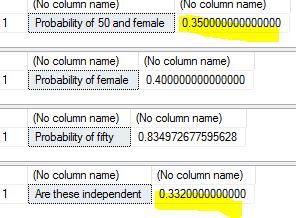
3 Do we know if these two events are dependent or independent of each other? That is , is does selecting a female over 50 affect the probability of selecting any person over 50? To find this out we have to apply the formula for independence – which is that the probability of their intersection should equal the product of their unconditional probabilities..that is probability of female over 50 multiplied by probability of female should equal probability of female and 50.

DECLARE @pro50andfemale numeric(12, 2), @total numeric(12, 2), @female numeric(12, 2), @fifty numeric(12, 2)
select @pro50andfemale= count(*) from [dbo].[WHO_LifeExpectancy] where age > 50 and gender = 'female'
select @total = count(*) from [dbo].[WHO_LifeExpectancy]
select 'Probability of 50 and female' ,round(@pro50andfemale/@total, 2)

select @female = count(*) from [dbo].[WHO_LifeExpectancy] where gender = 'female'
select 'Probability of female', @female/@total
select @fifty = count(*) from [dbo].[WHO_LifeExpectancy] where age > 50
select 'Probability of fifty', @fifty/@total
select 'Are these independent ', round((@female/@total), 2)*round((@fifty/@total), 2)

Results are as below..as we can see, the highlighted probability #s are very close suggesting that these two events are largely independent.

PROBABILITY1

From the next post am going to look into some of these concepts with R and do some real data analysis with them. Thanks for reading.


TSQL2sday – Daily database WTF

This month’s TSQL Tuesday is organized by Kennie T Pontoppidan(t) – the topic is ‘Daily Database WTF‘ – or a horror story from the database world.  As someone who has worked databases for nearly two decades, there are several of these – I picked one of my favorites. During my early years as a DBA, I was doing some contracting work for a government agency. At one of these agencies I encountered a rather strange problem. Their nightly backup job was failing on a daily basis. The lady DBA in charge was very stressed trying to solve it. It was a TSQL script written by someone who was no longer with them. According to their process, every failure had to be extensively documented on paper and filed for supervisors to review. So she had a file on this particular job failure that was bigger than the yellow pages, on her desk .She tasked me with finding out the reason for this job failure, as my first assignment.
I dug into the script – it was simple – it pulled an alphabetical list of databases from system metadata and proceeded to back them up. It didn’t do this one simple thing – leave TEMPDB off the list. So when the backups got down to TEMPDB, they promptly failed. Now as a smart person – I should have just communicated this to her and had it fixed quietly. But, I was young and rather hot headed at that time. It amazed me that a DBA with several years of experience did not know that TEMPDB cannot be backed up. So, I waited until the team meeting the next day. And when the said job failure came up again – I said that I knew the reason and stated why. I also added that this was a ‘very basic  thing’ that junior DBAs are supposed to know. I was stopped right there. It did not go down well. Her face was flaming red because a consultant showed her up in front of her boss in a bad light. She said she would talk to her boss and collegues the next day (several of whom were nodding their heads disapprovingly at me) and meeting was abruptly adjourned.
On my way back, I heard several people whisper that she does not like or do dissent, and I did a very unwise thing by pointing out something against her in public. I told myself that working with such a person would not be the right thing for me. When I came in to the office the next day, the HR girl was waiting at my desk. I was escorted to her office and told that my behavior was not acceptable coming from a consultant, and that my contract was terminated. I still recall being walked to the door with my jaw half open. Before she shut the door on me I said ‘there are still issues with that script, if you want to know’. Well sure enough they didn’t, and I went home. I really, honestly felt amused and free, despite the fact that I had no job to pay my bills.
In another week’s time, I had found another gig and moved on. I heard later about the issue I had not talked about. The databases that lined up after TEMPDB alphabetically were never backed up. In months. They had had a massive system failure and found out that they had no backups to recover from it. I don’t know if the lady in charge or her friends suffered any consequences, it was a government job after all and they could not be easily fired. But I do know that they found out the hard way and somebody probably paid for it.
I always narrate this incredible story to people who get fired for things that they did right, and also to watch your back in politically sensitive situations.

Generating Frequency Table

This week’s blog post is rather simple. One of the main characteristics of a data set involving classes, or discrete variables – are frequencies. The number of times each data element or class is observed is called its frequency. A table that displays the discrete variable and number of times it occurs in the data set is called a ‘Frequency Table’.A frequency table usually has frequency, percent or relative frequency expressed in % (the percentage of occurrences), cumulative frequency – the number of times all the preceding values have occurred and Cumulative Relative Frequency which is the ratio of cumulative frequency to size of sample (this can also be expressed as a percent if so desired).

For creating this I used the same data set I used for studying Simpson’s Paradox
To remember that variables we are deriving frequency for should be DISCRETE  in nature and each instance of the variable should be related/comparable to another in some way. If we are interested in cumulative values – those should make some kind of sense..so just summing all records before a name, or before a product(even though those classify as discrete), may not really make sense in most situations .In this case my variable is the age cohort, so summing whatever is below a certain age cohort can be useful data.

My TSQL for this is as below:

DECLARE @totalcount numeric(18, 2)
SELECT @totalcount = COUNT(*) FROM [dbo].[paradox_data]
;WITH agecte AS 
(
 SELECT [agecohort], c = COUNT(agecohort) 
 FROM [dbo].[paradox_data]
 GROUP BY [AgeCohort] 
)
SELECT agecte.[agecohort], c as frequency,(agecte.c/@totalcount)*100 AS [percent], 
 cumulativefrequency = SUM(c) OVER (ORDER BY [agecohort] ROWS UNBOUNDED PRECEDING),
 cumulativepercent = ((SUM(c) OVER (ORDER BY [agecohort] ROWS UNBOUNDED PRECEDING))/@totalcount)*100
FROM agecte
ORDER BY agecte.[agecohort];

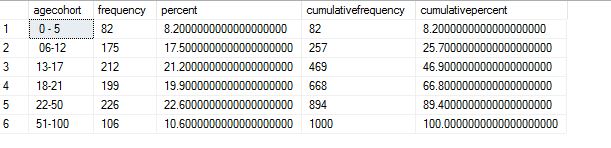
My results are as below. I have 1000 records in the table. This tells me that I have 82 occurences of age cohort 0-5, 8.2% of my dataset is from this bracket, 82 again is the cumulative frequency since this is the first record and 8.2 cumulative percent. For the next bracket 06-12 I have 175 occurences, 17.5 %, 257 occurences of age below 12, and 25.7 % of my data is in this age bracket. And so on.

freq1

Let us try the same thing with R. As it is with most R code, part of this is already written in a neat little function here. I did however, find some issues with this code and had to modify it. The main issue was that the function was calculating ‘length’ of the dataframe (in sql terms – number of records) from the variable – and R kept returning a value of ‘1’. The correct way to calculate number of records is to specify the field name after the dataframe, so when I did that it was able to get to the total number of records. This is a little nuance/trick with R that gets many sql people confused, and was happy to have figured it out. I do not know of a ‘macro’ or a generalised function that can pull this value so I had to stick it to the function. It will be different if you use another field for sure. The modified function and value it returns is as below.

##This is my code to initiate R and bring in the dataset

install.packages("RODBC")
library(RODBC)

cn <- odbcDriverConnect(connection="Driver={SQL Server Native Client 11.0};server=MALATH-PC\\SQL01;database=paradox_data;Uid=sa;Pwd=mypwd")data <- sqlQuery(cn, 'select agecohort from [dbo].[paradox_data]')

make_freq_table <- function( lcl_list )


 {
 ## This function will create a frequency table for 
 ## the one variable sent to it where that 
 ## table gives the items, the frequency, the relative 
 ## frequeny, the cumulative frequency, the relative
 ## cumulative frequency
 ## The actual result of this function is a data frame 
 ## holding that table.
 lcl_freq <- table( lcl_list )
 

##had to change this from original code to pull correct length.

lcl_size <- length( lcl_list$agecohort )
 lcl_df <- data.frame( lcl_freq )
 names( lcl_df ) <- c("Items","Freq")
 lcl_values <- as.numeric( lcl_freq )
 lcl_df$rel_freq_percent <- (lcl_values / lcl_size)*100
 lcl_df$cumul_freq <- cumsum( lcl_values )
 lcl_df$rel_cumul_freq_percent <- (cumsum( lcl_values ) / lcl_size)*100
lcl_df
 } 

make_freq_table(data) 


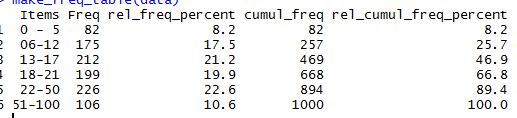
The result I get is as below and is the same as what I got with T-SQL.

freq2

Since this is a rather simple example that is 100 percent do-able in TSQL – I did not find the need to do it by calling R from within it. It did help me learn some nuances about R though.

Thanks for reading.

The Empirical Rule

I am resuming technical blogging after a gap of nearly a month. I will continue to blog my re learning of statistics and basic concepts, and illustrate them to the best of my ability using R and T-SQL where appropriate.

For this week I have chosen a statistical concept called ‘Empirical Rule’.

The empirical rule is a test to determine if or not the dataset belongs to a normal distribution.

  • 68% of data falls within the first standard deviation from the mean.
  • 95% fall within two standard deviations.
  • 99.7% fall within three standard deviations.

The rule is also called the 68-95-99 7 Rule or the Three Sigma Rule. The basic reason to test if a dataset follows this rule is to determine whether or not it is a normal distribution. When it is normally distributed and follows the bell curve – it lends itself easily to a variety of statistical analysis, especially forecasting. There are many other tests for normalisation that are more rigorous than this – and the wiki link has a good summary of those, but this is a basic and easy test.
For my test purpose I used the free dataset from WHO 0n life expectancies around the globe. It can be found here. I imported this dataset into sql server. I ran a simple TSQL script to find out if this dataset satisfies the empirical rule.

DECLARE @sdev numeric(18,2), @mean numeric(18, 2), @sigma1 numeric(18, 2), @sigma2 numeric(18, 2), @sigma3 numeric(18, 2)
DECLARE @totalcount numeric(18, 2)
SELECT @sdev = SQRT(var(age)) FROM [dbo].[WHO_LifeExpectancy]
SELECT @mean = sum(age)/count(*) FROM [dbo].[WHO_LifeExpectancy]
SELECT @totalcount = count(*) FROM [dbo].[WHO_LifeExpectancy]
SELECT @sigma1 = (count(*)/@totalcount)*100 FROM [dbo].[WHO_LifeExpectancy] WHERE age >= @mean-@sdev and age<= @mean+@sdev
SELECT @sigma2 = (count(*)/@totalcount)*100 FROM [dbo].[WHO_LifeExpectancy] WHERE age >= @mean-(2*@sdev) and age<= @mean+(2*@sdev)
SELECT @sigma3 = (count(*)/@totalcount)*100 FROM [dbo].[WHO_LifeExpectancy] WHERE age >= @mean-(3*@sdev) and age<= @mean+(3*@sdev)

SELECT @sigma1 AS 'Percentage in one SD FROM mean', @sigma2 AS 'Percentage in two SD FROM mean', 
@sigma3 as 'Percentage in 3 SD FROM mean'

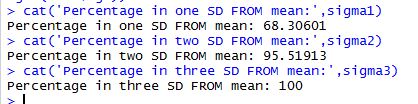
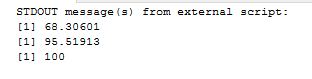
The results I got are as below. As we can see ,68.31 % of data falls between one difference of mean and standard deviation, 95 % falls between two differences and 100% falls between 3. This is a near perfect normal distribution – one that lends itself to statistical analysis very easily.

sd

To do the same analysis in R, I used script as below:

install.packages("RODBC")
library(RODBC)

cn <- odbcDriverConnect(connection="Driver={SQL Server Native Client 11.0};server=MALATH-PC\\SQL01;database=WorldHealth;Uid=sa;Pwd=Mysql1")
data <- sqlQuery(cn, 'select age from [dbo].[WHO_LifeExpectancy] where age is not null')
agemean<-mean(data$age)
agesd<-sd(data$age)
sigma1<-(sum(data$age>=agemean-agesd & data$age<=agemean+agesd)/length(data$age))*100
sigma2<-(sum(data$age>=agemean-(2*agesd) & data$age<=agemean+(2*agesd))/length(data$age))*100
sigma3<-(sum(data$age>=agemean-(3*agesd) & data$age<=agemean+(3*agesd))/length(data$age))*100
cat('Percentage in one SD FROM mean:',sigma1)
cat('Percentage in two SD FROM mean:',sigma2)
cat('Percentage in three SD FROM mean:',sigma3)

My results are as below:

rpercent

I can use the same script within TSQL and call it –

EXEC sp_execute_external_script
 @language = N'R'
 ,@script = N'agemean<-mean(InputDataSet$age)
agesd<-sd(InputDataSet$age)
sigma1<-(sum(InputDataSet$age>=agemean-agesd & InputDataSet$age<=agemean+agesd)/length(InputDataSet$age))*100
sigma2<-(sum(InputDataSet$age>=agemean-(2*agesd) & InputDataSet$age<=agemean+(2*agesd))/length(InputDataSet$age))*100
sigma3<-(sum(InputDataSet$age>=agemean-(3*agesd) & InputDataSet$age<=agemean+(3*agesd))/length(InputDataSet$age))*100
print(sigma1)
print(sigma2)
print(sigma3)'
 ,@input_data_1 = N'select age from [dbo].[WHO_LifeExpectancy] where age is not null;'

rpercentt

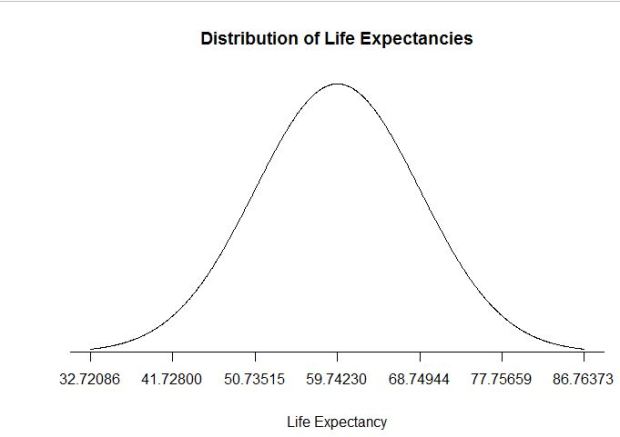
As we can see, the results are exactly the same in all 3 methods. We can also draw a bell curve with this data in R and see that it is a perfect curve, proving that the data is from a normally distributed set. The code I wrote to draw the graph is as below:

lower_bound <- agemean - agesd * 3
upper_bound <- agemean + agesd * 3
x <- seq(-3, 3, length = 1000) * agesd + agemean
y <- dnorm(x, agemean, agesd)
plot(x, y, type="n", xlab = "Life Expectancy", ylab = "", main = "Distribution of Life Expectancies", axes = FALSE)
lines(x, y)
sd_axis_bounds = 5
axis_bounds <- seq(-sd_axis_bounds * agesd + agemean, sd_axis_bounds * agesd + agemean, by = agesd)
axis(side = 1, at = axis_bounds, pos = 0)


graph


SQL Cruise 2017 – Western Carribean – my experience

As some readers may know, I am a regular attendee on SQL Cruise s for 8 years now. SQLCruise is a training(&-vacation for some) event organized by Tim Ford(b | t ) and Amy Ford (t) that happens twice a year. I went on the first one on Alaska 8 years ago – and I have been hooked since then doing them. I go on atleast one cruise every year – usually the one closest to the east coast. This year the route happened to be around western carribean – including 3 countries I had not visited before – Honduras, Mexico and Belize. Well, the third didn’t quite happen but the other two did and was a ton of fun. My notes are as below. I use this as a way to plan better for next year , so many things I have written are only relevant to me, and perhaps to other frequent cruisers. If you find them too rambling skip all the way down to the ‘Takeaways‘ section where I have summarized the value and gains I get from doing this.

Day 0:
I landed in Miami, our port city, late on Thursday January 26th. I have learned the hard way to fly in atleast one day early before the cruise ship leaves – because of frequent and unexpected flight delays, especially in winter. This year was an unusually warm winter with no weather related delays. I did however, manufacture some stress for myself (am seriously good at this) because of a short layover time of 45 minutes at Charlotte. Thankfully, I made the connection, with my luggage intact and checked in into the Hilton, where most of the other cruisers were staying. This is yet another lesson learned over the years – staying with everyone else at the same hotel before takeoff adds some good energy and reduces nervous tension. There is somewhat of a tradition around having breakfast together and leaving in vans to the terminal to board – there is a very comfy, family-like feel to that which is, to me, worth the extra $$ it might cost to stay at a hotel like the Hilton. I spent the next day just wandering around downtown Miami – it was too overcast and rainy to go to the beach.I walked around, got myself some good food to eat at the huge Whole foods Market, napped and waited for the rest of #sqlfamily to arrive.

Day 1: A number of cruisers, most of us known to each other fairly well – met up at the breakfast buffet  early. After a heavy, hearty meal (which is needed since boarding and getting food on the ship can take some time) – we piled into a couple of uber taxis and made our way to the cruise terminal. I got to meet one of the new tech leads and new cruiser – Ben Miller and his lovely wife Janelle. We stood in line together and were checked in rather quickly. I was handed my room keys and found to my pleasant surprise that  I was on the 5th floor. I was just one floor away from classroom on the 6th and one floor away from dis embarking when ship docked. This was so much easier than being up on 11th or 12th and waiting endlessly for elevators to arrive. My room was also much more airy and brighter than the small cubby-hole kind of rooms I had used before (I paid more for it and my co passenger/sister could not make it). Although it was expensive it seemed very worth it.I made my way to lunch buffet for a quick bite, and then joined the classroom shortly after. There were many former cruisers I knew rather well – Joe Sheffield, Jason Brimhall, Bill Sancrisante, Erickson Winter, Ivan Roderiguez – and among tech leads Ben Miller (b|t) , Jason Hall(b|t),  Grant Fritchey(b|t), Kevin Kline(b|t) and Buck Woody(b|t). The rest of the day was taken with exchanging pleasantries, meeting families and getting the week started. We were handed our swag – which was seriously awesome this time. The timbuctoo back packs are always great, as well as soft cotton t shirts – but my favorite was the water bottle/flask.

Day 2:
This was a day at sea. The day started with Buck Woody’s session on Data Pro’s guide to the Data Science path. As someone who did a career change from 20 years of operational dba work into BI/Analytics – I found it very interesting. Buck went through an introduction to data science and R programming, various tasks involved in data science profession, and most importantly – how a regular database person can break into this field. The presentation was among the most pragmatic, useful ones I have attended on this subject. Buck also spiced it up with his own brand of humor, small quizzes and exercises – which made it extra interesting. Following this session we had Grant Fritchey’s session on row counts, statistics and query tuning – for anyone doing query tuning on a regular basis, this information never really gets old and is worth listening to every single time. Grant covered changes to optimiser on SQL Server 2016 as well. Following lunch, we had a deep dive/500 level session by Kevin Kline on Optimizer secrets and trace flags. Kevin had a ton of information packed into a 1.5 hour session. The day ended with a group dinner at a restaurant. I personally never have much luck with ship’s restaurants given the restrictions on what I can eat – this time was not any different. I had great company though, to keep me entertained throughout – Buck Woody with his wife and mom, Chris and Joan Wood. I hugely enjoyed chatting with them and getting to know them better. I ended the day by grabbing a bite to eat at the buffet that suited my palate and retired, happy and satisfied.

Day 3: This was a day at port at Roatan Islands, Honduras. We had time for a quick class on encryption by Ben Miller. Ben’s presentation was simple and clear with great demos. Following this we docked at Roatan Islands. I was taking the ship’s tour to Gumbalimba Animal Preserve. I was very happy to have Chris and Joan Wood for company. I love sightseeing, it is one of the reasons for me to do sql cruise – and having company on those tours make them more fun and worth doing. It was a rainy, overcast day – we were taken on a bus ride to the park, which housed a lot of extinct animals and birds. It was a lush, green paradise. We got to play with macaws, white faced monkeys, take a lot of fun pics and returned late afternoon. It was a very fun day, despite the rain.


img_3957img_3971

Day 4:
We were supposed to be docked at Belize. But captain announced that they had some unexpected hurdles that prevented them from doing so, and that this would be a day at sea. I have not seen this happen on any other cruise I have been on before. I wondered how to spend the day. Tim got us together, and asked if we’d like to hear more on tools from Red Gate and SQL Sentry – two of the key sponsors. Almost every place I’ve worked at have used these tools, and I thought it was a great idea. The team seemed to agree. We spent the day at class – listening to some great tips and tricks on Plan Explorer and various Red Gate tools. To be honest this unexpected day was my highlight of the trip – I got great tips on tools I use, and I spent a very relaxing day discussing them among friends.

Day 5: We docked at Costa Maya, Mexico. I had booked a tour of mayan ruins that I wanted to see with fellow cruisers. We had to set the clock back a day ago because of a time zone change. There was another notification to set it forward for today, which I missed reading. So I showed up an hour late for the tour and they had already departed. I was very disappointed. The ship’s cruise excursions team was kind enough though, to refund the money to me since it was a genuine mistake. I spent the money on some lovely handicrafts near the port, took a long walk by the beach, got back in boat early, and took a nice nap. So in all, although things did not go per plan exactly, it turned out quite well. Towards the end of the day, we had a tech panel discussion with all the tech leads – a lot of interesting questions were posed and answered.

img_3985

Day 6: We docked at Cozumel, Mexico. I left the boat early and joined fellow cruisers for a tour of Mayan ruins. It was a long bus ride to the spot, and a good two mile walk in hot, humid weather. We did get a good look at ruins (one thing off the bucket list), spent some time on the lovely beach there and got back to the ship by mid afternoon. We had a second group dinner at night – with some good conversation.

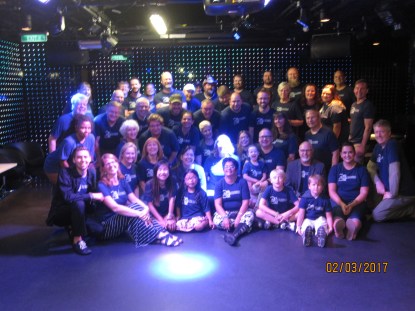
Day 7: There were several classes this day – by Grant, Buck, Ben and Jason Hall. It is hard for me to say which one I liked the most. Since am into BI and Analytics – Buck’s session on R had me listening with total attention .I liked the many examples and the differences illustrated between SQL and R programming. Although I have done both and know them rather well, I have always had a hard time explaining this to other people. Buck did a fantastic job and I will use his examples for this purpose. All other sessions were great in quality too. The day ended like it usually does with a group social, lots of pictures taken, hugs and fond messages of regard. Every cruise to me has been worth it for this time, but this particular one had a lot of people with a lot of affection going around , and made it extra special.
img_4063

Day 8: There is not much here to say except some lessons learned after several years of cruising. I booked a late flight hoping that I could hang out on the ship until lunch – turned out that everyone had to be out by 10 AM. I also made the mistake of opting for the ship’s shuttle thinking I could save on uber/taxi – this means you are mandated to check in luggage, not take it with you. There were other cruisers taking a shared ride and I could have joined them instead of checking luggage, but was too late. After a quick and early breakfast with Kevin Kline, Lance Harra and Jason Hall – I walked down the ship, into and past customs and into the luggage area. There was a 1.5 hour wait in a cold and dark room for luggage to arrive here, and when it did it was in another adjacent room. Lance and myself had to ask to find out where it was. This is definitely something to avoid next time. At the airport – I had a long 8 hour wait for my flight. Kevin Kline checked me along with Jason and Lance into the American Airlines exec lounge for the day. Kevin does this for me and fellow cruisers every year – a kindness that I appreciate very much. I could nap in the super comfy lounge, get a salad for a meal and then walk out when it was closer to boarding time – seriously better than wandering around in the airport. My flight was on time and I reached home safe.Another note for next year is to take the following day off from work. I was bone tired and had to go in. Things settled down over the week but that would have been a welcome day off.

So…after all this rambling..what did I come away with? My key takeaways from this particular cruise are as below:

1 How to get into data science? : I learned from Buck Woody’s sessions on how a data professional like me can make my way eventually into data science. Working on data cleansing and learning visualisation skills are important, and it was very beneficial for me to learn that. There are a lot of rumors/myths and false information around on data science – every second person you meet who is a data professional wants to get into it. But to get real practical advice from people who got there , and people who have SQL server as their background – is hard to get anywhere else.

2 Tools and more tools…: The day spent discussing tools was unique, wonderfully informative and fun. The only time anyone gets to hear such sessions are occasionally at sql saturday vendor sessions – I must be honest here that I have never really attended any of them. This was unique in that every person asked questions on these tools, enhancements they’d like and various ways they used them. Grant Fritchey, Kevin Kline and Jason Hall did a great job fielding these questions. I felt that my day was well spent ,what I said was heard and would go into some future version of Red Gate and Sentry one tools.

3 What to learn besides sql server?  – There are big changes happening in the data industry – everyone knows we need to have more than sql server on our resume. But nobody really knows what that ‘more’ needs to be or where it is going to get us. I heard from so many fellow data professionals – some were learning unix, some were into Azure/cloud in a big way and also exploring AWS and other cloud services, some were doing R programming and data analytics..on and on. It was enriching and heart warming to hear of each person’s experience and where it was taking them. It gave me confidence that I was not alone, and also a good idea of what are skills most people are looking to gain as the industry expands.

Last but not the least – I am not a naturally extroverted person. I do well in small, familiar crowds of people but am seriously shy among larger audiences. SQL cruise has really taught me to open up, be more relaxed even among strangers and speak to the technical info that am familiar with. I met several new people on this trip whose friendships I will treasure- Derik Hammer (t), Chris Wood (t) , Lance Harra(t),  Kiley Pollio, Joe Fullmer and Brett Ellingson. I apologize for missing anyone, it is not intentional and your company was wholly appreciated.

I am already looking forward to the next one in 2018!! THANK YOU to Tim and Amy Ford, Red Gate and Sentry One, and all tech leads for making it a pleasant, valuable experience.


: