Box-and-whisker plot and data patterns with R and T-SQL

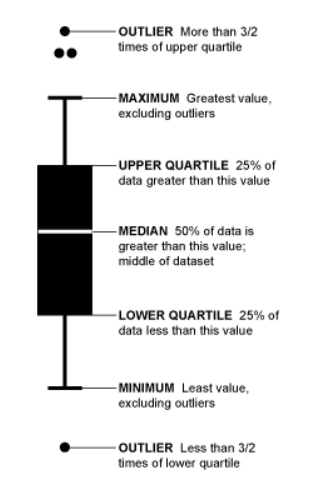
R is particularly good with drawing graphs with data. Some graphs are familiar to most DBAs as it has been things we have seen and used over time – bar charts, pie diagram and so on. Some are not. Understanding exploratory graphics is vitally important to the R programmer/data science newbie. This week I wanted to share what I learned about the box-and-whisker plot, a commonly used graph in R – and one that greatly helps to understand and interpret spread of data. Before getting into specifics of how data is described with this plot, we need to understand a term called Interquartile Range. For each range or subset of data we are involved with (or rather the field we choose to ‘group by’), the middle value is called ‘Median’. The middle of the top 50% of values is called first quartile, and middle of the bottom 50% is called ‘second quartile’. Difference between first and second quartile is called ‘interquartile range’. A box-and-whisker plot helps us to see these values visually – and in addition to this also shows outliers in the data. To borrow a graphic from here – it is as below.
inqr

Now, let us look at the dataset on chicken weights in R with the help of this type of graphic.This is basically a dataset comprising of data on 71 randomly picked chickens, who were fed six different types of feed. Their weight was then observed and compiled. Let us say we sort this data from minimum to maximum weight for each feed.

You need the mosaic R package installed, which in turn has a few dependencies – dplyr, mosaicData,ggdendro and  ggformula. You can install each of these packages with the command install.packages(“<package name”, repos = http://mran.revolutionanalytics.com&#8221;) and then issue below command for pulling up with B-W plot.

library("mosaic")
bwplot(weight~feed, data=chickwts, xlab="Feed type", ylab="Chickem weight at six weeks (g)")

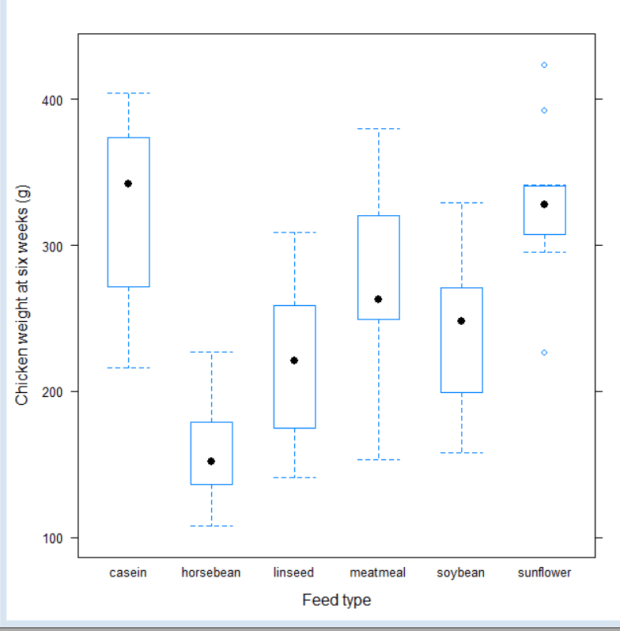
Results are as below:

chickfeed

With this we are easily able to see that
1 Feed type casein produces chickens with maximum weight
2 Feed type horsebean produces chickens with minimum weight
3 Feedtype sunflower has some outliers which don’t seem to match general pattern of data
4 The distribution of weights within each feed type seem fairly symetric.
5 There are also many overlapping weights across feed types.

To get to some of the numbers accurately you can just say

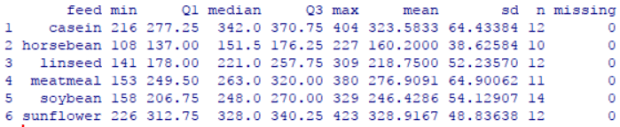
favstats(weight~feed, data=chickwts)

rstats

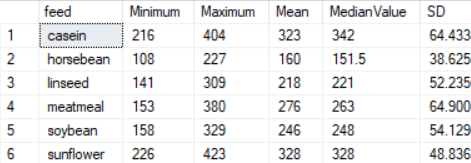
If you wish to get some of these values in T-SQL (i imported this data into SQL server via excel) – you can use query below. Comparing the values visually with graph will show that they are similar.

SELECT DISTINCT ck.feed,MIN(weight) OVER (PARTITION BY ck.feed) AS Minimum, Max(weight) OVER (PARTITION BY ck.feed) AS Maximum, 
AVG(weight) OVER (PARTITION BY ck.feed) AS Mean,
PERCENTILE_CONT(0.5) WITHIN GROUP (ORDER BY ck.weight)OVER (PARTITION BY ck.feed) AS MedianValue,
STDEV(weight) OVER (PARTITION BY ck.feed) AS SD
FROM chickfeed ck ORDER BY feed;

Results are as below:

sql

The math for Q1 and Q3 are a little complicated in T-SQL, I was unsure if it was worth doing since that is not the point of my blog post. You can find info on it here

As we can see, the numbers tie up regardless of which way we do it. But it is much harder though to find patterns and outliers using code. The graph is undoubtedly more useful in this regard.

In the next post we will look into applying some analysis of variance (ANOVA) to examine if the difference in weights across feed types is really significant to arrive at any conclusion on nature of the feed. Thanks for reading!


Confidence Intervals for a proportion – using R

What is the difference between reading numbers as they are presented, and interpreting them in a mature, deeper way? One way perhaps to look at the latter is what statisticians call ‘confidence interval’.

Suppose I look at a sampling of 100 americans who are asked if they approve of the job the supreme court is doing. Let us say for simplicity’s sake that the only two answers possible are yes or no. Out of 100, say 40% say yes. As an ordinary person, you would think 40% of people just approve. But a deeper answer would be – the true proportion of americans who approve of the job the supreme court is doing is between x% and y%.

How confident I am that it is?  About z%. (the common math used is 95%).  That is an answer that is more reflective of the uncertainty related to questioning people and taking the answers to be what is truly reflective of an opinion. The x and y values make up what is called a ‘confidence interval’.

Let us illustrate this with an example.

From this article  – out of a random sampling of 1089 people, 41% approved of the job the supreme court was doing. To construct the confidence interval, the first step is to determine if this sampling satisfies the needs for a normal distribution.
Step 1: Is the data from a normal distribution?
When we do not have the entire dataset with us, we use the below two rules to determine this:
1 The sample observations are independent – from the article it seems like random people were selected so this is safe to assume.
2 We need a minimum of 10 successes and 10 failures in the sample. – ie np >=10 and n(1-p) >= 10. This is called ‘success failure condition‘. Our n here is 1089, and p is 0.41. So successes are 1089*41 = 446.49 and failures are 642.5. Both are larger than 10, so we are good.
Step 2: Calculate standard error  or standard deviation of the confidence interval is calculated as square root of p(1-p)/n. In this case it is square root of 0.41*0.59/1089 which is 0.0149.
Step 3: Find the right critical value to use – we want a 95% confidence in our estimates, so the critical value recommended for this is 1.96.
Step 4: Calculate confidence interval – Now we have all we need to calculate confidence interval. The formula to use is point estimate +- (critical value x standard error) which is 0.41 + (1.96*0.0149)  = 0.4392, and 0.41 – (1.96*0.0149) = 0.3807.
So, we can say with 95% confidence that the true proportion of americans who approve of the supreme court is between 38.07% and 43.92%.

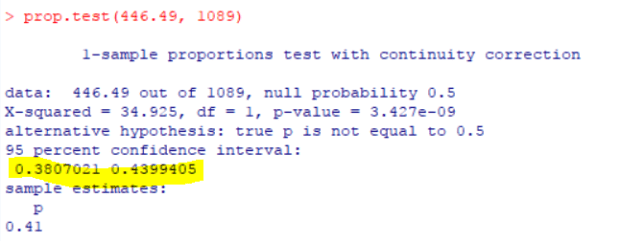
We can spare ourselves all this trouble by using a simple function in R as below, and we get the same results. We need to pass to this function what is 41% of 1089, which is 446.49.

Just typing prop.test(446.49, 1089) gets answers as below:

pic

So, with just two figures – the sample count and percentage value, we were able to derive a deeper conclusion of what this data might mean. Thanks for reading!


What is networking, really?

I am still trying to get up to speed on blogging after a gap. Today I managed to push myself to write some R code and test it, and it worked. Am getting there, although need more work to turn it into a blog post. So, here is another on the lines of professional development. It is about that word that many people hear of and know of, but really don’t know exactly what it means. I certainly didn’t.
When I was new to the community, I heard many people say networking is the best way to find work. But I really didn’t know what they meant. I thought you had to know a lot of very influential people, and am not the kind of person to seek out people of power/importance and push my cause with them. After a few years, that definition changed. Now I thought I need to tell people am looking for work and they would in turn respond if they knew of an opportunity that was of interest. This is true, but true only partially. It rarely happened. I started telling people I was looking for work, and almost nobody sent me any contacts or information. I was hurt and disappointed when they didn’t. Many times I started considering if it was worth my time to go to conferences/sql saturdays and so on.  It took me close to 15 years to figure out what networking really is, and to get it work for me (at times, it doesn’t work all the time, nothing really works all the time 🙂

To me it is as below:

1 Networking is really just making friends. Get friendly, learn to relax, introduce yourself to new people. Don’t go with any heavy objective or intent. Say you are so-and-so, pleased to meet you and then see how it goes. The next time you see that person, he/she may recall who you are. And there maybe someone else with them that they may introduce to you. That is how the friends circle/network grows.
2 Talk of things you are comfortable talking about. There are many things people talk of that one cannot participate in because one does not share that common interest or simply one does not like it. To me specific topics like that include religion, politics and at times cultural differences. I stick to things am comfortable with and usually find things to talk of in that area.
3 Make your work known via blog posts, talking at user groups or other events. This is by far the most important key to people recommending you for jobs or even letting you know of open positions. If they don’t know what you are good at they can’t relate you to any position you’d be good at. That is partly why I personally didn’t get anyone to recommend me, and I never realized it. Once I got active with blogging and speaking, things changed rather dramatically.
4 Give things time. Networking and building your network takes a long time. Sometimes we can find instant chemistry/connections in people, and the person you talk to today may be your boss or colleague at the next job. But such miracles are rare. Most of the time, people take time to know you and over time that can mature into an opportunity, or a referral.
5 Get active on social media. Many of the friends I have in the sql community are people I got to know better via twitter. I am personally not hugely active myself, but I do read what they have to say and respond appropriately when I can. I also share what I blog and get comments or feedback on that from time to time. Twitter is by far the easiest media there is to make new friends, particularly in the sql community.  It is not as personal as facebook and not as opaque as linked in – it is somewhere in between and is easy to use.

I hope this helps anyone getting started newly with community and networking. Networking is worth it – not only will you gain a lot of support and friends, you will find job openings and opportunities that never existed, guides/mentors who can help you and friendships that can last a lifetime! Best of luck!!


14 years of Summit…

I have been trying to get my blogging going again after a gap of two months. It has been incredibly hard. To warm up, I decided to try some non technical posts. One of them is stuff I have been wanting to write a long time – with this year I will complete attending 14 years of PASS Summit. It has been a while. There are people who have attended every single summit – I am by no means the record holder for that. But attending the same conference and being part of the same community for 14 years is still something to be proud of, and am very proud of it.

For the first 3 years  – I could not afford the entire summit. I was a junior DBA cum programmer back then, on a work visa, making about 65K or so per year. Money was hard, and the summit wasn’t cheap. For my very first summit at chicago, I could only afford to pay my way for one day. (I think it was 300 to 400 dollars). The hotels close to the summit were expensive, so I took a Greyhound bus from Louisville. (I do not like to drive long distance on my own , and nobody I knew was going). I landed in Chicago early morning, attended a day’s class and took the bus back same day evening. Most of what was said during the day went above my head. All I did with SQL server back then was backups, restores, attaching and detaching databases, and creating a few DTS jobs. But, I saw many passionate people. I was inspired by their love of what they do, and wanted to be part of them. So, whether I learned anything or not, didn’t matter much. I wanted to come back here, to this community, although I didn’t know a single soul among them. I did this for 2 more years.
The year 2005 was at Grapevine, TX. I had received a modest bonus at work – could afford airfare and two days of hotel. So off I went again, to hang among these very excited strangers and try to understand a wee bit of what they were saying, or doing. During lunch break – I was wandering around and stopped at a table with a bald man and another lady. They seemed very friendly. The bald man was Rushabh Mehta, one of the board members at PASS. He asked me if I had a user group at Louisville. I said no, and he asked me if I was interested in starting one. I was mostly an introverted person. I did not know how to get word around or how to get people to attend a user group, even if I started one. I expressed these concerns. He reassured me that he would help with mailings and would also get the local Microsoft people to help. What he said next made my heart leap – they offered free attendance to entire conference for running a user group!! I decided to go for it. On my way back from TX – I knew one person now. I had Rushabh’s contact information. While sitting at the airport terminal waiting for my flight home – I saw another lady with a PASS backpack. I asked her if she was from Louisville – and she responded , yes. It was just two of us from our little town at the conference.  I explained what Rushabh had told me, and asked her if she would help me start up the first meeting for our user group. She was interested. Teresa Mills was the second person in the SQL community whom I got to know, via attending a PASS conference.
The first meeting of Louisville SQL Server user group started in 2006, at the local library, with 12 people in attendance. Some of those folks are still with me as volunteers for SQL Saturday and for the chapter. After that, I started going to the summit every year. Some years, I got my employer to pay the whole way. Some other years, I had to pay for hotel. Or the airfare. In some rare cases, I had to take paid time off to go. I also volunteered for PASS in every capacity I could – I wrote for their newsletter, mentored new attendees, served on selection committee, worked as a Tech Ed volunteer, moderated 24HoP – everything I could in the time I had.
Now, after 15 years, I know a LOT of people in the community. It is many times difficult to find time for all of them. I have never had to look for work the traditional way – all my jobs after I started the user group have been because of referrals  – people I know in community telling others that am good at what I do.  Last year I was awarded the PASSion award for best volunteer – the highest recognition a volunteer can get. I am sure glad to have boarded the Greyhound bus that night into a city and among people I never knew or understood. I hope you find it in you to take that find step. You never know where it will take you.

Getting back to blogging

The past two months have been very hectic for me. I had an unexpected job offer towards end of July, which I gladly accepted – that was followed by some much needed home renovation, and a long vacation/tour of the west coast with my beloved sister. All of this has taken a toll on my regular blogging practice.
I am currently working as a database consultant with Fortified Data Services. I work remotely, 100 % from home – and with a group of very talented people. Working remotely has also given me the much needed flexibility I was looking for. I am looking forward to learning and growing with this new team.
I am now settling down at the new gig and the home is also falling in shape. I decided to become a minimalist after years of dealing with stuff – getting rid of things that I don’t need or use has been a growing/healing experience for me after I entered mid age. It has completely changed and improved my perspective on life itself – being light, taking things lightly and seeing everything in a better light.
Thank you to everyone who have been following my blog posts and hope to resume regularly starting this week!!


Understanding Relative Risk – with T-SQL

In this post we will explore a common statistical term – Relative Risk, otherwise called Risk Factor. Relative Risk is a term that is important to understand when you are doing comparative studies of two groups that are different in some specific way. The most common usage of this is in drug testing – with one group that has been exposed to medication and one group that has not. Or , in comparison of two different medications with two groups with each exposed to a different one.
To understand better am going to use the same example that I briefly referenced in my earlier post.

a1

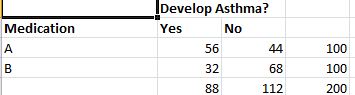
In this case the risk of a patient treated with Drug A developing asthma is 56/100 = 0.56. Risk of patient treated with drug B developing asthma is 32/100 = 0.32. So the relative risk is 0.56/0.32 which is 1.75. Absolute Risk, is another term which is the difference in probabilities of the two cases(0.56-0.32). There are some posts that argue that absolute risk should be used while comparing two medications and relative risk for one medication versus none at all but this is not a hard rule and there are many variations.

This wikipedia post has a great summary of relative risk – make sure to read the link they have on absolute risk also.

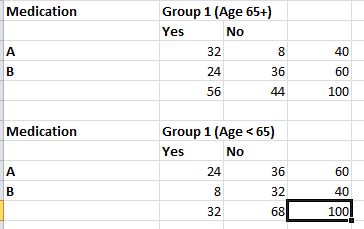
Now, applying relative risk to the problem we were trying to solve in the earlier post – we have two groups of data as below.

a3

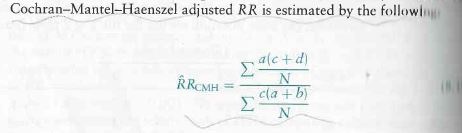
The relative risk in the first case is (32/40)/(24/60) = 2. In the second group it is (24/60)/(8/40) = 2. So logically when we combine(add) the two groups we should still get a relative risk of 2. But we get 1.75, as we saw with the first set of data above. The reason for that skew is because of the age factor, also called the confounding variable. We used the cochran-mantel test to mitigate the effect of the age factor to calculate x2 and pi value for the same data. We can use the same test to calculate relative risk by obscuring the age factor – the formula for doing this is as below (with due thanks to the text book on Introductory Applied Biostatistics.
relativerisk

Using the formula on the data in T-SQL (you can find the dataset to use here) –

declare @Batch2DrugAYes numeric(18,2), @Batch2DrugANo numeric(18,2), @Batch2DrugBYes numeric(18, 2), @Batch2DrugBNo numeric(18, 2)
declare @riskratio numeric(18, 2), @riskrationumerator numeric(18, 2), @riskratiodenom numeric(18,2 )
declare @totalcount numeric(18, 2)

SELECT @totalcount = count(*) FROM [dbo].[DrugResponse] WHERE batch = 1
SELECT @Batch1DrugAYes = count(*) FROM [dbo].[DrugResponse] WHERE batch = 1 AND drug = 'A' AND response = 'Y'
SELECT @Batch1DrugANo = count(*) FROM [dbo].[DrugResponse] WHERE batch = 1 AND drug = 'A' AND response = 'N'
SELECT @Batch1DrugBYes = count(*) FROM [dbo].[DrugResponse] WHERE batch = 1 AND drug = 'B' AND response = 'Y'
SELECT @Batch1DrugBNo = count(*) FROM [dbo].[DrugResponse] WHERE batch = 1 AND drug = 'B' AND response = 'N'

SELECT @Batch2DrugAYes = count(*) FROM [dbo].[DrugResponse] WHERE batch = 2 AND drug = 'A' AND response = 'Y'
SELECT @Batch2DrugANo = count(*) FROM [dbo].[DrugResponse] WHERE batch = 2 AND drug = 'A' AND response = 'N'
SELECT @Batch2DrugBYes = count(*) FROM [dbo].[DrugResponse] WHERE batch = 2 AND drug = 'B' AND response = 'Y'
SELECT @Batch2DrugBNo = count(*) FROM [dbo].[DrugResponse] WHERE batch = 2 AND drug = 'B' AND response = 'N'

SELECT @riskrationumerator = (@Batch1DrugAYes*(@Batch1DrugBYes+@Batch1DrugBNo))/@totalcount
SELECT @riskrationumerator = @riskrationumerator + (@Batch2DrugAYes*(@Batch2DrugBYes+@Batch2DrugBNo))/@totalcount

SELECT @riskratiodenom = (@Batch1DrugBYes*(@Batch1DrugAYes+@Batch1DrugANo))/@totalcount
SELECT @riskratiodenom = @riskratiodenom + (@Batch2DrugBYes*(@Batch2DrugAYes+@Batch2DrugANo))/@totalcount
--SELECT @riskratiodenom
--SELECT @riskrationumerator,@riskratiodenom
SELECT 'Adjust Risk Ratio: ', @riskrationumerator/@riskratiodenom

riskratio

We can write code in R to achieve above result – there is no in built function to do this as far as I can see. But when we can write simpler code in T-SQL I was not sure if it worth the trouble to do it for this particular case. We have at least one scenario we can do something easily in T-SQL that R does not seem to have built-in. I certainly enjoyed that feeling!! Thanks for reading.


Cochran-Mantel-Haenzel Method with T-SQL and R – Part I

This test is an extension of the Chi Square test I blogged of earlier. This is applied when we have to compare two groups over several levels and comparison may involve a third variable.
Let us consider a cohort study as an example – we have two medications A and B to treat asthma. We test them on a randomly selected batch of 200 people. Half of them receive drug A and half of them receive drug B. Some of them in either half develop asthma and some have it under control. The data set I have used can be found here. The summarized results are as below.
a1

To understand this data better, let us look at a very important statistical term – Relative Risk .It is the ratio of two probabilities.That is, the Risk of patient developing asthma with Medication A/Risk of patient developing asthma with medication B. In this case the risk of a patient treated with Drug A developing asthma is 56/100 = 0.56. Risk of patient treated with drug B developing asthma is 32/100 = 0.32. So the relative risk is 0.56/0.32 which is 1.75.

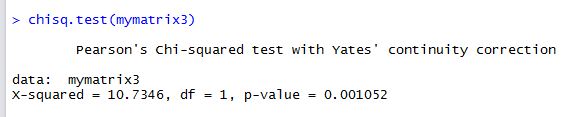
Let us assume a theory/hypothesis then, that there is no significant difference in developing asthma from taking drug A versus taking drug B. Or in other words, that comparative relative risk from the two medications is the same, or that their ratio is 1. We can test this hypothesis using Chi Square test in R. (If you want the long winded T-SQL way of doing the Chi Square test refer to my blog post here. The goal of this post is to go further than that so am not repeating this using T-SQL, just using R for this step).

mymatrix3 <- matrix(c(56,44,32,68),nrow=2,byrow=TRUE)
colnames(mymatrix3) <- c("Yes","No")
rownames(mymatrix3) <- c("A", "B")
chisq.test(mymatrix3)

a2

Since the p value is significantly less than 0.05, we can conclude with 95% certainty that the null hypothesis is false and the two medications have different effects, not the same.

Now, let us take it one step further. Inspection of the data reveals that people selected randomly for the test fall broadly into two age groups, below 65 and over or equal to 65. Let us call these two age groups 1 and 2. If we separate the data into these two groups it looks like this.

a3

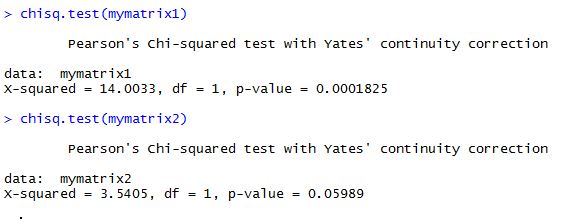
Running the chi square test on both of these datasets, we get results like this :

mymatrix1 <- matrix(c(32,8,24,36),nrow=2,byrow=TRUE)
colnames(mymatrix1) <- c("Yes","No")
rownames(mymatrix1) <- c("A","B")
chisq.test(mymatrix1)

mymatrix2 <- matrix(c(24,36,8,32),nrow=2,byrow=TRUE)
colnames(mymatrix2) <- c("Yes","No")
rownames(mymatrix2) <- c("A", "B")
myarray <- array(c(mymatrix1,mymatrix2),dim=c(2,2,2))
chisq.test(mymatrix2)

a3

In the second dataset for people of age group < 65, we can see that the p value is greater than 0.05 thus proving the null hypothesis right. In other words, when the data is split into two groups based on age, the original assumption does not hold true. Age, in this case, becomes the confounding variable or the variable that changes the conclusions we draw from the dataset. The chi square test shows results that take into account the age variable. These results are not wrong but do not tell us if the two datasets are related for -specifically- for the the two variables we are looking for – drug used and nature of response.
To test for the independence of two variables and mute the effect of the confounding variable with repeated measurements, the Cochran-Mantel-Haenszel test can be used. If you  have a matrix as below , the formula for x-squared/pi value for this test is

The above image is used with thanks from the book Introductory Applied Biostatistics.

Using T-SQL: I used the same formula as the textbook, only added the correction of 0.5 to the numerator, since R uses the correction automatically and we want to compare results to R.(Disclaimer: To be aware that I have intentionally done this step-by-step for the sake of clarity, and not tried to optimize T-SQL by doing it shortest way for this. It is my humble opinion that these calculations are best done using R – T-SQL is a backup method and a good means to understand what goes behind the formula, nothing more.)

declare @Batch1DrugAYes numeric(18,2), @Batch1DrugANo numeric(18,2), @Batch1DrugBYes numeric(18, 2), @Batch1DrugBNo numeric(18, 2)
declare @Batch2DrugAYes numeric(18,2), @Batch2DrugANo numeric(18,2), @Batch2DrugBYes numeric(18, 2), @Batch2DrugBNo numeric(18, 2)
declare @xsquared numeric(18, 2), @xsquarednumerator numeric(18, 2), @xsquareddenom numeric(18,2 )
declare @totalcount numeric(18, 2)

SELECT @totalcount = count(*) FROM [dbo].[DrugResponse] WHERE batch = 1
SELECT @Batch1DrugAYes = count(*) FROM [dbo].[DrugResponse] WHERE batch = 1 AND drug = 'A' AND response = 'Y'
SELECT @Batch1DrugANo = count(*) FROM [dbo].[DrugResponse] WHERE batch = 1 AND drug = 'A' AND response = 'N'
SELECT @Batch1DrugBYes = count(*) FROM [dbo].[DrugResponse] WHERE batch = 1 AND drug = 'B' AND response = 'Y'
SELECT @Batch1DrugBNo = count(*) FROM [dbo].[DrugResponse] WHERE batch = 1 AND drug = 'B' AND response = 'N'

SELECT @Batch2DrugAYes = count(*) FROM [dbo].[DrugResponse] WHERE batch = 2 AND drug = 'A' AND response = 'Y'
SELECT @Batch2DrugANo = count(*) FROM [dbo].[DrugResponse] WHERE batch = 2 AND drug = 'A' AND response = 'N'
SELECT @Batch2DrugBYes = count(*) FROM [dbo].[DrugResponse] WHERE batch = 2 AND drug = 'B' AND response = 'Y'
SELECT @Batch2DrugBNo = count(*) FROM [dbo].[DrugResponse] WHERE batch = 2 AND drug = 'B' AND response = 'N'

SELECT @xsquarednumerator = ((@Batch1DrugAYes*@Batch1DrugBNo) - (@Batch1DrugANo*@Batch1DrugBYes))/100
SELECT @xsquarednumerator = @xsquarednumerator + ((@Batch2DrugAYes*@Batch2DrugBNo) - (@Batch2DrugANo*@Batch2DrugBYes))/100
SELECT @xsquarednumerator = SQUARE(@xsquarednumerator-0.5)

SELECT @xsquareddenom = ((@Batch1DrugAYes+@Batch1DrugANo)*(@Batch1DrugBYes+@Batch1DrugBNo)*(@Batch1DrugAYes+@Batch1DrugBYes)*(@Batch1DrugANo+@Batch1DrugBNo))/(SQUARE(@TOTALCOUNT)*(@totalcount-1))
SELECT @xsquareddenom = @xsquareddenom + ((@Batch2DrugAYes+@Batch2DrugANo)*(@Batch2DrugBYes+@Batch2DrugBNo)*(@Batch2DrugAYes+@Batch2DrugBYes)*(@Batch2DrugANo+@Batch2DrugBNo))/(SQUARE(@TOTALCOUNT)*(@totalcount-1))
--SELECT @xsquareddenom
--SELECT @xsquarednumerator,@xsquareddenom
SELECT 'Chi Squared: ', @xsquarednumerator/@xsquareddenom


c1

We get a chi square value of 17.17. With T-SQL it is hard to take it further than that, so we have to stick this value into a calculator to get the corresponding p-value. The P-Value is 3.5E-05. The result is significant at p < 0.05. What this means in lay man terms is that the two datasets have differences that are statistically significant in nature and that the null hypothesis that says they are the same statistically is false.

Trying to do the same thing in R is very easy –

mymatrix1 <- matrix(c(32,8,24,36),nrow=2,byrow=TRUE)
colnames(mymatrix1) <- c("Yes","No")
rownames(mymatrix1) <- c("A","B")
 
mymatrix2 <- matrix(c(24,36,8,32),nrow=2,byrow=TRUE)
colnames(mymatrix2) <- c("Yes","No")
rownames(mymatrix2) <- c("A", "B")
myarray <- array(c(mymatrix1,mymatrix2),dim=c(2,2,2))
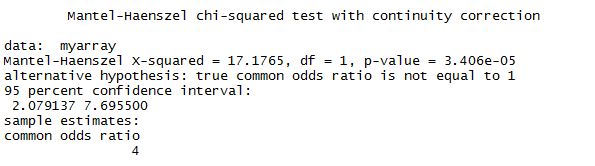
mantelhaen.test(myarray)

Results are as below and almost identical to what we found with T-SQL. Hence the conclusion drawn is valid, that the two datasets are different regardless of age.


m1

In the next post I will cover the calculation of relative risk with this method. Thank you for reading.

Dataset for Cochran-Mantel-Hanzel Test

Below is the script to create the table and dataset I used. This is just test data and not copied from anywhere.

USE [yourdb]
GO
/****** Object: Table [dbo].[DrugResponse] Script Date: 6/12/2017 6:45:46 AM ******/
SET ANSI_NULLS ON
GO
SET QUOTED_IDENTIFIERl ON
GO
SET ANSI_PADDING ON
GO
CREATE TABLE [dbo].[DrugResponse](
 [seqno] [int] IDENTITY(1,1) NOT NULL,
 [Batch] [smallint] NOT NULL,
 [Drug] [char](1) NOT NULL,
 [Response] [char](1) NOT NULL,
 CONSTRAINT [PK_DrugResponse] PRIMARY KEY CLUSTERED 
(
 [seqno] ASC
)WITH (PAD_INDEX = OFF, STATISTICS_NORECOMPUTE = OFF, IGNORE_DUP_KEY = OFF, ALLOW_ROW_LOCKS = ON, ALLOW_PAGE_LOCKS = ON) ON [PRIMARY]
) ON [PRIMARY]

GO
SET ANSI_PADDING OFF
GO
SET IDENTITY_INSERT [dbo].[DrugResponse] ON

GO
INSERT [dbo].[DrugResponse] ([seqno], [Batch], [Drug], [Response]) VALUES (1, 1, N'A', N'Y')
GO
INSERT [dbo].[DrugResponse] ([seqno], [Batch], [Drug], [Response]) VALUES (2, 1, N'A', N'Y')
GO
INSERT [dbo].[DrugResponse] ([seqno], [Batch], [Drug], [Response]) VALUES (3, 1, N'A', N'Y')
GO
INSERT [dbo].[DrugResponse] ([seqno], [Batch], [Drug], [Response]) VALUES (4, 1, N'A', N'Y')
GO
INSERT [dbo].[DrugResponse] ([seqno], [Batch], [Drug], [Response]) VALUES (5, 1, N'A', N'Y')
GO
INSERT [dbo].[DrugResponse] ([seqno], [Batch], [Drug], [Response]) VALUES (6, 1, N'A', N'Y')
GO
INSERT [dbo].[DrugResponse] ([seqno], [Batch], [Drug], [Response]) VALUES (7, 1, N'A', N'Y')
GO
INSERT [dbo].[DrugResponse] ([seqno], [Batch], [Drug], [Response]) VALUES (8, 1, N'A', N'Y')
GO
INSERT [dbo].[DrugResponse] ([seqno], [Batch], [Drug], [Response]) VALUES (9, 1, N'A', N'Y')
GO
INSERT [dbo].[DrugResponse] ([seqno], [Batch], [Drug], [Response]) VALUES (10, 1, N'A', N'Y')
GO
INSERT [dbo].[DrugResponse] ([seqno], [Batch], [Drug], [Response]) VALUES (11, 1, N'A', N'Y')
GO
INSERT [dbo].[DrugResponse] ([seqno], [Batch], [Drug], [Response]) VALUES (12, 1, N'A', N'Y')
GO
INSERT [dbo].[DrugResponse] ([seqno], [Batch], [Drug], [Response]) VALUES (13, 1, N'A', N'Y')
GO
INSERT [dbo].[DrugResponse] ([seqno], [Batch], [Drug], [Response]) VALUES (14, 1, N'A', N'Y')
GO
INSERT [dbo].[DrugResponse] ([seqno], [Batch], [Drug], [Response]) VALUES (15, 1, N'A', N'Y')
GO
INSERT [dbo].[DrugResponse] ([seqno], [Batch], [Drug], [Response]) VALUES (16, 1, N'A', N'Y')
GO
INSERT [dbo].[DrugResponse] ([seqno], [Batch], [Drug], [Response]) VALUES (17, 1, N'A', N'Y')
GO
INSERT [dbo].[DrugResponse] ([seqno], [Batch], [Drug], [Response]) VALUES (18, 1, N'A', N'Y')
GO
INSERT [dbo].[DrugResponse] ([seqno], [Batch], [Drug], [Response]) VALUES (19, 1, N'A', N'Y')
GO
INSERT [dbo].[DrugResponse] ([seqno], [Batch], [Drug], [Response]) VALUES (20, 1, N'A', N'Y')
GO
INSERT [dbo].[DrugResponse] ([seqno], [Batch], [Drug], [Response]) VALUES (21, 1, N'A', N'Y')
GO
INSERT [dbo].[DrugResponse] ([seqno], [Batch], [Drug], [Response]) VALUES (22, 1, N'A', N'Y')
GO
INSERT [dbo].[DrugResponse] ([seqno], [Batch], [Drug], [Response]) VALUES (23, 1, N'A', N'Y')
GO
INSERT [dbo].[DrugResponse] ([seqno], [Batch], [Drug], [Response]) VALUES (24, 1, N'A', N'Y')
GO
INSERT [dbo].[DrugResponse] ([seqno], [Batch], [Drug], [Response]) VALUES (25, 1, N'A', N'Y')
GO
INSERT [dbo].[DrugResponse] ([seqno], [Batch], [Drug], [Response]) VALUES (26, 1, N'A', N'Y')
GO
INSERT [dbo].[DrugResponse] ([seqno], [Batch], [Drug], [Response]) VALUES (27, 1, N'A', N'Y')
GO
INSERT [dbo].[DrugResponse] ([seqno], [Batch], [Drug], [Response]) VALUES (28, 1, N'A', N'Y')
GO
INSERT [dbo].[DrugResponse] ([seqno], [Batch], [Drug], [Response]) VALUES (29, 1, N'A', N'Y')
GO
INSERT [dbo].[DrugResponse] ([seqno], [Batch], [Drug], [Response]) VALUES (30, 1, N'A', N'Y')
GO
INSERT [dbo].[DrugResponse] ([seqno], [Batch], [Drug], [Response]) VALUES (31, 1, N'A', N'Y')
GO
INSERT [dbo].[DrugResponse] ([seqno], [Batch], [Drug], [Response]) VALUES (32, 1, N'A', N'Y')
GO
INSERT [dbo].[DrugResponse] ([seqno], [Batch], [Drug], [Response]) VALUES (33, 1, N'A', N'N')
GO
INSERT [dbo].[DrugResponse] ([seqno], [Batch], [Drug], [Response]) VALUES (34, 1, N'A', N'N')
GO
INSERT [dbo].[DrugResponse] ([seqno], [Batch], [Drug], [Response]) VALUES (35, 1, N'A', N'N')
GO
INSERT [dbo].[DrugResponse] ([seqno], [Batch], [Drug], [Response]) VALUES (36, 1, N'A', N'N')
GO
INSERT [dbo].[DrugResponse] ([seqno], [Batch], [Drug], [Response]) VALUES (37, 1, N'A', N'N')
GO
INSERT [dbo].[DrugResponse] ([seqno], [Batch], [Drug], [Response]) VALUES (38, 1, N'A', N'N')
GO
INSERT [dbo].[DrugResponse] ([seqno], [Batch], [Drug], [Response]) VALUES (39, 1, N'A', N'N')
GO
INSERT [dbo].[DrugResponse] ([seqno], [Batch], [Drug], [Response]) VALUES (40, 1, N'A', N'N')
GO
INSERT [dbo].[DrugResponse] ([seqno], [Batch], [Drug], [Response]) VALUES (41, 1, N'B', N'Y')
GO
INSERT [dbo].[DrugResponse] ([seqno], [Batch], [Drug], [Response]) VALUES (42, 1, N'B', N'Y')
GO
INSERT [dbo].[DrugResponse] ([seqno], [Batch], [Drug], [Response]) VALUES (43, 1, N'B', N'Y')
GO
INSERT [dbo].[DrugResponse] ([seqno], [Batch], [Drug], [Response]) VALUES (44, 1, N'B', N'Y')
GO
INSERT [dbo].[DrugResponse] ([seqno], [Batch], [Drug], [Response]) VALUES (45, 1, N'B', N'Y')
GO
INSERT [dbo].[DrugResponse] ([seqno], [Batch], [Drug], [Response]) VALUES (46, 1, N'B', N'Y')
GO
INSERT [dbo].[DrugResponse] ([seqno], [Batch], [Drug], [Response]) VALUES (47, 1, N'B', N'Y')
GO
INSERT [dbo].[DrugResponse] ([seqno], [Batch], [Drug], [Response]) VALUES (48, 1, N'B', N'Y')
GO
INSERT [dbo].[DrugResponse] ([seqno], [Batch], [Drug], [Response]) VALUES (49, 1, N'B', N'Y')
GO
INSERT [dbo].[DrugResponse] ([seqno], [Batch], [Drug], [Response]) VALUES (50, 1, N'B', N'Y')
GO
INSERT [dbo].[DrugResponse] ([seqno], [Batch], [Drug], [Response]) VALUES (51, 1, N'B', N'Y')
GO
INSERT [dbo].[DrugResponse] ([seqno], [Batch], [Drug], [Response]) VALUES (52, 1, N'B', N'Y')
GO
INSERT [dbo].[DrugResponse] ([seqno], [Batch], [Drug], [Response]) VALUES (53, 1, N'B', N'Y')
GO
INSERT [dbo].[DrugResponse] ([seqno], [Batch], [Drug], [Response]) VALUES (54, 1, N'B', N'Y')
GO
INSERT [dbo].[DrugResponse] ([seqno], [Batch], [Drug], [Response]) VALUES (55, 1, N'B', N'Y')
GO
INSERT [dbo].[DrugResponse] ([seqno], [Batch], [Drug], [Response]) VALUES (56, 1, N'B', N'Y')
GO
INSERT [dbo].[DrugResponse] ([seqno], [Batch], [Drug], [Response]) VALUES (57, 1, N'B', N'Y')
GO
INSERT [dbo].[DrugResponse] ([seqno], [Batch], [Drug], [Response]) VALUES (58, 1, N'B', N'Y')
GO
INSERT [dbo].[DrugResponse] ([seqno], [Batch], [Drug], [Response]) VALUES (59, 1, N'B', N'Y')
GO
INSERT [dbo].[DrugResponse] ([seqno], [Batch], [Drug], [Response]) VALUES (60, 1, N'B', N'Y')
GO
INSERT [dbo].[DrugResponse] ([seqno], [Batch], [Drug], [Response]) VALUES (61, 1, N'B', N'Y')
GO
INSERT [dbo].[DrugResponse] ([seqno], [Batch], [Drug], [Response]) VALUES (62, 1, N'B', N'Y')
GO
INSERT [dbo].[DrugResponse] ([seqno], [Batch], [Drug], [Response]) VALUES (63, 1, N'B', N'Y')
GO
INSERT [dbo].[DrugResponse] ([seqno], [Batch], [Drug], [Response]) VALUES (64, 1, N'B', N'Y')
GO
INSERT [dbo].[DrugResponse] ([seqno], [Batch], [Drug], [Response]) VALUES (65, 1, N'B', N'N')
GO
INSERT [dbo].[DrugResponse] ([seqno], [Batch], [Drug], [Response]) VALUES (66, 1, N'B', N'N')
GO
INSERT [dbo].[DrugResponse] ([seqno], [Batch], [Drug], [Response]) VALUES (67, 1, N'B', N'N')
GO
INSERT [dbo].[DrugResponse] ([seqno], [Batch], [Drug], [Response]) VALUES (68, 1, N'B', N'N')
GO
INSERT [dbo].[DrugResponse] ([seqno], [Batch], [Drug], [Response]) VALUES (69, 1, N'B', N'N')
GO
INSERT [dbo].[DrugResponse] ([seqno], [Batch], [Drug], [Response]) VALUES (70, 1, N'B', N'N')
GO
INSERT [dbo].[DrugResponse] ([seqno], [Batch], [Drug], [Response]) VALUES (71, 1, N'B', N'N')
GO
INSERT [dbo].[DrugResponse] ([seqno], [Batch], [Drug], [Response]) VALUES (72, 1, N'B', N'N')
GO
INSERT [dbo].[DrugResponse] ([seqno], [Batch], [Drug], [Response]) VALUES (73, 1, N'B', N'N')
GO
INSERT [dbo].[DrugResponse] ([seqno], [Batch], [Drug], [Response]) VALUES (74, 1, N'B', N'N')
GO
INSERT [dbo].[DrugResponse] ([seqno], [Batch], [Drug], [Response]) VALUES (75, 1, N'B', N'N')
GO
INSERT [dbo].[DrugResponse] ([seqno], [Batch], [Drug], [Response]) VALUES (76, 1, N'B', N'N')
GO
INSERT [dbo].[DrugResponse] ([seqno], [Batch], [Drug], [Response]) VALUES (77, 1, N'B', N'N')
GO
INSERT [dbo].[DrugResponse] ([seqno], [Batch], [Drug], [Response]) VALUES (78, 1, N'B', N'N')
GO
INSERT [dbo].[DrugResponse] ([seqno], [Batch], [Drug], [Response]) VALUES (79, 1, N'B', N'N')
GO
INSERT [dbo].[DrugResponse] ([seqno], [Batch], [Drug], [Response]) VALUES (80, 1, N'B', N'N')
GO
INSERT [dbo].[DrugResponse] ([seqno], [Batch], [Drug], [Response]) VALUES (81, 1, N'B', N'N')
GO
INSERT [dbo].[DrugResponse] ([seqno], [Batch], [Drug], [Response]) VALUES (82, 1, N'B', N'N')
GO
INSERT [dbo].[DrugResponse] ([seqno], [Batch], [Drug], [Response]) VALUES (83, 1, N'B', N'N')
GO
INSERT [dbo].[DrugResponse] ([seqno], [Batch], [Drug], [Response]) VALUES (84, 1, N'B', N'N')
GO
INSERT [dbo].[DrugResponse] ([seqno], [Batch], [Drug], [Response]) VALUES (85, 1, N'B', N'N')
GO
INSERT [dbo].[DrugResponse] ([seqno], [Batch], [Drug], [Response]) VALUES (86, 1, N'B', N'N')
GO
INSERT [dbo].[DrugResponse] ([seqno], [Batch], [Drug], [Response]) VALUES (87, 1, N'B', N'N')
GO
INSERT [dbo].[DrugResponse] ([seqno], [Batch], [Drug], [Response]) VALUES (88, 1, N'B', N'N')
GO
INSERT [dbo].[DrugResponse] ([seqno], [Batch], [Drug], [Response]) VALUES (89, 1, N'B', N'N')
GO
INSERT [dbo].[DrugResponse] ([seqno], [Batch], [Drug], [Response]) VALUES (90, 1, N'B', N'N')
GO
INSERT [dbo].[DrugResponse] ([seqno], [Batch], [Drug], [Response]) VALUES (91, 1, N'B', N'N')
GO
INSERT [dbo].[DrugResponse] ([seqno], [Batch], [Drug], [Response]) VALUES (92, 1, N'B', N'N')
GO
INSERT [dbo].[DrugResponse] ([seqno], [Batch], [Drug], [Response]) VALUES (93, 1, N'B', N'N')
GO
INSERT [dbo].[DrugResponse] ([seqno], [Batch], [Drug], [Response]) VALUES (94, 1, N'B', N'N')
GO
INSERT [dbo].[DrugResponse] ([seqno], [Batch], [Drug], [Response]) VALUES (95, 1, N'B', N'N')
GO
INSERT [dbo].[DrugResponse] ([seqno], [Batch], [Drug], [Response]) VALUES (96, 1, N'B', N'N')
GO
INSERT [dbo].[DrugResponse] ([seqno], [Batch], [Drug], [Response]) VALUES (97, 1, N'B', N'N')
GO
INSERT [dbo].[DrugResponse] ([seqno], [Batch], [Drug], [Response]) VALUES (98, 1, N'B', N'N')
GO
INSERT [dbo].[DrugResponse] ([seqno], [Batch], [Drug], [Response]) VALUES (99, 1, N'B', N'N')
GO
INSERT [dbo].[DrugResponse] ([seqno], [Batch], [Drug], [Response]) VALUES (100, 1, N'B', N'N')
GO
INSERT [dbo].[DrugResponse] ([seqno], [Batch], [Drug], [Response]) VALUES (101, 2, N'A', N'Y')
GO
INSERT [dbo].[DrugResponse] ([seqno], [Batch], [Drug], [Response]) VALUES (102, 2, N'A', N'Y')
GO
INSERT [dbo].[DrugResponse] ([seqno], [Batch], [Drug], [Response]) VALUES (103, 2, N'A', N'Y')
GO
INSERT [dbo].[DrugResponse] ([seqno], [Batch], [Drug], [Response]) VALUES (104, 2, N'A', N'Y')
GO
INSERT [dbo].[DrugResponse] ([seqno], [Batch], [Drug], [Response]) VALUES (105, 2, N'A', N'Y')
GO
INSERT [dbo].[DrugResponse] ([seqno], [Batch], [Drug], [Response]) VALUES (106, 2, N'A', N'Y')
GO
INSERT [dbo].[DrugResponse] ([seqno], [Batch], [Drug], [Response]) VALUES (107, 2, N'A', N'Y')
GO
INSERT [dbo].[DrugResponse] ([seqno], [Batch], [Drug], [Response]) VALUES (108, 2, N'A', N'Y')
GO
INSERT [dbo].[DrugResponse] ([seqno], [Batch], [Drug], [Response]) VALUES (109, 2, N'A', N'Y')
GO
INSERT [dbo].[DrugResponse] ([seqno], [Batch], [Drug], [Response]) VALUES (110, 2, N'A', N'Y')
GO
INSERT [dbo].[DrugResponse] ([seqno], [Batch], [Drug], [Response]) VALUES (111, 2, N'A', N'Y')
GO
INSERT [dbo].[DrugResponse] ([seqno], [Batch], [Drug], [Response]) VALUES (112, 2, N'A', N'Y')
GO
INSERT [dbo].[DrugResponse] ([seqno], [Batch], [Drug], [Response]) VALUES (113, 2, N'A', N'Y')
GO
INSERT [dbo].[DrugResponse] ([seqno], [Batch], [Drug], [Response]) VALUES (114, 2, N'A', N'Y')
GO
INSERT [dbo].[DrugResponse] ([seqno], [Batch], [Drug], [Response]) VALUES (115, 2, N'A', N'Y')
GO
INSERT [dbo].[DrugResponse] ([seqno], [Batch], [Drug], [Response]) VALUES (116, 2, N'A', N'Y')
GO
INSERT [dbo].[DrugResponse] ([seqno], [Batch], [Drug], [Response]) VALUES (117, 2, N'A', N'Y')
GO
INSERT [dbo].[DrugResponse] ([seqno], [Batch], [Drug], [Response]) VALUES (118, 2, N'A', N'Y')
GO
INSERT [dbo].[DrugResponse] ([seqno], [Batch], [Drug], [Response]) VALUES (119, 2, N'A', N'Y')
GO
INSERT [dbo].[DrugResponse] ([seqno], [Batch], [Drug], [Response]) VALUES (120, 2, N'A', N'Y')
GO
INSERT [dbo].[DrugResponse] ([seqno], [Batch], [Drug], [Response]) VALUES (121, 2, N'A', N'Y')
GO
INSERT [dbo].[DrugResponse] ([seqno], [Batch], [Drug], [Response]) VALUES (122, 2, N'A', N'Y')
GO
INSERT [dbo].[DrugResponse] ([seqno], [Batch], [Drug], [Response]) VALUES (123, 2, N'A', N'Y')
GO
INSERT [dbo].[DrugResponse] ([seqno], [Batch], [Drug], [Response]) VALUES (124, 2, N'A', N'Y')
GO
INSERT [dbo].[DrugResponse] ([seqno], [Batch], [Drug], [Response]) VALUES (125, 2, N'A', N'N')
GO
INSERT [dbo].[DrugResponse] ([seqno], [Batch], [Drug], [Response]) VALUES (126, 2, N'A', N'N')
GO
INSERT [dbo].[DrugResponse] ([seqno], [Batch], [Drug], [Response]) VALUES (127, 2, N'A', N'N')
GO
INSERT [dbo].[DrugResponse] ([seqno], [Batch], [Drug], [Response]) VALUES (128, 2, N'A', N'N')
GO
INSERT [dbo].[DrugResponse] ([seqno], [Batch], [Drug], [Response]) VALUES (129, 2, N'A', N'N')
GO
INSERT [dbo].[DrugResponse] ([seqno], [Batch], [Drug], [Response]) VALUES (130, 2, N'A', N'N')
GO
INSERT [dbo].[DrugResponse] ([seqno], [Batch], [Drug], [Response]) VALUES (131, 2, N'A', N'N')
GO
INSERT [dbo].[DrugResponse] ([seqno], [Batch], [Drug], [Response]) VALUES (132, 2, N'A', N'N')
GO
INSERT [dbo].[DrugResponse] ([seqno], [Batch], [Drug], [Response]) VALUES (133, 2, N'A', N'N')
GO
INSERT [dbo].[DrugResponse] ([seqno], [Batch], [Drug], [Response]) VALUES (134, 2, N'A', N'N')
GO
INSERT [dbo].[DrugResponse] ([seqno], [Batch], [Drug], [Response]) VALUES (135, 2, N'A', N'N')
GO
INSERT [dbo].[DrugResponse] ([seqno], [Batch], [Drug], [Response]) VALUES (136, 2, N'A', N'N')
GO
INSERT [dbo].[DrugResponse] ([seqno], [Batch], [Drug], [Response]) VALUES (137, 2, N'A', N'N')
GO
INSERT [dbo].[DrugResponse] ([seqno], [Batch], [Drug], [Response]) VALUES (138, 2, N'A', N'N')
GO
INSERT [dbo].[DrugResponse] ([seqno], [Batch], [Drug], [Response]) VALUES (139, 2, N'A', N'N')
GO
INSERT [dbo].[DrugResponse] ([seqno], [Batch], [Drug], [Response]) VALUES (140, 2, N'A', N'N')
GO
INSERT [dbo].[DrugResponse] ([seqno], [Batch], [Drug], [Response]) VALUES (141, 2, N'A', N'N')
GO
INSERT [dbo].[DrugResponse] ([seqno], [Batch], [Drug], [Response]) VALUES (142, 2, N'A', N'N')
GO
INSERT [dbo].[DrugResponse] ([seqno], [Batch], [Drug], [Response]) VALUES (143, 2, N'A', N'N')
GO
INSERT [dbo].[DrugResponse] ([seqno], [Batch], [Drug], [Response]) VALUES (144, 2, N'A', N'N')
GO
INSERT [dbo].[DrugResponse] ([seqno], [Batch], [Drug], [Response]) VALUES (145, 2, N'A', N'N')
GO
INSERT [dbo].[DrugResponse] ([seqno], [Batch], [Drug], [Response]) VALUES (146, 2, N'A', N'N')
GO
INSERT [dbo].[DrugResponse] ([seqno], [Batch], [Drug], [Response]) VALUES (147, 2, N'A', N'N')
GO
INSERT [dbo].[DrugResponse] ([seqno], [Batch], [Drug], [Response]) VALUES (148, 2, N'A', N'N')
GO
INSERT [dbo].[DrugResponse] ([seqno], [Batch], [Drug], [Response]) VALUES (149, 2, N'A', N'N')
GO
INSERT [dbo].[DrugResponse] ([seqno], [Batch], [Drug], [Response]) VALUES (150, 2, N'A', N'N')
GO
INSERT [dbo].[DrugResponse] ([seqno], [Batch], [Drug], [Response]) VALUES (151, 2, N'A', N'N')
GO
INSERT [dbo].[DrugResponse] ([seqno], [Batch], [Drug], [Response]) VALUES (152, 2, N'A', N'N')
GO
INSERT [dbo].[DrugResponse] ([seqno], [Batch], [Drug], [Response]) VALUES (153, 2, N'A', N'N')
GO
INSERT [dbo].[DrugResponse] ([seqno], [Batch], [Drug], [Response]) VALUES (154, 2, N'A', N'N')
GO
INSERT [dbo].[DrugResponse] ([seqno], [Batch], [Drug], [Response]) VALUES (155, 2, N'A', N'N')
GO
INSERT [dbo].[DrugResponse] ([seqno], [Batch], [Drug], [Response]) VALUES (156, 2, N'A', N'N')
GO
INSERT [dbo].[DrugResponse] ([seqno], [Batch], [Drug], [Response]) VALUES (157, 2, N'A', N'N')
GO
INSERT [dbo].[DrugResponse] ([seqno], [Batch], [Drug], [Response]) VALUES (158, 2, N'A', N'N')
GO
INSERT [dbo].[DrugResponse] ([seqno], [Batch], [Drug], [Response]) VALUES (159, 2, N'A', N'N')
GO
INSERT [dbo].[DrugResponse] ([seqno], [Batch], [Drug], [Response]) VALUES (160, 2, N'A', N'N')
GO
INSERT [dbo].[DrugResponse] ([seqno], [Batch], [Drug], [Response]) VALUES (161, 2, N'B', N'Y')
GO
INSERT [dbo].[DrugResponse] ([seqno], [Batch], [Drug], [Response]) VALUES (162, 2, N'B', N'Y')
GO
INSERT [dbo].[DrugResponse] ([seqno], [Batch], [Drug], [Response]) VALUES (163, 2, N'B', N'Y')
GO
INSERT [dbo].[DrugResponse] ([seqno], [Batch], [Drug], [Response]) VALUES (164, 2, N'B', N'Y')
GO
INSERT [dbo].[DrugResponse] ([seqno], [Batch], [Drug], [Response]) VALUES (165, 2, N'B', N'Y')
GO
INSERT [dbo].[DrugResponse] ([seqno], [Batch], [Drug], [Response]) VALUES (166, 2, N'B', N'Y')
GO
INSERT [dbo].[DrugResponse] ([seqno], [Batch], [Drug], [Response]) VALUES (167, 2, N'B', N'Y')
GO
INSERT [dbo].[DrugResponse] ([seqno], [Batch], [Drug], [Response]) VALUES (168, 2, N'B', N'Y')
GO
INSERT [dbo].[DrugResponse] ([seqno], [Batch], [Drug], [Response]) VALUES (169, 2, N'B', N'N')
GO
INSERT [dbo].[DrugResponse] ([seqno], [Batch], [Drug], [Response]) VALUES (170, 2, N'B', N'N')
GO
INSERT [dbo].[DrugResponse] ([seqno], [Batch], [Drug], [Response]) VALUES (171, 2, N'B', N'N')
GO
INSERT [dbo].[DrugResponse] ([seqno], [Batch], [Drug], [Response]) VALUES (172, 2, N'B', N'N')
GO
INSERT [dbo].[DrugResponse] ([seqno], [Batch], [Drug], [Response]) VALUES (173, 2, N'B', N'N')
GO
INSERT [dbo].[DrugResponse] ([seqno], [Batch], [Drug], [Response]) VALUES (174, 2, N'B', N'N')
GO
INSERT [dbo].[DrugResponse] ([seqno], [Batch], [Drug], [Response]) VALUES (175, 2, N'B', N'N')
GO
INSERT [dbo].[DrugResponse] ([seqno], [Batch], [Drug], [Response]) VALUES (176, 2, N'B', N'N')
GO
INSERT [dbo].[DrugResponse] ([seqno], [Batch], [Drug], [Response]) VALUES (177, 2, N'B', N'N')
GO
INSERT [dbo].[DrugResponse] ([seqno], [Batch], [Drug], [Response]) VALUES (178, 2, N'B', N'N')
GO
INSERT [dbo].[DrugResponse] ([seqno], [Batch], [Drug], [Response]) VALUES (179, 2, N'B', N'N')
GO
INSERT [dbo].[DrugResponse] ([seqno], [Batch], [Drug], [Response]) VALUES (180, 2, N'B', N'N')
GO
INSERT [dbo].[DrugResponse] ([seqno], [Batch], [Drug], [Response]) VALUES (181, 2, N'B', N'N')
GO
INSERT [dbo].[DrugResponse] ([seqno], [Batch], [Drug], [Response]) VALUES (182, 2, N'B', N'N')
GO
INSERT [dbo].[DrugResponse] ([seqno], [Batch], [Drug], [Response]) VALUES (183, 2, N'B', N'N')
GO
INSERT [dbo].[DrugResponse] ([seqno], [Batch], [Drug], [Response]) VALUES (184, 2, N'B', N'N')
GO
INSERT [dbo].[DrugResponse] ([seqno], [Batch], [Drug], [Response]) VALUES (185, 2, N'B', N'N')
GO
INSERT [dbo].[DrugResponse] ([seqno], [Batch], [Drug], [Response]) VALUES (186, 2, N'B', N'N')
GO
INSERT [dbo].[DrugResponse] ([seqno], [Batch], [Drug], [Response]) VALUES (187, 2, N'B', N'N')
GO
INSERT [dbo].[DrugResponse] ([seqno], [Batch], [Drug], [Response]) VALUES (188, 2, N'B', N'N')
GO
INSERT [dbo].[DrugResponse] ([seqno], [Batch], [Drug], [Response]) VALUES (189, 2, N'B', N'N')
GO
INSERT [dbo].[DrugResponse] ([seqno], [Batch], [Drug], [Response]) VALUES (190, 2, N'B', N'N')
GO
INSERT [dbo].[DrugResponse] ([seqno], [Batch], [Drug], [Response]) VALUES (191, 2, N'B', N'N')
GO
INSERT [dbo].[DrugResponse] ([seqno], [Batch], [Drug], [Response]) VALUES (192, 2, N'B', N'N')
GO
INSERT [dbo].[DrugResponse] ([seqno], [Batch], [Drug], [Response]) VALUES (193, 2, N'B', N'N')
GO
INSERT [dbo].[DrugResponse] ([seqno], [Batch], [Drug], [Response]) VALUES (194, 2, N'B', N'N')
GO
INSERT [dbo].[DrugResponse] ([seqno], [Batch], [Drug], [Response]) VALUES (195, 2, N'B', N'N')
GO
INSERT [dbo].[DrugResponse] ([seqno], [Batch], [Drug], [Response]) VALUES (196, 2, N'B', N'N')
GO
INSERT [dbo].[DrugResponse] ([seqno], [Batch], [Drug], [Response]) VALUES (197, 2, N'B', N'N')
GO
INSERT [dbo].[DrugResponse] ([seqno], [Batch], [Drug], [Response]) VALUES (198, 2, N'B', N'N')
GO
INSERT [dbo].[DrugResponse] ([seqno], [Batch], [Drug], [Response]) VALUES (199, 2, N'B', N'N')
GO
INSERT [dbo].[DrugResponse] ([seqno], [Batch], [Drug], [Response]) VALUES (200, 2, N'B', N'N')
GO
SET IDENTITY_INSERT [dbo].[DrugResponse] OFF
GO
Fischer’s Exact Test – with T-SQL and R

This post is a long overdue second part to the post on Chi Square Test that I did a few months ago.  This post addresses relationships between two categorical variables, but in cases where data is sparse, and the numbers (in any cell) are less than 5. The Chi Square test is to be used when numbers are higher than 5, but what if you have a problem with smaller numbers, and you want to find the connection between variables involved, or if there is a connection involved? To study this i picked a simple example from our SQL Saturday data. I have a very simple matrix like below. This tells me count of speakers, by gender, and separated as new (new to our event, not new entirely), and repeat, those who have attended our event.

Speakers New Repeat Row Total
Male 2 11 13
Female 1 2 3
Column Total 3 13 16

Step 1 – Setup Hypothesis: What is the question am trying to answer?  – if I were to choose 3 new speakers at random, say – what is the probability that a minimum of 1 of them will be a woman? Another more simplified way of stating the same problem is – Is there a correlation between gender and number of new speakers? From a statistical perspective, the assumption is a ‘no’ to begin with. (also called Null Hypothesis). If we disprove this statement, we prove the opposite – that there is a relationship. If not, there isn’t. So putting it down:
H0, or Null hypothesis : There is no correlation between gender and new speaker count that is statistically significant.
H1: The alternate hypothesis: There is a correlation between gender and new speaker count that is statistically significant.
What do both of these statements mean mathematically, or in other words , what would be the basis on which we make this decision? We can look at that in Step 3.

Step 2: Set up the appropriate test statistic: We choose to use Fischer’s test because of the sparse number of values we have, and also because our variables of choice are categorical.

Step 3: How do i decide? : The decision rule in two sample tests of hypothesis depends on three factors :
1 Whether the test is upper, lower or two tailed (meaning the comparison is greater, lesser or both sides of gender and speaker count)
2 The level of significance or degree of accuracy needed,
3 The form of test statistic.
Our test here is to just find out if gender and speaker count are related so it is a two tailed test. The level of significance we can use is the most commonly used 95% which is also the default in R for Fischer’s Test. The form of the test statistic is P value. So our decision rule would be that gender and speaker category are related if P value is less than 0.05.

Step 4: Calculation

Now, time to do the math...first, with R:
Input =(" Speaker New Repeat
 Male 2 11
 Female 1 2
 ")
 
 TestData = as.matrix(read.table(textConnection(Input),
 header=TRUE, row.names=1))
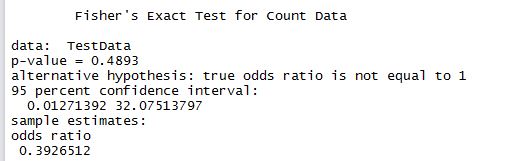
fisher.test(TestData,alternative="two.sided")

fischers

R is telling us that the p value is 0.4893. way above 0.05. And hence per our decision rule the two elements are not correlated based on the sparse data we have.

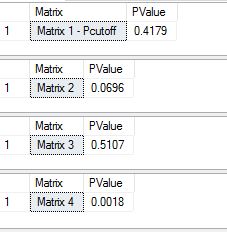
Now let us try the same thing with T-SQL. The calculation for Fischer’s test is rather elaborate when done manually – which is where you can appreciate how elegant and easy it is to use built-in functions with R. To do it otherwise, you need to not only code the calculation, but also come up with different possibilities of the same matrix. That is those that total up the same row and column wise. Then calculate the probabilities on each of them and sum those probabilities that are less than the ‘base probability’, or the one we derive from the base matrix. In this case we have 4 possible matrices as below, and each of the their probabilities (calculated with T-SQL) and as shown

Fischers1

T-SQL to calculate probabilities: All probability related math needs calculation of factorials. For this purpose I used the method described by Jeff Moden here.

DECLARE @newmen int , @newwomen int
, @repeatmen int , @repeatwomen int

DECLARE @pvalue numeric(18, 4)
DECLARE @numerator1 float,@numerator2 float,@numerator3 float,@numerator4 float,@numerator5 float 
DECLARE @denominator1 float,@denominator2 float,@denominator3 float,@denominator4 float,@denominator5 float

SELECT @newmen = 2, @newwomen = 1, @repeatmen = 11, @repeatwomen = 2


SELECT @numerator1 = [n!] FROM [dbo].[Factorial] WHERE N = (@newmen+@newwomen)
--select @newmen+@newwomen
SELECT @numerator2 = [n!] FROM [dbo].[Factorial] WHERE N = (@repeatmen+@repeatwomen)
--select @repeatmen+@repeatwomen

SELECT @numerator3 = [n!] FROM [dbo].[Factorial] WHERE N = (@newmen+@repeatmen)
--select @newmen+@repeatwomen

SELECT @numerator4 = [n!] FROM [dbo].[Factorial] WHERE N = (@newwomen+@repeatwomen)
--select @newwomen+@repeatmen

--select @numerator1, @numerator2, @numerator3, @numerator4
SELECT @denominator1 = [n!] FROM [dbo].[Factorial] WHERE N = @newmen
SELECT @denominator2 = [n!] FROM [dbo].[Factorial] WHERE N = @newwomen
SELECT @denominator3 = [n!] FROM [dbo].[Factorial] WHERE N = @repeatmen
SELECT @denominator4 = [n!] FROM [dbo].[Factorial] WHERE N = @repeatwomen
SELECT @denominator5 = [n!] FROM [dbo].[Factorial] WHERE N = (@newmen+@newwomen+@repeatmen+@repeatwomen)
SELECT @pvalue = (@numerator1*@numerator2*@numerator3*@numerator4)/(@denominator1*@denominator2*@denominator3*@denominator4*@denominator5)
--select @denominator1, @denominator2, @denominator3, @denominator4, @denominator5
SELECT 'Matrix 1 - Pcutoff' as Matrix, @pvalue as PValue


SELECT @newmen = 1, @newwomen = 2, @repeatmen = 12, @repeatwomen = 1

SELECT @numerator1 = [n!] FROM [dbo].[Factorial] WHERE N = (@newmen+@newwomen)
--select @newmen+@newwomen
SELECT @numerator2 = [n!] FROM [dbo].[Factorial] WHERE N = (@repeatmen+@repeatwomen)
--select @repeatmen+@repeatwomen

SELECT @numerator3 = [n!] FROM [dbo].[Factorial] WHERE N = (@newmen+@repeatmen)
--select @newmen+@repeatwomen

SELECT @numerator4 = [n!] FROM [dbo].[Factorial] WHERE N = (@newwomen+@repeatwomen)
--select @newwomen+@repeatmen

--select @numerator1, @numerator2, @numerator3, @numerator4
SELECT @denominator1 = [n!] FROM [dbo].[Factorial] WHERE N = @newmen
SELECT @denominator2 = [n!] FROM [dbo].[Factorial] WHERE N = @newwomen
SELECT @denominator3 = [n!] FROM [dbo].[Factorial] WHERE N = @repeatmen
SELECT @denominator4 = [n!] FROM [dbo].[Factorial] WHERE N = @repeatwomen
SELECT @denominator5 = [n!] FROM [dbo].[Factorial] WHERE N = (@newmen+@newwomen+@repeatmen+@repeatwomen)
SELECT @pvalue = (@numerator1*@numerator2*@numerator3*@numerator4)/(@denominator1*@denominator2*@denominator3*@denominator4*@denominator5)
--select @denominator1, @denominator2, @denominator3, @denominator4, @denominator5
SELECT 'Matrix 2' as Matrix, @pvalue as PValue


SELECT @newmen = 3, @newwomen = 0, @repeatmen = 10, @repeatwomen = 3


SELECT @numerator1 = [n!] FROM [dbo].[Factorial] WHERE N = (@newmen+@newwomen)
--select @newmen+@newwomen
SELECT @numerator2 = [n!] FROM [dbo].[Factorial] WHERE N = (@repeatmen+@repeatwomen)
--select @repeatmen+@repeatwomen

SELECT @numerator3 = [n!] FROM [dbo].[Factorial] WHERE N = (@newmen+@repeatmen)
--select @newmen+@repeatwomen

SELECT @numerator4 = [n!] FROM [dbo].[Factorial] WHERE N = (@newwomen+@repeatwomen)
--select @newwomen+@repeatmen

--select @numerator1, @numerator2, @numerator3, @numerator4
SELECT @denominator1 = [n!] FROM [dbo].[Factorial] WHERE N = @newmen
SELECT @denominator2 = [n!] FROM [dbo].[Factorial] WHERE N = @newwomen
SELECT @denominator3 = [n!] FROM [dbo].[Factorial] WHERE N = @repeatmen
SELECT @denominator4 = [n!] FROM [dbo].[Factorial] WHERE N = @repeatwomen
SELECT @denominator5 = [n!] FROM [dbo].[Factorial] WHERE N = (@newmen+@newwomen+@repeatmen+@repeatwomen)
SELECT @pvalue = (@numerator1*@numerator2*@numerator3*@numerator4)/(@denominator1*@denominator2*@denominator3*@denominator4*@denominator5)
--select @denominator1, @denominator2, @denominator3, @denominator4, @denominator5
SELECT 'Matrix 3' as Matrix, @pvalue as PValue

SELECT @newmen = 0, @newwomen = 3, @repeatmen = 13, @repeatwomen = 0


SELECT @numerator1 = [n!] FROM [dbo].[Factorial] WHERE N = (@newmen+@newwomen)
--select @newmen+@newwomen
SELECT @numerator2 = [n!] FROM [dbo].[Factorial] WHERE N = (@repeatmen+@repeatwomen)
--select @repeatmen+@repeatwomen

SELECT @numerator3 = [n!] FROM [dbo].[Factorial] WHERE N = (@newmen+@repeatmen)
--select @newmen+@repeatwomen

SELECT @numerator4 = [n!] FROM [dbo].[Factorial] WHERE N = (@newwomen+@repeatwomen)
--select @newwomen+@repeatmen

--select @numerator1, @numerator2, @numerator3, @numerator4
SELECT @denominator1 = [n!] FROM [dbo].[Factorial] WHERE N = @newmen
SELECT @denominator2 = [n!] FROM [dbo].[Factorial] WHERE N = @newwomen
SELECT @denominator3 = [n!] FROM [dbo].[Factorial] WHERE N = @repeatmen
SELECT @denominator4 = [n!] FROM [dbo].[Factorial] WHERE N = @repeatwomen
SELECT @denominator5 = [n!] FROM [dbo].[Factorial] WHERE N = (@newmen+@newwomen+@repeatmen+@repeatwomen)
SELECT @pvalue = (@numerator1*@numerator2*@numerator3*@numerator4)/(@denominator1*@denominator2*@denominator3*@denominator4*@denominator5)
--select @denominator1, @denominator2, @denominator3, @denominator4, @denominator5
SELECT 'Matrix 4' as Matrix, @pvalue as PValue

The response we get is as below.

fischers4

If we sum the 3 values that are less than base value 0.4179 – we get 0.4179 + 0.0696 + 0.0018 = 0.4893, which is exactly what we got from the R function.

Step 5: Conclusion: Since 0.4893 is greater than our desired value of 0.05, our decision rule did not pass. Or in other words, we accept the null hypothesis in Step 1, that there is no significant correlation between these two variables.

So, we can logically conclude, that based on the data we are given, we do not have enough evidence that gender of speakers and their count is actually related or significant. Thanks for reading!!


SQL Saturday Louisville precon – interview Andy Leonard

This will be year #9 of sql saturdays in Louisville. Every year (starting with 3rd or 4th), it has been a tradition to do ‘precons’ on Fridays. For those who don’t know – Precons are day long paid trainings by an expert in the subject, held on the friday before the event. We have heard repeatedly from many attendees that precons are their best bet at attending any solid training – they are local, priced low and given by the best of the teachers there is. Quite a number of attendees come to precons on their own dime to learn more.  In short it is impossible to overstate the value add of a precon to community.

We try to have 2 or 3 different precons on different subject areas. This year, we have a precon on Query Tuning by Grant Fritchey, SSIS/BIML by Andy Leonard and Building modern  data architecture by Joshua Luedemann.  Karla Landrum, the queen of sql saturdays – has been doing a blog interview with each presenter for the precons she has at SQL saturday, Pensacola. I thought this is a great way to publicize the event as well as the presenter and am doing it for our events too. This post is an interview with Andy Leonard.

If you are a serious BI/SSIS professional – it is impossible to not know Andy.  He is a highly respected person in the BI community – a technical guru and a former MVP who voluntarily gave up his title to enable more new people to get it. I am really glad to have him do a precon for us this year. Below is a short interview with him.

1. Give us a brief background/history of your work with sql server.
I started working with SQL Server in the late 1990’s. I was building electrical control systems and human-machine interfaces (HMIs) for manufacturing back then. To stress-test an HMI, I set the data-acquisition frequency to one second for every tag (data-collection point) and left for a 3-day weekend. When I returned I tried to open a 3GB Access file and… nothing happened. The stress test succeeded in letting me I’d need a bigger database engine. I found SQL Server 6.5 and it passed that same test. Problem solved.

2.What are the top 3 compelling reasons you’d give to someone for attending your precon – ‘intelligent-data-integration-ssis-design-patterns-and-biml’?
Automation is happening all around us. The days of being paid to copy, paste, and edit repetitive SSIS packages are fading fast; as are the days of manually building and deploying configurations scripts between SSIS Catalogs. Attendees will learn:
1) How to use Business Intelligence Markup Language (Biml) to automate the development of repetitive SSIS solutions;
2) How to leverage SSIS Design Patterns to improve SSIS package performance; and
3) How to combine SSIS Design Patterns and Biml to manage enterprise data integration. I’ll even throw in some demos of the free tools and utilities available at DILM Suite – no extra charge!

3. We are going through a lot of changes in database world. There are lot of skills required to sustain ourselves as data/BI professionals. Why do you think SSIS/BIML are among them, why is it so important to add to our skills as BI professionals?

All of the changes in data/BI are driven by economies of scale. Automation is driving down the costs of data integration and management. The net result is data integration developers can now deliver more in less time, with improved quality. There is benefit in spotting a trend and getting in early (ask me how I know!). Data integration automation with Biml is new-enough that one may still get in “early.”
4. What are a few reasons you’d give to someone for attending sql saturdays?
SQL Saturdays are awesome for so many reasons! My #1 reason for supporting SQL Saturdays is the networking opportunities they represent. I love the local-ness of the event. I love that SQL Saturdays offer so many in our community the opportunity to present their ideas and solutions to an audience for the very first time. And I love that SQL Saturdays introduce so many to our community. As I tell my lovely bride, Christy, attending a SQL Saturday is just like hanging out with family, except I don’t have to explain acronyms!

5. What do you like to do for fun/relaxation?

I like to read for relaxation. I read science fiction series – some old, others new. I really enjoyed The Expanse novels and I think the television series is doing a good job capturing the story line. I read business books (and listen to business audio books) because I’m interested in becoming a better businessperson and leader. I read (and listen to) books about theology and Christianity because I want to be a better husband, father, grandfather, and person.

I hope you enjoyed reading and hope it helps you sign up for his precon!! Thank you.