T-SQL Tuesday #152 – The crazy login client

This month’s T-SQL Tuesday is hosted by Deborah Melkin(b|t), and she has an interesting topic. She wants us to write a rant on a scenario we encountered at a client that has the common ‘it depends’ stance go right out of the window..or in other words, something that is so bad that there is no way it should be sustained practice, ever.
Its been a few years since I left consulting. But the last gig I was at – we encountered something like this. We had a big client who had outsourced all their database development and manual update work (no not to us, to some third-party contracting company). These were contractors paid by the hour, and the turnover was really high. Our client did not want to issue windows based authenticated logins to these people for some reason (do not recall what). So every week, when the week started, the contractor working on a particular server would get a SQL Server authenticated login they could use. This was valid just for that week and would expire the next week. And, every weekend , it was our job, as the remote DBA company, to set up those logins. We would get an excel spreadsheet with *hundreds* of names, and what kind of server/database/level of access was needed by the person. We then had to get on the server and painfully create these logins with the right access. We had to set up the password to be changed to something else on first login and set up the login itself to expire in a week. This was an entire day, sometimes two days’ worth of work to set up. And they *paid* us to do that! We tried some degree of automation, like writing some code to read the excel sheet and automatically create these logins. But, it didn’t work too well – because there would be some access needed that wasn’t the norm before, or some new database, or something or the other. Surely, if you want to outsource your work and care that much about security – there could be better ways? Some of the conversations/reasoning we had with this client, trying to explain *why* this approach was so problematic even if they were crazy enough to pay us to do it – as below.
1 Outsourcing work to a place with so much turnover can cause a ton of problems. No one person knows or is responsible for what came before them.
2 Having this many SQL Server logins is also a huge problem – there is no guarantee that people aren’t sharing their passwords (we actually caught several people doing this).
3 Having two third-party companies (one was us and the other was the contracting company) – with you the customer in the middle is in itself problematic. Ultimately your data and its security is your problem, not either of these company’s.
4 The ‘it depends’ clause does not belong at all in a scenario like this. Invest in paying people well and they will take good care of your data. Operate on principle of least privilege and your data will be more secure. Don’t pay someone to do trashy work with the line assuming that they will do it for money.
Needless to say I was really happy moving on from doing this sort of work. And am extra careful when I hear of companies outsourcing their stuff for cheap – you can run into all sorts of ridiculous scenarios like we did here. Thanks for reading.


T-SQL Tuesday 151 Round up: Coding Standards

I received a great collection of blog posts in response to my T-SQL Tuesday 151 – asking people to write on T-SQL Coding Standards.

Rob Farley (t|b) is of the opinion that coding values that help with efficiency are better than rigidly enforced standards, although he as a consultant abides by his customer’s needs in this regard. ‘Coding standards are not a bad thing. But I think values are better. Valuing readable code, valuing comments that explain the reasons for coding decisions, and valuing patterns that avoid problems, can raise the quality of the coding culture’.
Tom(b) from Czech republic has a neat list of standards they abide by and try to enforce. I particularly liked what they said on specifying nullability on temp tables/table variables, and on code being idempotent – re runnable.

Kevin Chant(t|b) talks about being consistent, and the importance of short, informative comments. Both points are valid and useful.

Aaron Bertrand(t|b) has an amazing post on ‘controversial standard’ CAST Vs Convert – I really enjoyed reading this one. I always use CONVERT personally, but was not aware of the gotchas with CAST that he points out – such as with yyyy-mm-dd and British date, and of CAST being unsupported in other platforms. CONVERT for the win, and am glad I stuck with it. Aaron’s posts are always very informative, and packed with some snarky humor as well. Don’t miss reading this one!

Glenn Berry(t|b) has a nice post where he talks of some basic coding standards, defends his use of NOLOCK and OPTION RECOMPILE on his DMV queries (I believe this is totally fine and use his queries extensively). In the end , he too is of the same opinion as Rob Farley – that ‘it is much more important to have functional, readable code that performs well and is easier to maintain.’.

Deborah Melkin(t|b) has a post that lists the coding standards she thinks are important. She raises an important point – do you fail a PR if a standard is not met if it is not that critical, or just flag it as something to be fixed later? She also discusses the burden of being the ‘one person’ on the team who has to enforce standards and how hard that can sometimes be.

My good friend Steve Jones(t|b) lists a few standards he thinks are important but emphasizes that it is important there is a standard to begin with. He also has a gentle rebuke for me for hosting this blog party 4 times and wants more new folks to start hosting T-SQL Tuesdays going forward. If you are reading this and are interested in hosting, please contact him on twitter.

Deepthi Goguri(t|b) has an excellent blog post on T-SQL practices she wished she knew earlier..it is packed with various tools and tips any T-SQL programmer can use. I did not know of PoorSQL as a formatting tool, and I also appreciated the tip on updating statistics after importing a large number of rows. Well done, Deepthi!

Ken Fisher(t|b) talks of organizational politics with standards – and the importance of having one set of standards everyone in the organization agrees to. I can totally see how this can be a problem in a large organization.

Gerard Jaryczewski(t|b) is writing his first T-SQL Tuesday post – welcome Gerard!! He talks of the importance of simplicity and consistency as T-SQL Standards, naming conventions and adhering to the naming convention of the domain the language uses.

Hugo Kornelis(t|b), an amazing friend I look to for T-SQL related knowledge and guidance talks about having one standard and sticking to it even if you disagree. He also has an interesting take on prefixing view names, something I freely admit I’ve done and enforced as a standard many times..Hugo believes tables and views have to be interchangeable, so you don’t need to be named differently and there are other ways to find out if something is a view..my take personally has been that view is considered code while a table isn’t..so knowing what is code helps in including it for various purposes of analysis. Regardless I respect Hugo’s stance and will consider it going forward for my standards too.

My good friend Tracy Boggiano(t|b) has some great tips on readability here. She also suggests putting performance ahead of any formatting related standards.

To summarize, the lessons I learned are as below –
1 It is important to have standards
2 Pick one set of standards and stick to them.
3 Respect standards at the client (if you are a consultant) or existing standards wherever you go.
4 Performance and code that functions right is more important compared to how it looks, although readability matters too.
5 Standards include stuff that you shouldn’t use, like CAST instead of CONVERT.
6 Many other standards are buried in the posts above.
7 Sign up with Steve to host a T-SQL Tuesday, if you haven’t already!!

That is it!! Thank you to everyone who participated and sharing your nuggets of wisdom.

T-SQL Tuesday 151 Invite: T-SQL Coding Standards

T-SQL Tuesday is the blog party started by Adam Machanic (b|t) over a decade ago and is now maintained by Steve Jones (b|t) on tsqltuesday.com. On the first Tuesday of each month, a blogger hosts the party and suggests a topic. Anyone interested in the topic gets to blog about it. You have one week to write your blog post. It has to go live on the second Tuesday of the month. The host then compiles a list of posts and creates a blog post, for a summarized read. It is a great way to get thinking on subjects you may not have thought of, read other people’s ideas on the same subject, and also get a few people to visit your blog to read your thoughts. Many bloggers including me have used this to get started.

I am honored to be the host for June 2022’s T-SQL Tuesday.

My invite is about coding standards, or what I now call Linting Rules, for T-SQL. What are the T-SQL coding rules that are appropriate for where you work and what you do? If there are exceptions to those rules, state them too! If this is enough, read the blog party rules below and get started!!

  • Your post must be published on Tuesday June 14, 2022.
  • Your post must contain the T-SQL Tuesday logo (see above) and the image must link back to this blog post.
  • Trackbacks should work, but if not please put a link to your post in the comments section so everyone can see your contribution! (My comments are moderated so please don’t worry if yours doesn’t appear right away, I will make sure it does!)
  • If you are on twitter include the hash tag #tsql2sday – it helps with RT-s and visibility!!

More on why I picked this topic as below –

When I started out as a DBA two decades ago, I had a list of rules that I would carry with me into every job I went..these are things I look for in T-SQL code and try to enforce as standard. Some examples were casing rules, minimized usage of SELECT STAR, equating the right data types in columns, avoiding NOLOCK hint and so on. Standards ensure quality and consistency in code.

Standards differ for each firm, depending on what is appropriate for an environment..it is even possible to have varying standards in the same company, depending on the environment and what is appropriate for a database. This is an excellent article on what are the different components that comprise coding standards, and why we need them. I am also a big proponent of automated code checking for standards – there are lots of tools available for doing this – SQL Prompt, which is a personal favorite of mine, and many others as listed here.

Several tools currently do linting on many relational platforms, not just SQL Server. Almost all of them though, have rules that the author(s) think are best for the worlds they work in, and do not include other conditions which they have not encountered yet. A common example I like to use is unnamed primary keys on temporary tables. There is nothing inherently wrong with having an inline primary key constraint/index on a temporary table – but if you use Query Store, plan forcing on a plan that uses this temp table will not work simply because the constraint gets named differently each time. When I started to look for a linting tool for where I work – I ran into so many rules that were non-existent or not applicable to my environment with outside tools that I decided to write my own using ScriptDOM – a Microsoft-provided library that was created specifically for this purpose.

It would help greatly if we had a collection of rules that people use to pick from and enforce as appropriate for their environments. It will also help me to code some of these into ScriptDOM and put it out on GitHub, if the rule is one that ScriptDOM can find easily. So, re-stating the call for this month – What are the T-SQL coding rules that are appropriate for where you work and what you do? If there are exceptions to those rules, state them too!

T-SQL Tuesday 150: My first technical job

I am glad to be contributing to the 150th blog party started by Adam Machanic and has helped so many get our blogs going. This month’s T-SQL Tuesday is hosted by a dear friend Ken Fisher – Ken wants us to write on our first technical job.

The year was 1987. I was an engineering dropout who had learned some COBOL, and some DBASE at a tech school liked the latter better, and was looking for a job. It wasn’t an easy time to be a techie. Most tech jobs expected engineering degrees, it was much much later that non-engineers would be able to make their way into tech jobs. The transition from paper-based systems into the digital world was threatening to a lot of people. There were union-led strikes at banks and various government-run organizations with people objecting to the ‘new computers’ taking away their jobs. I made a few bucks teaching some COBOL on the side but was desperate otherwise to find a gig. In those days newspaper ads for jobs were very common. One ad caught my attention – a ‘Data Systems Manager’ role, at a textile company. I got my resume together and highlighted my experience with DBase and an accounts payable project that I had done learning it. Included some reports, printed on ribbon-based dot matrix printers, line by line – I can still hear them run in my head :). Two days later, I got a call for an interview. The interviewer was a 65-year-old man, an expat from the US, and getting ready to retire. He was the only person they could find who could ask me any tech questions 🙂 He asked me a few easy ones, and then asked – why DBase over COBOL? I like the GUI and ease with which I could play with data, I said. He was impressed. I got the job and started.

The first few months were fun, writing DBASE programs for their Accounts Payable, Accounts Receivable, and Payroll. After that, the pollution at the place got to me. They stored clothing, and there was a lot of dust. The building was old and there was plenty of mold. Two years later, I got really ill with severe allergies and lung congestion. I had to quit that job, learn more FoxPro and other software and move on to other stuff. I learned the hard way to never compromise on health for any job. It is like driving without time for gas. It never works.

That gig taught me about my passion for working with data though, and that carried me a long way. Thanks, Ken, for hosting.

T-SQL Tuesday 148: Finding and keeping a consistent audience, and what works


This months’ T-SQL Tuesday blog party is hosted by Rie Merrit (t|b) as part of Azure Community Group lead. Her call is to pick one or two things that work for running a user group and blog on it.

I am co lead at two user groups – the Triangle SQL Server User Group and Data Platform WIT virtual group. I will write here on two topics – finding and keeping a consistent audience, which I have learned from Triangle SQL Server User Group, and finding what works to keep the group going – which I learned from Data Platform WIT group.

Lessons from Triangle SSUG: Finding and Keeping a consistent audience
The Triangle SQL Server User Group is primarily led by Kevin Feasel(b|t). The rest of us on the board are me, Tracy Boggiano(b|t), Mike Chrestenson, and Rick Pack(t). When I joined the team they were already going strong with 3 meetings a month – each themed around DBA/Advanced DBA and Data Science respectively. Each meeting had a different location and sponsor and their own audience, with some overlap between DBA and Advanced DBA. When Covid hit and in-person meets went away, we brainstormed on what our strategy would be, to keep the show going. We had the following challenges.

1 It was difficult to find speakers for the data science group. There were few people and the community around it was a bit scattered.
2 Networking with virtual meets was limited and that was a big value people got out of our in-person meetings.
3 We had to make virtual meetings attractive enough to keep the audience we already had.

The challenges with keeping a physical location and finding sponsors were no longer relevant, thankfully – although that might be back soon. But we made the following changes to how we operated.

1 We expanded the focus of the data science group to include BI topics. This made it easier to seek speakers from among the BI #sqlfamily community. It has been much less of a challenge and going well.
Lesson: Broaden your topics if you are not getting enough people.

2 Kevin created a bi-weekly chat show called Shop Talk – we get on the air and talk about various tech topics and address any issues the audience wants to talk about. The show has had a dedicated audience and has been going really well. Granted, I will readily admit that Kevin is the star of the show because of his ability to speak with ease on any data topic and offer expert-level advice for free – but my take is that even if you don’t have a Kevin, and you don’t want a regular show – you can try the occasional online chat and invite the audience to weigh in. People like engagement and like to listen to topics that interest them.
Lesson: Try something different, like chat shows, every now and then if not regularly.

3 We did a few day-long virtual events – we had some attendance but not a lot. It wasn’t worth the effort and we don’t do it anymore.
Lesson: Don’t waste time doing things that do not gain audience traction.

4 For regular ug meets – we work hard on finding diverse topics and speakers. We look at social media for talks that speakers have, and also on listings like the one on Azure Community groups and ask the speaker if they would like to talk for us. We keep a consistent time and day on which we have the meets – no compromises there. This helps the audience to plan their availability easily. These things have really paid off. Our average user group attendance is around 20 people and some talks have up to 40 people tune in – several from various parts of the world, not just ours.
Lesson: Find diverse topics and keep consistent timings so that audience knows when to tune in.

Lessons from DPWIT: Finding what works
I joined the DPWIT group last year when PASS dissolved and Kathi Kellenberger was looking for a co-lead. We are two years old as of this March. The primary goal of the group was and it continues to be to empower women in tech by highlighting what they do – via speaking or other means. For six months we continued to host tech talks as it had been in the past. We suffered a low audience – mostly because there was an abundance of tech talks, several were already recorded and on youtube. Then we decided to put on day-long tech events. This was a huge amount of effort and still didn’t get a lot of traction. Then, Kathi and I did some interviews with the women who were going to do pre-cons at PASS community summit. These interviews were spontaneous, a lot of fun, and to our surprise got significant viewership as well. So, this year, my new co-lead Leslie Andrews and I decided to stick with doing interviews with tech women – mostly those who were not very famous in the community and needed high lighting. We have done two so far and it has been going really well. We also continue to write the monthly newsletter, keeping up with what Kathi used to do in this regard.
Lesson: Experiment and find what works well to get a decent audience. There is a huge range of options. You may fail a few times before you succeed.

Last, but not least – make sure what you are doing as a user group lead energizes you. If not feel free to give it up. When I gave up running SQL Saturdays , which I ran for 12 years in a row at Louisville – I felt really low and thought would miss doing it a lot. I do miss doing it – but lots of other things have taken that place. It was right for a certain time, but no more. Life goes on. Stay energized with what motivates you, and stay connected to the community in ways that work for you!! Thank you, Rie, for hosting.

Thrilled to #BITS!

2021 was a strange year…mid way through a pandemic, enormously depressing on many fronts to me..and yet, it bought with it some unexpected joys. I never imagined, in the wildest of dreams, that I would get a chance to present at a prestigious non-US conference. But this year, I was selected to present at SQLBits, the biggest conference for SQL Server Data professionals in Europe and among the best professionally run events there is. They are doing a blended event this year, so you can attend from where you are- although given a chance I’d be in London in an absolute heartbeat!! Sign up to attend if you are reading this!

Details of my session are as below. I will be co presenting with the awesome Koen Verbeeck (b | t).

Finding and Fixing T-SQL Anti-Patterns with ScriptDOM

Quality code is free of things we call ‘anti-patterns’ – nolock hints, using SELECT *, queries without table aliases, and so on.
We may also need to enforce certain standards: naming conventions, ending statements with semicolons, indenting code the right way etc. Furthermore, we may need to apply specific configurations on database objects, such as to create tables on certain filegroups or use specific settings for indexes.

All of this may be easy with a small database and a small volume of code to handle, but what happens when we need to deal with a large volume of code? What if we inherit something full of these anti-patterns, and we just don’t have time to go through all of it manually and fix it? But suppose we had an automated utility that could do this for us? Even better, if we could integrate it in our Azure Devops pipelines?

ScriptDOM is a lesser-known free tool from SQL Server DacFx which has the ability to help with finding programmatic and stylistic errors (a.k.a linting) in T-SQL code. It can even fix some of these errors!
In this session, we will learn about what it is, how we can harness its power to read code and tell us what it finds, and actually fix some of those anti-patterns.
Join us for this highly interactive and demo-packed session for great insights on how to improve the quality of your code. Basic knowledge of T-SQL and Powershell is recommended to get the most out of this session.

ROOM 03

Thu 14:10 – 15:00

Oh, I did miss saying that the awesome Ben Weismann(b | t) will be our moderator as well..Hope to see some of you there if you are reading this!!

Parsing scripts with ScriptDOM

In the last post I wrote about what ScriptDOM is and why it is useful. From this post, I will explain how it can be put to use. What it does when you pass a script to it is to parse it, check if it is free of syntax errors, and build what is called an ‘Abstract Syntax Tree’, which is a programmatic representation of the script, with nodes and branches for each code element. The rest of the usage/functionality is built around the Abstract Syntax Tree. So in this post let us look into how this is accomplished.

1 Download ScriptDOM from here. There are separate versions for .NET core and .NET framework. I will be using the latter in my blog posts. All you need is the library Microsoft.SqlServer.TransactSql.ScriptDom.dll – you can search where it is installed and copy it somewhere for your use, or leave it where it is. The default location is C:\Program Files\Microsoft SQL Server\<version>\DAC\bin\

2 Add a reference to the DLL as the first line of the PowerShell script – like below.

Add-Type -Path "C:\Program Files\Microsoft SQL Server\150\DAC\bin\Microsoft.SqlServer.TransactSql.ScriptDom.dll"

3 Create the parser object with a compatibility level that is appropriate to the SQL server database you are planning to deploy the scripts on or where scripts already exist. I used 150, you go all the way back to 90.

$parser = New-Object Microsoft.SqlServer.TransactSql.ScriptDom.TSql150Parser($true)

4 Create the object that will hold syntax errors if any.

$SyntaxErrors = New-Object System.Collections.Generic.List[Microsoft.SqlServer.TransactSql.ScriptDom.ParseError]
5 Parse the file into strings using streamreader, and then call the parser object with strings to check for syntax errors.

$stringreader = New-Object -TypeName System.IO.StreamReader -ArgumentList $Script

6 Build an abstract syntax tree from string reader object.

$tSqlFragment = $parser.Parse($stringReader, [ref]$SyntaxErrors)

Then we check if the syntaxerrors object has anything in it, which means there are errors. I removed a comma after the first column and

7 Example:

I have a script as below in which I have introduced a syntax error. I removed a comma after the first column.

USE [AdventureWorks2019]
GO

SET ANSI_NULLS ON
GO

SET QUOTED_IDENTIFIER ON
GO

CREATE TABLE [HumanResources].[Department](
[DepartmentID] [smallint] IDENTITY(1,1) NOT NULL
[Name] [dbo].[Name] NOT NULL,
[GroupName] [dbo].[Name] NOT NULL,
[ModifiedDate] [datetime] NOT NULL,
CONSTRAINT [PK_Department_DepartmentID] PRIMARY KEY CLUSTERED
(
[DepartmentID] ASC
)WITH (PAD_INDEX = OFF, STATISTICS_NORECOMPUTE = OFF, IGNORE_DUP_KEY = OFF, ALLOW_ROW_LOCKS = ON, ALLOW_PAGE_LOCKS = ON, OPTIMIZE_FOR_SEQUENTIAL_KEY = OFF) ON [PRIMARY]

) ON [PRIMARY]
GO

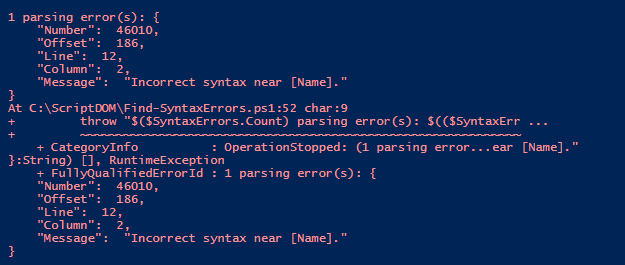
I pass this script to the syntax checking function as below. (The code for the entire function is below this post).
Find-SyntaxErrors c:\scriptdom\createtable.sql

My results are as below.

I add a comma,fix the error, and re-run it – my results are as below

This is hence an easy, asynchronous way to check for syntax errors in code. To be aware though that it cannot validate objects (check for valid column names/table names etc) as it is not connected to any SQL Server.

The output of a syntactically clean script is the abstract syntax tree object – which can be used to find patterns. In the next post, we can look at how to use it to find what we need in the code. The complete code is as below. Thanks for reading!

<#
.SYNOPSIS
Will check passed script for syntax errors
.DESCRIPTION
Will display syntax errors if any
.NOTES
Author : Mala Mahadevan (malathi.mahadevan@gmail.com)
.PARAMETERS
-Script: text file containing T-SQL
.LIMITATIONS
Can only check for syntax, not validate objects since it is asynchronous and not connected to any sql server
.LINK
.HISTORY
2022.01.25 V 1.00
#>
function Find-SyntaxErrors
{
[CmdletBinding()]
param(
$Script
)
try {
# load Script DOM assembly for use by this PowerShell session
Add-Type -Path "C:\Program Files\Microsoft SQL Server\150\DAC\bin\Microsoft.SqlServer.TransactSql.ScriptDom.dll"
If ((Test-Path $Script -PathType Leaf) -eq $false)
{
$errormessage = "File $Script not found!"
throw $errormessage
}
#Use the parser that is best suited to your compat level.
$parser = New-Object Microsoft.SqlServer.TransactSql.ScriptDom.TSql150Parser($true)
#Set object to capture errors if any
$SyntaxErrors = New-Object System.Collections.Generic.List[Microsoft.SqlServer.TransactSql.ScriptDom.ParseError]
#Set object to read script linewise
$stringreader = New-Object -TypeName System.IO.StreamReader -ArgumentList $Script
#Building the abstract syntax tree
$tSqlFragment = $parser.Parse($stringReader, [ref]$SyntaxErrors)
#If any syntax errors are found display
if($SyntaxErrors.Count -gt 0) {
throw "$($SyntaxErrors.Count) parsing error(s): $(($SyntaxErrors | ConvertTo-Json))"
}
else
{
write-host "No Syntax errors found in $($Script)!" -backgroundcolor Green
}
}
catch {
throw
}
}

T-SQL Tuesday 146: Where should business logic reside?

I am trying to get started on blogging again this year…T-SQL Tuesday came in handy with a great topic. This month’s host is Andy Yun(t |b). Andy’s challenge for us is to write about some notion ‘something you’ve learned, that subsequently changed your opinion/viewpoint/etc. on something. ‘

There are many things on which I’ve changed my opinion in my journey as a data professional. For this blog post, I picked a common one – where business logic should reside. During my years as a production DBA – there was (and probably is) a hard-held belief that databases are meant for CRUD operations only and business logic belongs in the application/middle tier. This belief has its place – DBAs don’t like debugging code that is application-specific, or be tasked with why data looks a certain way or what code caused it. Business logic can also be very complex and get deeply embedded in one place (the database). I have believed in this and fought for this at most places I’ve worked as a DBA.

Over time though, my opinion has changed. The fact that DBAs have to learn some degree of programming to survive today’s world has a lot to do with it. Also, I started to understand the nature of business logic better. I learned that a lot of things like foreign key constraints, not null constraints, triggers actually have to do with business logic and how the business defines its data. Databases usually outlive applications and less work is necessary when there is a move to a new application layer. It is much faster to make changes on the database side and roll it out compared to most application changes. It also offers single-point control of business logic, as opposed to it spread all over the place in applications.

And last but not least – learning business logic makes a person an important asset to the business. Most DBAs complain about being ‘just firefighters’…if we know business logic and have control over that, that makes us more than that – it makes us an important asset, in addition to helping us learn more programming as part of that process.

I do realize that there are cons to putting business logic in the database too. It can be very complex in some cases. The business may not have enough people to maintain it. It is a single point of control, therefore a single point of failure too if one looks at it that way. But now I believe there are more advantages to it than disadvantages. Thank you, Andy, for hosting.

TSQL-Tuesday 143: Short Code Examples

I decided to resume tech blogging after a long break and this tsql-tuesday came in handy. This month’s blog part is hosted by John McCormack (B|T). He would like us to blog about handy scripts.

I use Query Store a lot where I work – and I’d like to share queries I use on Query Store DMVs that I find incredibly useful.

My favorite is one below, which I use to see stored procedure duration. It comes with other information including plan id, start and end time – all of us help me see red flags right away if there is any query not performing as well as it should.

SELECT q.object_id,object_name(q.object_id),q.query_id,max_duration, avg_duration, max_rowcount,
   p.plan_id,i.start_time,i.end_time
FROM sys.query_store_runtime_stats AS a
JOIN sys.query_store_runtime_stats_interval i
ON I.runtime_stats_interval_id = a.runtime_stats_interval_id
JOIN sys.query_store_plan p on p.plan_id = a.plan_id
JOIN sys.query_store_query q on p.query_id = q.query_id
WHERE q.object_id = object_id(‘dbo.myproc’)
order by i.start_time DESC

My next favorite one is one I use to find a plan based on text in the query.

SELECT c.plan_id, cast(c.query_plan as xml) , c.last_execution_time
FROM sys.query_store_plan C INNER JOIN sys.query_store_query B
ON C.query_id = b.query_id
INNER JOIN sys.query_store_query_text A ON
B.query_text_id = A.query_text_id
WHERE A.query_sql_text like ‘tablea’

The last one is duration of specific queries over time.

SELECT TOP 100 avg_duration/1000000.0 avg_dur_sec
FROM

sys.query_store_runtime_stats WHERE plan_id = 4962438
order by runtime_stats_id DESC

If you are reading this and not using query store yet – you must. Consider signing up for Erin Stellato’s precon too at the upcoming past community summit. It may be a good use of your time and money.

Crocs and Naps….

I was planning a blog post for a TSQL2sday..instead would up writing an obituary blog post for a dear friend who passed on yesterday.

Brian Moran was among the older members of the community. I was introduced to him by a mutual friend at a SQL saturday many years ago. I recognized him instantly as the person who with a beard (he didn’t have one when i met him) who wrote articles in SQLServerMagazine. There was one on statistics, i think, which was well written that i could recall well and i spent some time discussing that with him. It was actually a funny discussion because it was a really old article, one that he could not recollect writing, but one that I could recollect really well because it was one I read during my early years as a SQL Server DBA. But he managed to keep up the conversation with ‘hmmm’, ‘did i really say that’, ‘oh wow your memory is great’ and so on. He didn’t seemed bored or tired discussing something that old and was keen we become friends. I appreciated that and it started the beginning of a friendship that will remain among my sweetest memories.

What I really appreciated about Brian was his sense of humor – ability to laugh at just about anything. We were discussing careers once after he moved to microsoft in a sales position, and was doing more recruiting for them. He reached out to me and asked if i’d be interested in a salesy role and i said no, ‘i can’t sell a pin’. At the next sql saturday at DC , I was sitting at the swag table with some PASS Related swag to hand to attendees. There were some pins ..he came up and said ‘what do you have here?’… I handed him a pin, he turned his head and went ‘look what you just did..you sold me a pin..bwahahaha’…and then we met the Microsoft manager for the role, and he introduced me ‘This is Mala, she can sell a pin, really well. She is great ‘…we laughed a good amount of time after that.

I liked how much Brian enjoyed life, or seemed to. He spent a lot of time in beaches, loved naps and wearing crocs around even when he wasn’t at a beach. To me, tech is a way of finding time to do things like that, not an end in of itself and he was exactly that. I also liked informal, sloppy footwear a lot. With an arch problem I could not wear flip flops even when i wanted to and that left me mostly with crocs, most of which were oversized for a female with small feet like me. When i finally found some that matched my size..i actually texted Brian from the shoe store… ‘they are bright yellow, but seem to fit..what do you think?’…he responded ‘go for it!’. I bought those and they are still with me.

In Brian’s memory, when COVID is over, I will wear those bright yellow crocs to the beach..and enjoy a nap after. Or two. And laugh and hug more. RIP dear, kind, funny friend. Thank you for the cheer and brighness you bought all of us.