TSQL Tuesday #83 – The Stats update solution

TSQL Tuesday is a monthly blog part hosted by a different blogger every month – it was started by Adam Machanic. This week’s TSQL Tuesday is hosted by Andy Mallon – the topic is ‘We’re dealing with the same problem’. I have chosen to write about a common problem I have encountered at many places I have worked at. The problem has to do with queries or stored procedures that suddenly start to perform poorly – when no changes have been made to the code or to the server.

The common perception/misunderstanding I have encountered for this is that it is only an issue with statistics updates and updating statistics with full scan should take care of it. In many cases this is the real reason. In some cases it really isn’t. It could be an issue with parameter sniffing, and a plan being reused that was generated for a set of parameters and appropriate for that set of parameters. But, most people jump to fixing statistics. This is especially true when they don’t really have the runtime plan it used, can’t find it in the cache and are just going with some sort of past experience.

At one place I was at people would update statistics every 10 minutes or so in a frantic attempt to ‘fix the slow query’, which would at many times not respond at all. At another place they actually had an automated check for when the stored procedure finished running and if it was still running beyond its normal duration a full scan statistics update would fire off. None of these are wrong – but repeatedly doing the same thing when the query does not improve, and assuming that is the only reason for the problem is wrong.

What I do is to recompile the plan with different parameters – test it to see the performance. If you are able to get a difference in performance with a different set of parameters then it is probably a parameter sniffing issue. And, if the stats updates do not fix it it is probably that too. Statistics updates are never really a bad thing to do, but they may not fix every slow query there is. Check if the issue is with parameter sniffing also. Also make sure there are no changes that went out – to the code and to the environment, that may be contributing to it.


 

11 years of PASS Summit

This is a story of my 11-year association with PASS, and the many ways it helped me grow as a person and in my career. And the many ways I saw other people grow.

 Summit #1 – 2006: Gaylord,TX: I was a visa holding dba-developer at a small shop. The Microsoft marketing person who came to meet my boss sent me some info on the summit when I asked him for info on SQL Server related training. I could only afford two days along with paying for lodging and airfare. The resort was lovely. I did not know anyone in the crowd.Most of what was discussed was going above my head as a small-shop dba. In the vendor area I met a bald guy named Rushabh Mehta who was handing out fliers about starting user groups. I found out from him that there was no user group in Louisville. He encouraged me to start one, and readily gave me his cell number if I had any questions. On my way back home I met a lady at the airport who was from my town and worked as a DBA.She and I struck up a conversation and she was willing to help me with starting the user group.Our first user group meeting was at the local library attended by 12 people. Rushabh was the first person in the SQL community that I got to be friends with. Through the year he responded patiently to my many phone calls regarding setting up the site, getting speakers, getting sponsors, on and on.

Summit #2 – Denver, CO: By now the user group was going strong and I had gotten to know many people in the community as a result of running it. Craig Utley, Dave Fackler and Sarah Barela were among my first speakers. I got permission from work to spend a whole week at the summit – and since the registration was now comp-ed as a chapter lead I could afford to. At the Denver summit my best memory is around sitting at the breakfast table with a tall guy from Chicago named Brent Ozar who said he was an aspiring speaker.  I enjoyed the summit greatly and learned many new things.

Summit #3 – Seattle, WA: This was my first ‘proper’ summit – as this was the year they started doing chapter leader meetings. I still did not know too many people. Rushabh and another volunteer named Sujata from Rhode Island were the only people I knew. But I met many people at the chapter leader meeting and liked the discussions a lot. My earliest memories are around meeting TJ Belt and Troy Schuh. I also got a chance to meet Kevin Kline and Andy Warren. Andy talked to me about this day long event called SQL Saturdays that he was doing in Orlando. He readily offered me his cell number and help with setting up one in our town. Kevin offered to drive in from Nashville to speak for our user group. What impressed me right away was how sincere and committed they were to the cause.SQL Saturday #1 at Louisville started this year, with Andy’s coaching and at a small venue in New Horizons Louisville. Although we only had 50-60 attendees – it was a huge success and appreciated by many. We also had the honor of being sponsored by another user group – John Magnabosco from IndyPASS was our first sponsor. Don’t think there are too many sql saturdays who have been helped in this manner.

Summit #5 – Seattle, WA: By now I had started doing other things besides being a chapter lead and running a SQL Saturday – I wrote regularly for their news letter. I was a Regional Mentor for the South Asia region – and this year I also helped run the pass booth at Tech Ed. The summit had a table per chapter at lunch – it was at this table that I met a gentleman who would open doors for my next job soon after I got home. Two days after I was home – I received a phone call with a message from a large firm with a great reputation – that the DBA manager wanted to talk to me. Someone on his team was at the summit and had met me there, and had recommended me for a senior role based on our conversation. I could hardly believe my ears. I am not a naturally extroverted person. It is even harder for me to drum up my skills when needed. And in this case all that I did was to have a conversation with somebody at the lunch table. I met the person who called me and in a week I landed the best job of my career as a senior DBA. They also included in the contract that they would pay every dime of my expenses to the summit.

Summit #6, 7, 8, 9, 10 and this year…11 – time flies in a blur. I have done so many activities with PASS during these years – served on selection committee, moderated 24HOP, been first time attendee mentor..in fact I even forget some of those titles now as so much time has gone by. We have 10 years of SQL Saturdays to our credit now.  I intentionally book my room a little further from the summit for quiet time after the day, I can barely walk 10 steps without someone calling my name. I have never, ever, ever looked for jobs using headhunters or monster or dice or any such thing. after that one incident when I received a phone call. It has always been via referrals through the community. I think that is what I’d  consider the best reward ever professionally – that jobs come to you, you don’t go searching for them. And the friendships and relationships I’ve made via this community really don’t have a price tag. They have all grown along with me, as family – we will grow old together, retire and recall many of these good times.

Thank you SQLPASS, and #SQLFAMILY.


Script for creating test data for odds ratio

Make sure you have a working version of SQL Server 2016.

USE [master]
GO

/****** Object: Database [WorldHealth] ******/
CREATE DATABASE [WorldHealth]
CONTAINMENT = NONE
ON PRIMARY
( NAME = N’WorldHealth’, FILENAME = N’D:\Microsoft SQL Server\DATA\WorldHealth.mdf’ , SIZE = 8192KB , MAXSIZE = UNLIMITED, FILEGROWTH = 65536KB )
LOG ON
( NAME = N’WorldHealth_log’, FILENAME = N’D:\Microsoft SQL Server\\WorldHealth_log.ldf’ , SIZE = 8192KB , MAXSIZE = 2048GB , FILEGROWTH = 65536KB )
GO

CREATE TABLE [dbo].[smokers](
[Smokingstatus] [char](1) NULL,
[AgeRange] [varchar](50) NULL,
[HealthyorSick] [char](1) NULL,
[Numberofpeople] [int] NULL
) ON [PRIMARY]

GO
INSERT [dbo].[smokers] ([Smokingstatus], [AgeRange], [HealthyorSick], [Numberofpeople]) VALUES (N’0′, N’ 1′, N’1′, 20132)
GO
INSERT [dbo].[smokers] ([Smokingstatus], [AgeRange], [HealthyorSick], [Numberofpeople]) VALUES (N’0′, N’ 2′, N’1′, 21671)
GO
INSERT [dbo].[smokers] ([Smokingstatus], [AgeRange], [HealthyorSick], [Numberofpeople]) VALUES (N’0′, N’ 3′, N’1′, 19790)
GO
INSERT [dbo].[smokers] ([Smokingstatus], [AgeRange], [HealthyorSick], [Numberofpeople]) VALUES (N’0′, N’ 4′, N’1′, 16499)
GO
INSERT [dbo].[smokers] ([Smokingstatus], [AgeRange], [HealthyorSick], [Numberofpeople]) VALUES (N’1′, N’ 1′, N’1′, 39990)
GO
INSERT [dbo].[smokers] ([Smokingstatus], [AgeRange], [HealthyorSick], [Numberofpeople]) VALUES (N’1′, N’ 2′, N’1′, 32894)
GO
INSERT [dbo].[smokers] ([Smokingstatus], [AgeRange], [HealthyorSick], [Numberofpeople]) VALUES (N’1′, N’ 3′, N’1′, 20739)
GO
INSERT [dbo].[smokers] ([Smokingstatus], [AgeRange], [HealthyorSick], [Numberofpeople]) VALUES (N’1′, N’ 4′, N’1′, 11197)
GO
INSERT [dbo].[smokers] ([Smokingstatus], [AgeRange], [HealthyorSick], [Numberofpeople]) VALUES (N’0′, N’ 1′, N’0′, 204)
GO
INSERT [dbo].[smokers] ([Smokingstatus], [AgeRange], [HealthyorSick], [Numberofpeople]) VALUES (N’0′, N’ 2′, N’0′, 394)
GO
INSERT [dbo].[smokers] ([Smokingstatus], [AgeRange], [HealthyorSick], [Numberofpeople]) VALUES (N’0′, N’ 3′, N’0′, 488)
GO
INSERT [dbo].[smokers] ([Smokingstatus], [AgeRange], [HealthyorSick], [Numberofpeople]) VALUES (N’0′, N’ 4′, N’0′, 766)
GO
INSERT [dbo].[smokers] ([Smokingstatus], [AgeRange], [HealthyorSick], [Numberofpeople]) VALUES (N’1′, N’ 1′, N’0′, 647)
GO
INSERT [dbo].[smokers] ([Smokingstatus], [AgeRange], [HealthyorSick], [Numberofpeople]) VALUES (N’1′, N’ 2′, N’1′, 857)
GO
INSERT [dbo].[smokers] ([Smokingstatus], [AgeRange], [HealthyorSick], [Numberofpeople]) VALUES (N’1′, N’ 3′, N’1′, 855)
GO
INSERT [dbo].[smokers] ([Smokingstatus], [AgeRange], [HealthyorSick], [Numberofpeople]) VALUES (N’1′, N’ 4′, N’0′, 643)
GO

TSQL Tuesday #081 – Sharpening something

SqlTuesday

This TSQL tuesday is hosted by my good friend Jason Brimhall – Jason has put forth a creative challenge – plan to do something, carry out that plan, and then write about the experience. He gave a two week period between planning and implementation. I must confess that i cheated a bit here, because what am writing about is not really a two week thing – but it is an opportunity for me to write on something I recently planned and carried out.
I have about a decade and a half of operational DBA experience as of this year. I was beginning to tire of the relentless repetitive nature of the work, and longed to do something different. I was reading a lot on BI/Analytics – although I have little background in BI – I was fascinated by what was currently possible with many tools available to analyze data and come up with interesting findings. I love painting dashboards, and I have a background in statistics as well. Talking to a few people in the community – it seemed to make sense to find my way into BI/Analytics. But here was was the catch. What was the industry to go into? Analytics is very industry specific – knowledge of data and its nuances being as important as knowledge of technical tools one dabbles with. Some thought and deliberation seemed to point to healthcare analytics as a good choice. So, I had a plan. To find a job that introduces me to the wide world of BI/healthcare analytics, and learn it as much as I can on my own.
After a 3 month search that involved many uncertainities and turning down many lucrative operational dba offers – I found a job where they actually needed a BI DBA – they were willing to let me learn BI if I brought my DBA skills to the table. They were also going into Tableau and analytics. And what is more, they do healthcare.
I took the job and then started working on upping my skills in the said area. I’ve joined a course in healthcare analytics. I use pluralsight to learn SQL Server BI, and udemy for R programming. I also blog once a week on something i learned with R on healthcare data. My blogging interest and following has picked up considerably.
That is in short, my mid life career transition – a rather big subject for a TSQL tuesday, but one that most people run into. I wish you best of luck – with patience and perseverance to find what you truly love to do. Thanks Jason, for the opportunity.


Basic Statistics with SQL – Introduction

I was a student of statistics in school and college. I didn’t get to use much of anything I learned at school, and this was considered one of them. But apparently with the boom in interest in data mining, knowledge of statistics has become more important than ever before. Along with learning basics of statistics comes numerous tools available to mine data, and get appropriate metrics for business. For many people including me – we’d like to get involved with meaningful data mining but don’t know where to start. I personally decided to go back into revising some concepts I knew back in the days off the top of my head. I am going to blog every week on one concept that I am re-learning and applying to some data. I have great interest in data related to healthcare, so I used a data set available for public download from World Health Organization to help me. I also used T-SQL to run basic statistical queries. T-SQL is far from the best tool there is for statistical analysis, but it is certainly useful for getting a start on the subject of understanding and summarizing data.

You are given a dataset. It could a table, or multiple tables. What are the appropriate questions to ask before you get around to analyzing/mining this dataset? Below are a few that are recommended that I found useful to begin with:

  1. What is the variable being measured? (There may be multiple, but for simplicity’s sake, let us make it 1).
    In my case that is life expectancy of people around the globe,summarized at country level.
  2. What is the population used? (The population is the potential collection of people that are ideally part of the sample used.)
    People living in the countries around the globe.
  3. What is the sample used? (The sample is the subset of the population used for this specific purpose)
    People living in the countries targeted for this study.

The reason for asking these questions is to ensure that the dataset is representative of what we intend to present – if we say we are presenting statistics on global life expectancy there better be numbers related to that from many different countries around the world. There need not be every country on the list, but several countries are necessary to make the sample worthy of study. Sampling and sample size is in itself a very vast and deep subject. But this is just about understanding its basics and why we ask certain questions.

The last question that would determine the nature of our queries is about type of the variable being measured. Data used for statistical analysis can fall into one of 4 categories ,also called statistical scales – Nominal, Ordinal, Interval and Ratio. Like it is with rules of normalization – there are 4 rules to determine nature of measurement –

  1. Identity  – each value is unique
  2. Magnitude – values have a relationship to each other
  3. Equal Intervals – difference between two unique values is the same
  4. Minimum value of 0 – the minimal value of the variable is 0.

Applying these rules to the above types of data –

Nominal data is what falls into specific mutually exclusive categories (the ones commonly under radio buttons) – male/female, ethnicity, nationality and so on. It satisfies rule 1.

Ordinal data is basically nominal data but has buckets that are gradeable or have some sort of order to them – such as ‘how good was this presentation – excellent to horrible’, or ‘how do you feel’, or even for example, work related titles – like data entry clerk, programmer, dba, senior dba and so on. It satisfies rules 1 and 2.

Interval data is numbers,  and like ordinal – very specific numbers but you can calculate the difference between them.  Interval data satisfies rules 1,2 and 3 but not 4 – because it does not stop at 0. An example would be temperature.

Ratio data is numbers like interval data but the minimum stops at 0. This enables data to be ratio friendly and hence is the best kind for statistical analysis.Examples would be weight, speed of a vehicle and so on.

In my specific data set – the variable am analyzing is life expectancies/age, which is ratio data by some and ordinal by others. This link addresses why.  (There are a lot of such ambiguities and in the end what we call it is secondary to the value we derive out it).  Now that i know my data, i need to go about running some basic statistics on it. More on that in the next post.


TSQL Tuesday #75 – PowerBI

SqlTuesday

This month’s TSQL Tuesday post is from one of my favorite people in the community – Jorge Segarra a.k.a. SQL Chicken. It is an invite to play with a new and shiny toy – Power BI. Now – like most people, my initial  reaction was like ‘naaah, am not a BI person!’. I dread TSQL Tuesdays that leave me staring at a wall wondering what to write, and there have been a few of them. Certain features are not easy to try in a test lab environment – and work environments do not always lend themselves to that flexibility. But this seemed like something very easy to install and play with, on one’s own desktop.

After some hiccups with email and such which Jorge helped me resolve – (details on how to download the tool are in his post) I got the tool installed very easily. I considered various test data to play  with it – felt it would be fun to use data accumulated over our sql saturdays at Louisville, which I have been the lead organizer for. We have had 8 events to date, but  only 5 are available as history on website. But this was information enough. I pulled the reports on attendee registration going back five years from the sql saturday  website, saved them as excel files, removed attendee personal information, and consolidated all of it into one CSV file. I learned later that you can actually do some data scrubbing within PowerBI itself but this  was something I did outside and was ready with.

I launched the PowerBI desktop –  pointed to my csv file as data source, and bingo, I was ready to go. The reports I needed  were not raw data from the file – needed some grouping and consolidation – so  I clicked on new query – which by default will bring up your raw data for you. In my case I needed the data to be grouped in several ways for my reports.Details of grouping are as below.

pb5

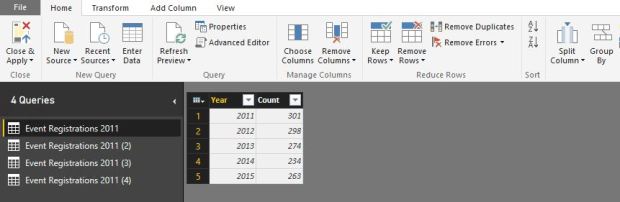
I created  4 queries – one each for each of my reports.
1 Query 1 – really simple, year wise grouping of attendee count.
2 Query 2 – two levels of grouping – year, meal preferences, count of people with those preferences.
3 Query 3 – two levels of grouping- year, opt in choice for emails, count for opt in choices.
4 Query 4 – two levels of grouping – year, state attendee is from, count of attendees. Here I had to filter out some junk data for name of state – and consolidate some verbage, like KY=Kentucky and so on.

When I was done the list of my data sources looked like below.

pb6

Now with my data ready, I launched into getting my reports up. I used each data source from above list for each graph (you can also use multiple but wanted to keep this simple).


pb4

The interactive graph can be viewed with better fonts here

https://app.powerbi.com/view?r=eyJrIjoiY2EzMWI1ZWQtYTQxNC00YjJhLTgxZTQtYjEyZjBkNzU5YTllIiwidCI6IjU2MzQ0OTU1LTJiZWYtNGFhZi1iYzg2LTQ4YWEzNzMzNzI0MSIsImMiOjZ9

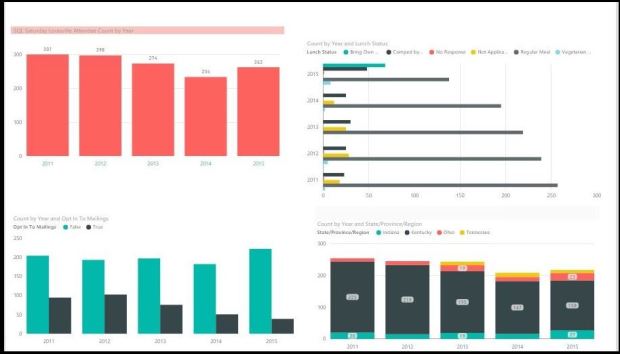
Based on above graphs I was able to draw following conclusions:

1 First bar graph on the top left: Attendee by year: Our highest turnout was in 2011 (301) in the past five years. Hope to beat that record in 2016! Last year was 263 people.

2 Second horizontal bar on the right: Food payment preferences by year: A lot more people opted to bring their own lunch last year – this may be because we hiked the lunch  fee to 10$ after several years (yeah Kentucky:)) . There are more people being comped as well due to higher number of sponsors and volunteers, which is not a bad thing. It would be interesting to see how this graph changes this year, because we provided a fantastic BBQ lunch last year. We have also hiked lunch fee from 10-12$ so it could go either way.

3 First bar graph on bottom left: Optin attendees over years: People who have opted out from vendor emails has gone up and was highest last year.We need to work harder on getting more people to opt-in as this means lesser reach for vendors.

4 Last graph bottom right: Attendee count by state: Looks like we did not have significant people from TN until 2013…(I filtered out #s less than 10 for this graph as we are not interested in 1 or 2 random attendees from other states). Our largest # of people are from KY, which is no surprise at all..but what was  surprising to me for sure was that IN and OH both had around similar number of people.We did have several speakers from OH – but not 23, and there are certainly more people coming in  from there. This shows that we have to promote our event harder in OH, as well as work on getting more people from TN, another border state.

All said and done, I had an absolute ball doing this. Not only is it easy and convenient to use but comes in handy for a variety of different things, including analysing personal finances and such. I highly recommend it!


Comparing data in two identical tables

Continuing with the recipes in SQL Server 2012 T-SQL recipes book – I was drawn to this puzzle that asked for how you would compare data in two identical tables using a single query. Now, if they didn’t specify the means I would readily point them to Red Gate’s SQL Data Compare – a nifty great tool that does this kind of stuff and gives an awesome report on differences. But as we all know, not all companies have tools. And, if you are presented  this question at an interview – that would probably not be an acceptable answer.
My answer to this problem is different from what is in the book – mainly because I wanted a generic query that I could use on any table. The book  deals with grouping on a field-to-field basis which is table specific and would come in handy if the situation demands that.
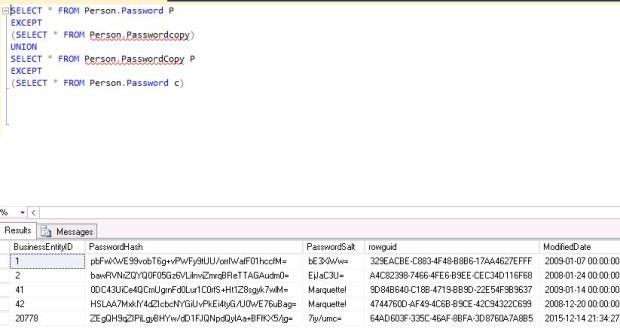
My solution is as below – I took two tables in Adventureworks, Password and Passwordcopy which is an identical version of Password. I made some changes to the latter as below(updated two records, added one record and changed two more via  management studio).

TABLECOMPARE1

Now I ran query as below to give me differences.

TABLECOMPARE2

It gave me the differences I was looking for. I can run the first part of the query before union to see what of these came from first table and second part to see what is in the second. Of course, it is not SQL Data Compare – it does not tell me what the differences are but it is a simple easy way to get a look.

TSQL Puzzle

Today’s TSQL post is an answer to a puzzle posted by Adam Machanic. I learnt something new via this puzzle today. The puzzle is as below – what would this query return?

SELECT * FROM(VALUES(1),(2)) AS x(i) WHERE EXISTS (SELECT MAX(i) FROM (VALUES(1)) AS y(i) WHERE y.i=x.i)

Upon looking at it, I thought I would get 1 row (1) – ecause the second where condition was looking for matches to 1. But I got two rows, 1 and 2. So I broke up the query as below to dig further:

SELECT * FROM

(VALUES(1),(2)) AS x(i) WHERE

EXISTS (SELECT MAX(i) FROM (VALUES(1)) AS y(i) WHERE y.i=x.i)

–this returns two rows , 1 and 2

SELECT * FROM (VALUES(1),(2)) AS x(i)
–this also returns 1 and 2

SELECT MAX(i) FROM (VALUES(1)) AS y(i)
–this returns 1

SELECT MAX(i) FROM (VALUES(2)) AS y(i)
–this returns 2

SELECT * FROM (VALUES(1),(2)) AS x(i) WHERE

EXISTS (SELECT MAX(i) FROM (VALUES(1)) AS y(i) WHERE 1=2)

–Bingo, I got my answer!! Even if exists clause is null it still returns two rows , 1 and 2.
This was a very interesting discovery and one that I will always remember when using MAX in and embedded select. Thanks, Adam.


TSQL-Paging through a resultset

I have been out of touch with latest features in TSQL for a while now. That mostly happened because my dba gigs in the past few years have not involved a lot of programming. To come upto speed with TSQL, am working with a book TSQL recipes written by my good friends Wayne Sheffield(blog|twitter), Jason Brimhall(blog|twitter) and some others. Am going to pick one ‘recipe’ from the book for each blog post and write of what I learnt from it.  Today’s recipe is a simple problem –

‘You wish to present a result set to an application user n rows at a time, how will you do it’.

This lead me to research two keywords in TSQL – OFFSET and FETCH NEXT.These are used together. What Offset does is to tell the
resultsets to skip first <x> rows, and Fetch Next <y> rows grabs the y rows after the offset. So suppose my requirement at a more refined level is to return 100 products at a time to the application, ordered by product id – I would go for a stored procedure  as below:

CREATE PROCEDURE Paging100Rows

@cycle INTEGER

AS

DECLARE @offsetrows INTEGER, @fetchrows INTEGER

SET @offsetrows = @cycle

SET @fetchrows = 100

SELECT ProductID,[Name] FROM [Production].[Product]

ORDER BY [ProductID]

OFFSET @offsetrows ROWS FETCH NEXT @fetchrows ROWS ONLY;

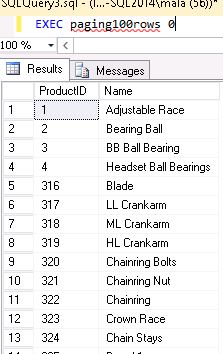
So if I wanted the first 100 rows, I would call it as below..for the next 100 rows I’d pass 100 and the next 100 rows 200 and so on.

paging100rows

What to look out for:

1 The sort order must be very specific and related to the rows you want returned.
2 Any change in isolation level will impact results with dirty reads/non repeatable reads etc. (as it does with any select statement of any kind)

Related links:
https://technet.microsoft.com/en-us/library/gg699618(v=sql.110).aspx


Dedicated Admin Connection (DAC)

What is DAC?
DAC is short for Dedicated Administrator connection to SQL Server – it is used for troubleshoooting by those who are SAs in for exceptional situations where a regular login will not meet the needs.

When is DAC typically needed?
In situations that require serious troubleshooting by an administrator.

How do I connect to SQL Server using DAC?
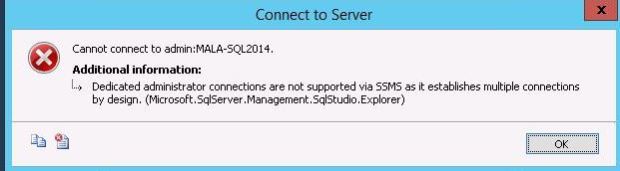
I decided to figure this out the hard way instead of googling for solutions. I only knew that i had to use admin:mylogin on ssms (I picked the ssms option over SQLCMD which is also another way to try) and decided to try it. I clicked on object explorer, prefixed my login with ‘Admin:’ and connected. After all, all connections go via Object Explorer right? No…I was faced with error as below –

dac6

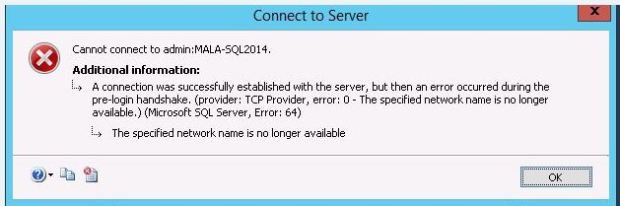
I was using the wrong method to connect – the right way is to use ‘Database Engine’ query icon, the one to the right of ‘New Query’ on SSMS toolbar. I tried again using that method (it gives you the same login window as object explorer did). Below was the next error.

dac5
Now I realized that I had RDP-ed into the machine and did not have remote admin connections enabled. So the next step  was enabling those connections, as below. This configuration is  apparently needed on clustered servers also – and may not be needed if you are on a local machine.

EXEC sp_configure ‘remote admin connections’, 1;
GO
RECONFIGURE
GO

Now I was done and connected fine.

What can I do with DAC?
I was able to do a sp_who2, kill a runaway process, and run some dmv queries. I was not able to do a backup/restore.  This link from MSDN has a list of diagnostic and troubleshooting queries that can be run (various DBCC commands and querying DMVs). It is important to remember that it not the best option to run regular maintenence – only DBCC commands that relate to troubleshooting specific and rare issues.

What is the database I connect to with DAC?
It is the default database associated with the login. You can access any database after connecting with the use statement. To connect directly to the master you can use the sqlcmd line sqlcmd –A –d master (it assumes your windows login has access to master as SA).

What are some other miscellaneous facts to know regarding DAC?
It has limited resources, so should always be used for lightweight operations.
It cannot make use of parellelism.
The port number that DAC listens on is written to the error log during start up and is 1434 by default.
You can have only one DAC connection open at a time.(Even if the
other admin is a different person).

There is a great post by my friend and SQL Server MVP Kendra Little’s blog on the same subject – which  is also a worthy read. She also gives us an interesting DMV based query to find out if there are other DAC users if you are not allowed to get in.

Knowing about DAC might save your bacon in unexpected situations.I consider enabling it to be added to my list of standards for configuring a server.