Parsing scripts with ScriptDOM

In the last post I wrote about what ScriptDOM is and why it is useful. From this post, I will explain how it can be put to use. What it does when you pass a script to it is to parse it, check if it is free of syntax errors, and build what is called an ‘Abstract Syntax Tree’, which is a programmatic representation of the script, with nodes and branches for each code element. The rest of the usage/functionality is built around the Abstract Syntax Tree. So in this post let us look into how this is accomplished.

1 Download ScriptDOM from here. There are separate versions for .NET core and .NET framework. I will be using the latter in my blog posts. All you need is the library Microsoft.SqlServer.TransactSql.ScriptDom.dll – you can search where it is installed and copy it somewhere for your use, or leave it where it is. The default location is C:\Program Files\Microsoft SQL Server\<version>\DAC\bin\

2 Add a reference to the DLL as the first line of the PowerShell script – like below.

Add-Type -Path "C:\Program Files\Microsoft SQL Server\150\DAC\bin\Microsoft.SqlServer.TransactSql.ScriptDom.dll"

3 Create the parser object with a compatibility level that is appropriate to the SQL server database you are planning to deploy the scripts on or where scripts already exist. I used 150, you go all the way back to 90.

$parser = New-Object Microsoft.SqlServer.TransactSql.ScriptDom.TSql150Parser($true)

4 Create the object that will hold syntax errors if any.

$SyntaxErrors = New-Object System.Collections.Generic.List[Microsoft.SqlServer.TransactSql.ScriptDom.ParseError]
5 Parse the file into strings using streamreader, and then call the parser object with strings to check for syntax errors.

$stringreader = New-Object -TypeName System.IO.StreamReader -ArgumentList $Script

6 Build an abstract syntax tree from string reader object.

$tSqlFragment = $parser.Parse($stringReader, [ref]$SyntaxErrors)

Then we check if the syntaxerrors object has anything in it, which means there are errors. I removed a comma after the first column and

7 Example:

I have a script as below in which I have introduced a syntax error. I removed a comma after the first column.

USE [AdventureWorks2019]
GO

SET ANSI_NULLS ON
GO

SET QUOTED_IDENTIFIER ON
GO

CREATE TABLE [HumanResources].[Department](
[DepartmentID] [smallint] IDENTITY(1,1) NOT NULL
[Name] [dbo].[Name] NOT NULL,
[GroupName] [dbo].[Name] NOT NULL,
[ModifiedDate] [datetime] NOT NULL,
CONSTRAINT [PK_Department_DepartmentID] PRIMARY KEY CLUSTERED
(
[DepartmentID] ASC
)WITH (PAD_INDEX = OFF, STATISTICS_NORECOMPUTE = OFF, IGNORE_DUP_KEY = OFF, ALLOW_ROW_LOCKS = ON, ALLOW_PAGE_LOCKS = ON, OPTIMIZE_FOR_SEQUENTIAL_KEY = OFF) ON [PRIMARY]

) ON [PRIMARY]
GO

I pass this script to the syntax checking function as below. (The code for the entire function is below this post).
Find-SyntaxErrors c:\scriptdom\createtable.sql

My results are as below.
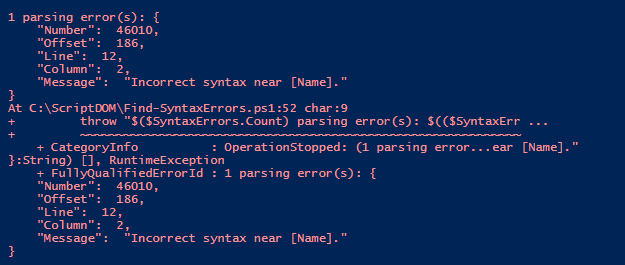
I add a comma,fix the error, and re-run it – my results are as below

This is hence an easy, asynchronous way to check for syntax errors in code. To be aware though that it cannot validate objects (check for valid column names/table names etc) as it is not connected to any SQL Server.

The output of a syntactically clean script is the abstract syntax tree object – which can be used to find patterns. In the next post, we can look at how to use it to find what we need in the code. The complete code is as below. Thanks for reading!

<#
.SYNOPSIS
Will check passed script for syntax errors
.DESCRIPTION
Will display syntax errors if any
.NOTES
Author : Mala Mahadevan (malathi.mahadevan@gmail.com)
.PARAMETERS
-Script: text file containing T-SQL
.LIMITATIONS
Can only check for syntax, not validate objects since it is asynchronous and not connected to any sql server
.LINK
.HISTORY
2022.01.25 V 1.00
#>
function Find-SyntaxErrors
{
[CmdletBinding()]
param(
$Script
)
try {
# load Script DOM assembly for use by this PowerShell session
Add-Type -Path "C:\Program Files\Microsoft SQL Server\150\DAC\bin\Microsoft.SqlServer.TransactSql.ScriptDom.dll"
If ((Test-Path $Script -PathType Leaf) -eq $false)
{
$errormessage = "File $Script not found!"
throw $errormessage
}
#Use the parser that is best suited to your compat level.
$parser = New-Object Microsoft.SqlServer.TransactSql.ScriptDom.TSql150Parser($true)
#Set object to capture errors if any
$SyntaxErrors = New-Object System.Collections.Generic.List[Microsoft.SqlServer.TransactSql.ScriptDom.ParseError]
#Set object to read script linewise
$stringreader = New-Object -TypeName System.IO.StreamReader -ArgumentList $Script
#Building the abstract syntax tree
$tSqlFragment = $parser.Parse($stringReader, [ref]$SyntaxErrors)
#If any syntax errors are found display
if($SyntaxErrors.Count -gt 0) {
throw "$($SyntaxErrors.Count) parsing error(s): $(($SyntaxErrors | ConvertTo-Json))"
}
else
{
write-host "No Syntax errors found in $($Script)!" -backgroundcolor Green
}
}
catch {
throw
}
}

T-SQL Tuesday 146: Where should business logic reside?

I am trying to get started on blogging again this year…T-SQL Tuesday came in handy with a great topic. This month’s host is Andy Yun(t |b). Andy’s challenge for us is to write about some notion ‘something you’ve learned, that subsequently changed your opinion/viewpoint/etc. on something. ‘

There are many things on which I’ve changed my opinion in my journey as a data professional. For this blog post, I picked a common one – where business logic should reside. During my years as a production DBA – there was (and probably is) a hard-held belief that databases are meant for CRUD operations only and business logic belongs in the application/middle tier. This belief has its place – DBAs don’t like debugging code that is application-specific, or be tasked with why data looks a certain way or what code caused it. Business logic can also be very complex and get deeply embedded in one place (the database). I have believed in this and fought for this at most places I’ve worked as a DBA.

Over time though, my opinion has changed. The fact that DBAs have to learn some degree of programming to survive today’s world has a lot to do with it. Also, I started to understand the nature of business logic better. I learned that a lot of things like foreign key constraints, not null constraints, triggers actually have to do with business logic and how the business defines its data. Databases usually outlive applications and less work is necessary when there is a move to a new application layer. It is much faster to make changes on the database side and roll it out compared to most application changes. It also offers single-point control of business logic, as opposed to it spread all over the place in applications.

And last but not least – learning business logic makes a person an important asset to the business. Most DBAs complain about being ‘just firefighters’…if we know business logic and have control over that, that makes us more than that – it makes us an important asset, in addition to helping us learn more programming as part of that process.

I do realize that there are cons to putting business logic in the database too. It can be very complex in some cases. The business may not have enough people to maintain it. It is a single point of control, therefore a single point of failure too if one looks at it that way. But now I believe there are more advantages to it than disadvantages. Thank you, Andy, for hosting.