Comparing data in two identical tables

Continuing with the recipes in SQL Server 2012 T-SQL recipes book – I was drawn to this puzzle that asked for how you would compare data in two identical tables using a single query. Now, if they didn’t specify the means I would readily point them to Red Gate’s SQL Data Compare – a nifty great tool that does this kind of stuff and gives an awesome report on differences. But as we all know, not all companies have tools. And, if you are presented  this question at an interview – that would probably not be an acceptable answer.
My answer to this problem is different from what is in the book – mainly because I wanted a generic query that I could use on any table. The book  deals with grouping on a field-to-field basis which is table specific and would come in handy if the situation demands that.
My solution is as below – I took two tables in Adventureworks, Password and Passwordcopy which is an identical version of Password. I made some changes to the latter as below(updated two records, added one record and changed two more via  management studio).

TABLECOMPARE1

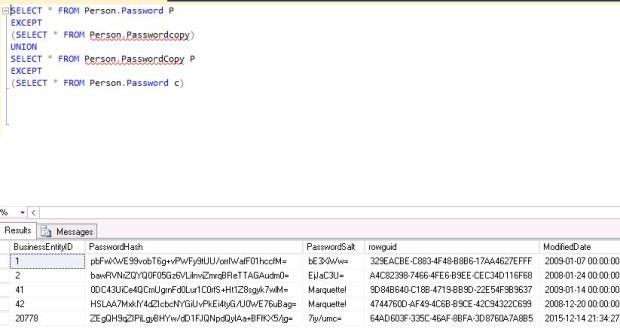
Now I ran query as below to give me differences.
TABLECOMPARE2

It gave me the differences I was looking for. I can run the first part of the query before union to see what of these came from first table and second part to see what is in the second. Of course, it is not SQL Data Compare – it does not tell me what the differences are but it is a simple easy way to get a look.
TSQL Puzzle

Today’s TSQL post is an answer to a puzzle posted by Adam Machanic. I learnt something new via this puzzle today. The puzzle is as below – what would this query return?

SELECT * FROM(VALUES(1),(2)) AS x(i) WHERE EXISTS (SELECT MAX(i) FROM (VALUES(1)) AS y(i) WHERE y.i=x.i)

Upon looking at it, I thought I would get 1 row (1) – ecause the second where condition was looking for matches to 1. But I got two rows, 1 and 2. So I broke up the query as below to dig further:

SELECT * FROM

(VALUES(1),(2)) AS x(i) WHERE

EXISTS (SELECT MAX(i) FROM (VALUES(1)) AS y(i) WHERE y.i=x.i)

–this returns two rows , 1 and 2

SELECT * FROM (VALUES(1),(2)) AS x(i)
–this also returns 1 and 2

SELECT MAX(i) FROM (VALUES(1)) AS y(i)
–this returns 1

SELECT MAX(i) FROM (VALUES(2)) AS y(i)
–this returns 2

SELECT * FROM (VALUES(1),(2)) AS x(i) WHERE

EXISTS (SELECT MAX(i) FROM (VALUES(1)) AS y(i) WHERE 1=2)

–Bingo, I got my answer!! Even if exists clause is null it still returns two rows , 1 and 2.
This was a very interesting discovery and one that I will always remember when using MAX in and embedded select. Thanks, Adam.


TSQL-Paging through a resultset

I have been out of touch with latest features in TSQL for a while now. That mostly happened because my dba gigs in the past few years have not involved a lot of programming. To come upto speed with TSQL, am working with a book TSQL recipes written by my good friends Wayne Sheffield(blog|twitter), Jason Brimhall(blog|twitter) and some others. Am going to pick one ‘recipe’ from the book for each blog post and write of what I learnt from it.  Today’s recipe is a simple problem –

‘You wish to present a result set to an application user n rows at a time, how will you do it’.

This lead me to research two keywords in TSQL – OFFSET and FETCH NEXT.These are used together. What Offset does is to tell the
resultsets to skip first <x> rows, and Fetch Next <y> rows grabs the y rows after the offset. So suppose my requirement at a more refined level is to return 100 products at a time to the application, ordered by product id – I would go for a stored procedure  as below:

CREATE PROCEDURE Paging100Rows

@cycle INTEGER

AS

DECLARE @offsetrows INTEGER, @fetchrows INTEGER

SET @offsetrows = @cycle

SET @fetchrows = 100

SELECT ProductID,[Name] FROM [Production].[Product]

ORDER BY [ProductID]

OFFSET @offsetrows ROWS FETCH NEXT @fetchrows ROWS ONLY;

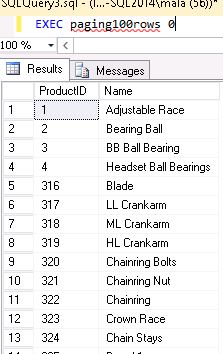
So if I wanted the first 100 rows, I would call it as below..for the next 100 rows I’d pass 100 and the next 100 rows 200 and so on.

paging100rows

What to look out for:

1 The sort order must be very specific and related to the rows you want returned.
2 Any change in isolation level will impact results with dirty reads/non repeatable reads etc. (as it does with any select statement of any kind)

Related links:
https://technet.microsoft.com/en-us/library/gg699618(v=sql.110).aspx